Proof
    Aussie Plumbing — ad spend scaled 1.8× with enquiries up 2.1×, so each enquiry cost lessI-ELEC — a 231-page electrician website for Inner SydneyWhat a plumbing lead costs on Google AdsWhat a lead costs on Google Ads, industry by industrySLS Solicitors — cost per recorded Google Ads conversion down 58.48%Wilco Plumbing — search campaigns and service pagesWilco Plumbing — service menus and guided enquiriesHow much should a trade business spend on marketing?State Choice Plumbing — a drains, hot water and gas websiteAussie Drains — a 600-page drain website for SydneyWhat an electrician lead costs on Google AdsAussie Electrical — a 650-page electrical website for SydneyThe most efficient ways for a trade business to get leadsEOL Melbourne — click-to-enquiry rate up from 28% to 33.4%What a cleaning lead costs on Google AdsAlliance Plumbing — ad spend scaled 1.8× with enquiries up 2.1×, so each enquiry cost lessImpress Blinds — cost per recorded Google Ads conversion down 62.63%FixCare Property - cost per enquiry down 28%Rubbish Removal WA — cost per enquiry down 53.18%Floral Cakery — cost per enquiry down 49.82%ILLUMINATE Laser Emporium — cost per enquiry down 48.54%Sydney Fence Painting — cost per enquiry down 33.68%Alliance Plumbing — cost per enquiry down 29.6%Gridless Build Solutions — cost per enquiry down 29.16%FacilityWorx — cost per enquiry down 23.62%Cornerstone Roofing — cost per enquiry down 20.47%Council finance — budgeting and workforce designCouncil planning — clearer approvals and reportingCultural audiences — media strategy and creative conceptsCommunity participation — surveys, maps and project pagesPublic-sector research — survey design and analysisPublic art — site studies and visual conceptsRegional identity — visitor guides and wayfinding conceptsCouncil systems — integration and migration planningA pressure washing business — service-led search campaignsA pressure washing business — a clear enquiry journeyA carpet cleaner — Google Ads built around cleaning servicesA roofing company — campaigns for repairs and restorationA CCTV installer — campaigns for security enquiriesA fence painter — search campaigns for specific surfacesA maintenance business — live in 8 weeks, 3 stacks gone5.0 across every Google review$120M+ in media under management250+ active engagements across five countries
    Champion Drains

    Drain services · Sydney, NSW

    Champion Drains: a drain website built around specific jobs and the local crew

    We built a Drain Services menu that lists the specific jobs inside each service, with call and quote buttons. We also added region pages described by their pipes and suburb pages that name the drainers working nearby.

    Visit website
    Services
    Website design and build · Service, region and suburb page structure · Mega menu design · Mobile call design · Crew photo and video sections
    Talk to us about your website

    The case study

    In this case study

    White paper · PDF

    Marketing for home services in Australia

    58 pages · 2.3 MB

    Download this PDFRead it on the page

    We built a Drain Services menu that lists the specific jobs inside each service, with call and quote buttons. We also added region pages described by their pipes and suburb pages that name the drainers working nearby.

    The business

    Champion Drains is a family-owned drain business working across Greater Sydney, the drain-only sister brand of Champion Plumbing. Its drainers clear blocked drains, hydro-jet and descale lines, cut out tree roots, run CCTV inspections, reline and patch cracked pipes, repair sewer and stormwater drains and dig and replace pipes that are past saving. Each truck carries a jet blaster, a drain camera and the common parts, so most jobs are finished in one visit.

    The brief

    People with a drain problem rarely know the name of the fix. They know the kitchen sink will not clear, the toilet is backing up or water is pooling in the yard, and they want three answers: can it be cleared today, what will it cost, and is the crew real. The brief was a site about drains only, with a page for each kind of drain job and each Sydney suburb, and those three answers on every one of them.

    A drain menu that goes down to the job

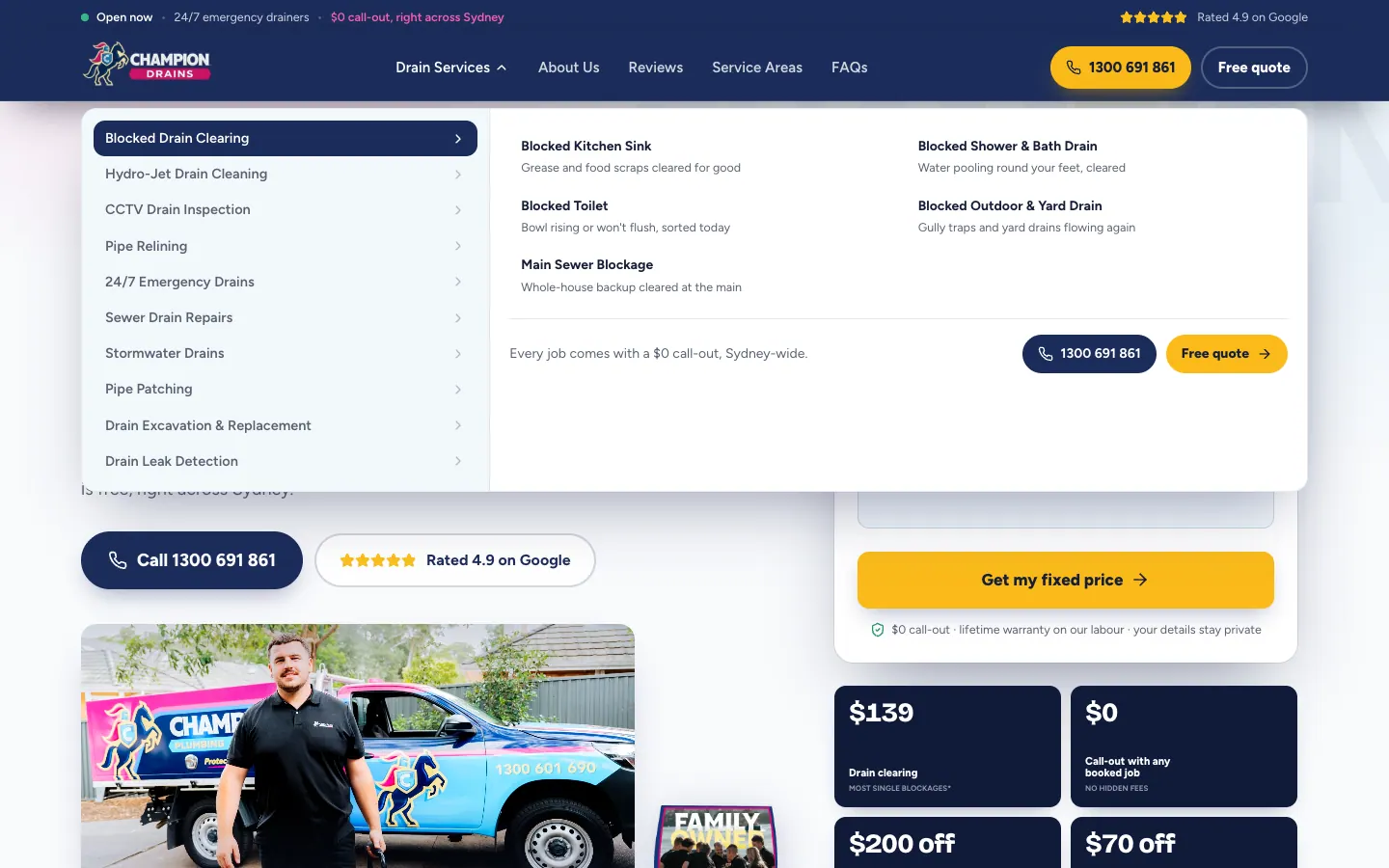
    The header carries a strip with the open-now status, emergency cover and the no call-out promise, then a Drain Services menu, About Us, Reviews, Service Areas, FAQs, a call button and a Free quote button. The Drain Services menu lists the ten services on the left. Pointing at one opens its specific jobs on the right, each with one line on what gets fixed, and a call button and quote button sit under every list.

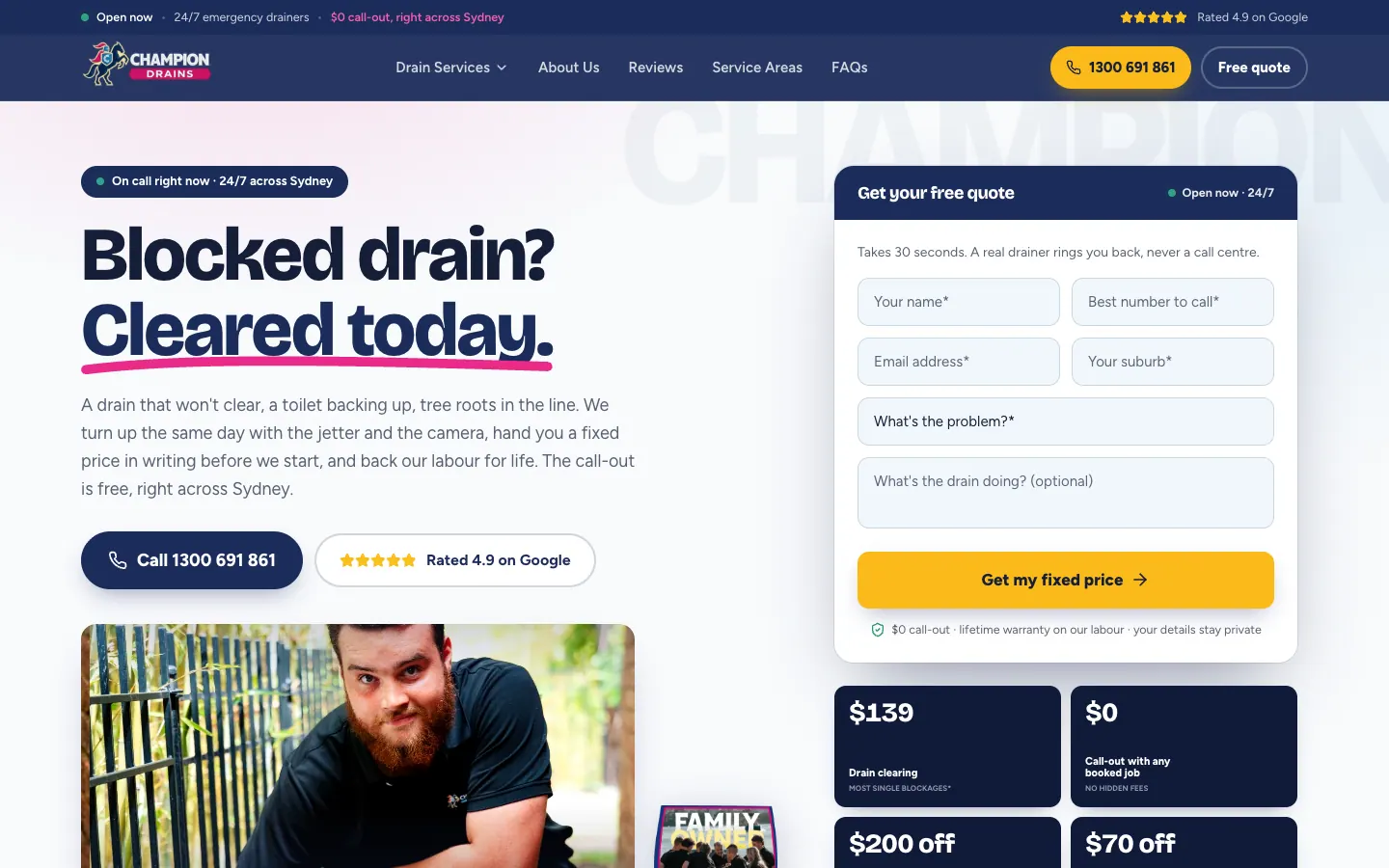
    The home page opens with Blocked drain? Cleared today., a sentence on the jetter, the camera and the written price, a call button and a photo of the crew on a job. The quote form beside it asks for a name, a number, an email and a suburb, which drain service it is, and optionally what the drain is doing.

    A page for the job you've got

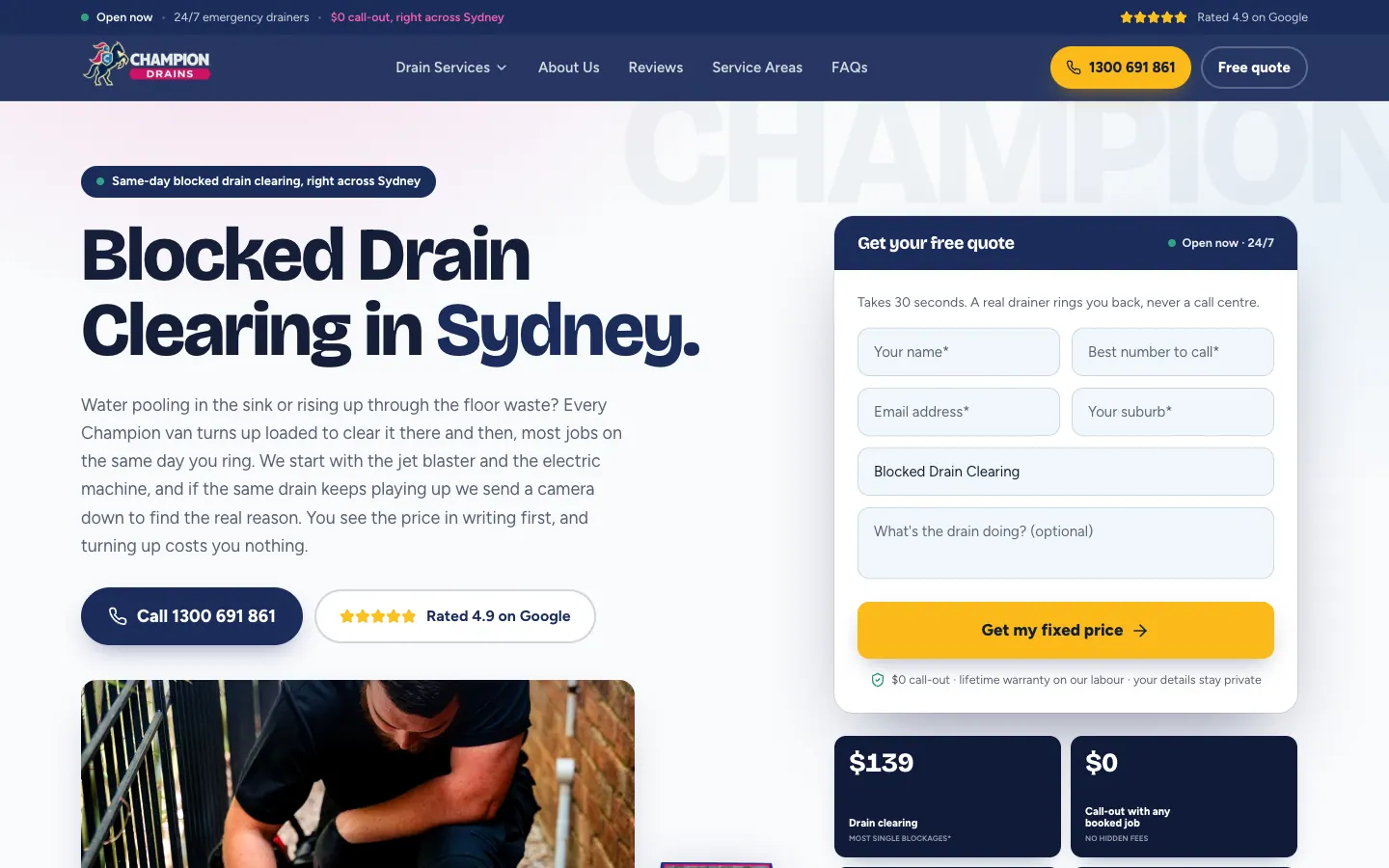
    Each of the ten services has a page with the service in the headline and already chosen in the quote form, then a list of what comes with every job of that kind. Below that, the visitor picks the job they actually have: blocked drain clearing, for example, splits into the kitchen sink, the shower and bath, the toilet, the outdoor and yard drain, and the main sewer. Each of the 47 specific jobs has its own page explaining what the work involves, with common questions answered.

    20 regions and 688 suburbs

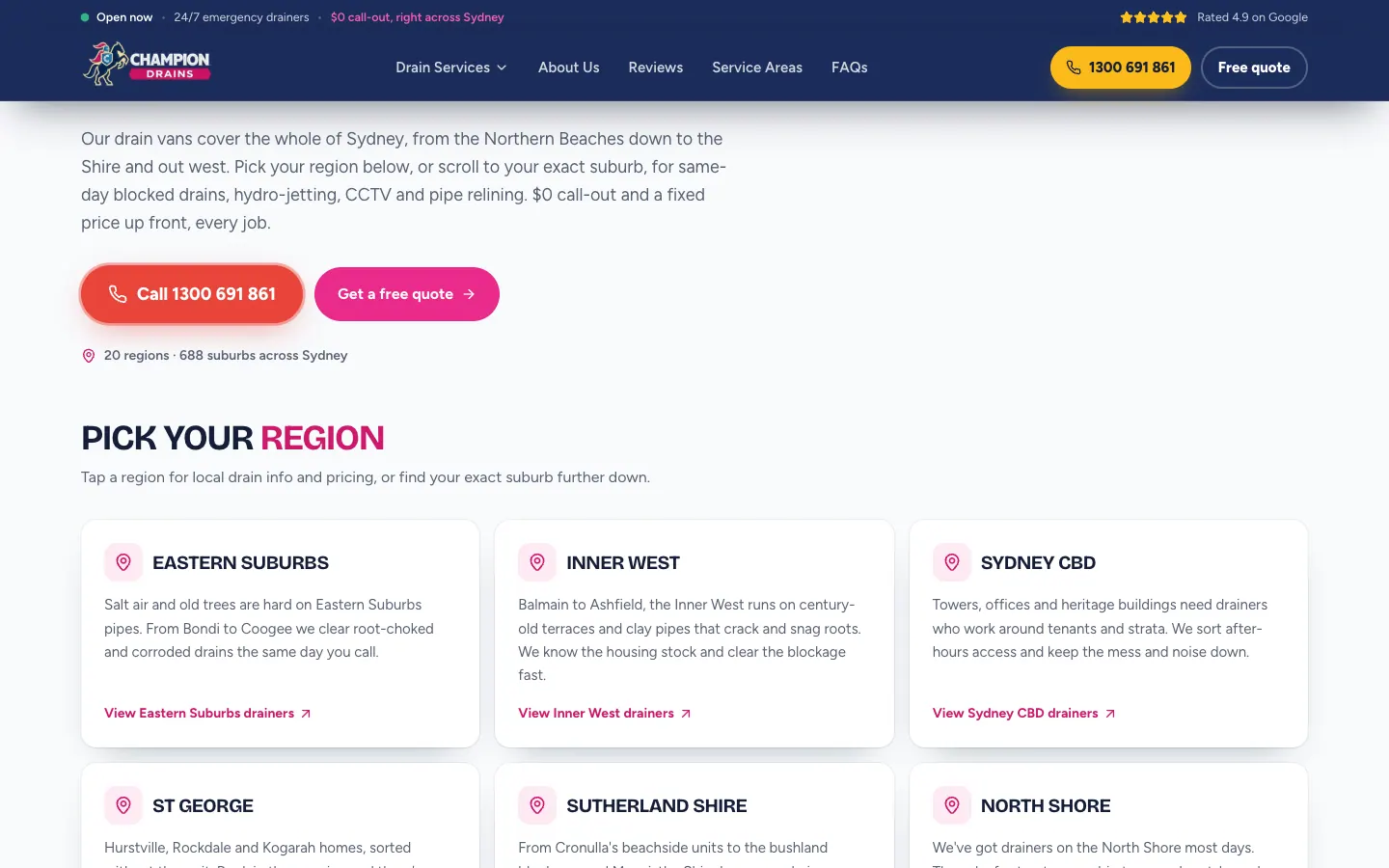
    The service areas page splits Sydney into 20 regions, from the Northern Beaches to Wollondilly. Each region card opens with a line on what is hard on drains there, such as salt air and old trees in the Eastern Suburbs, and leads to a region page with its own quote form. Below the cards, every suburb is listed under its region.

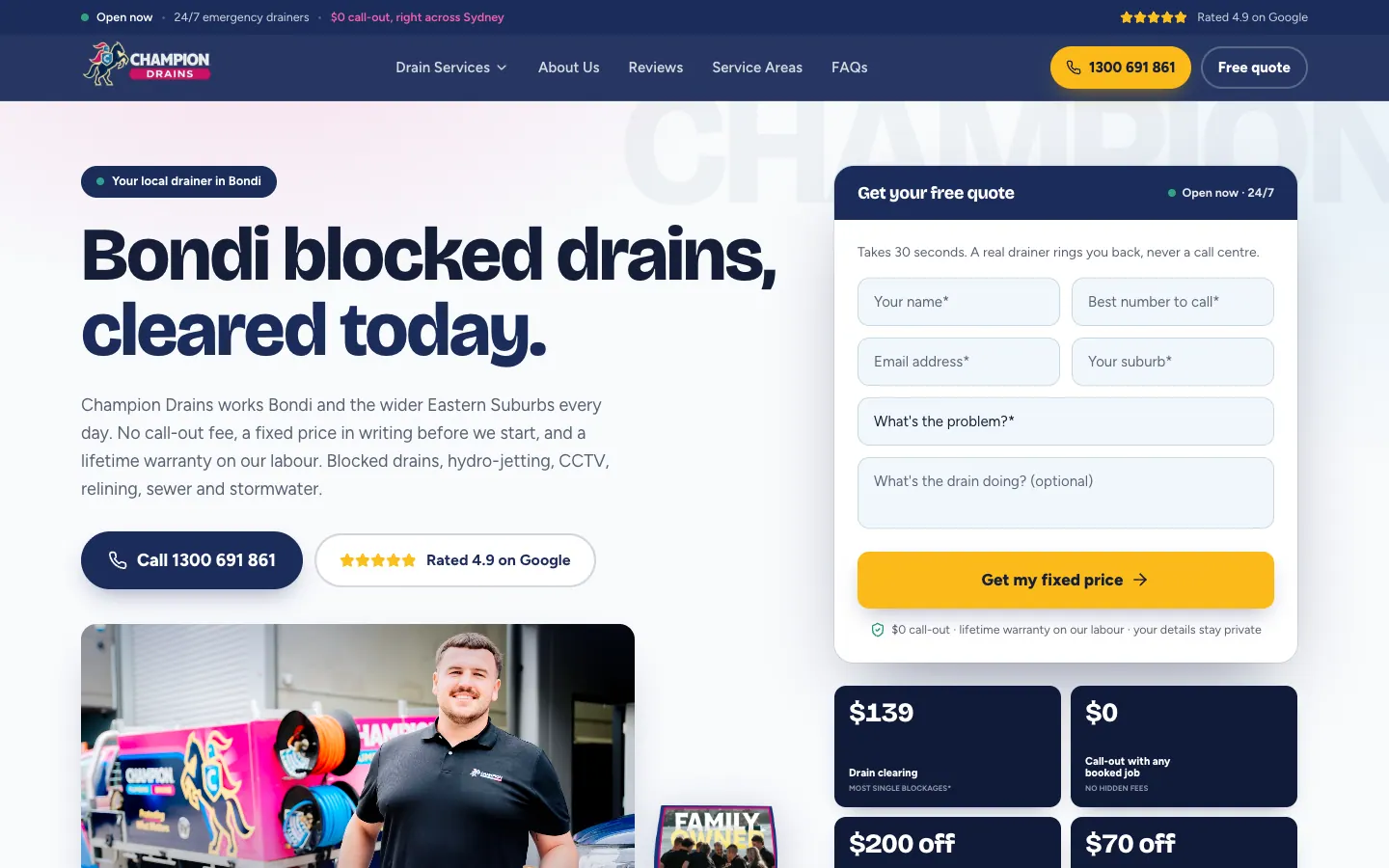
    Each of the 688 suburb pages names the suburb in the headline, explains which region run it sits on and which nearby suburbs the drainers are already working in, then lists the other suburbs in that region. The services, promises, steps and questions follow, so a suburb page answers as much as the home page.

    The crew, on every page

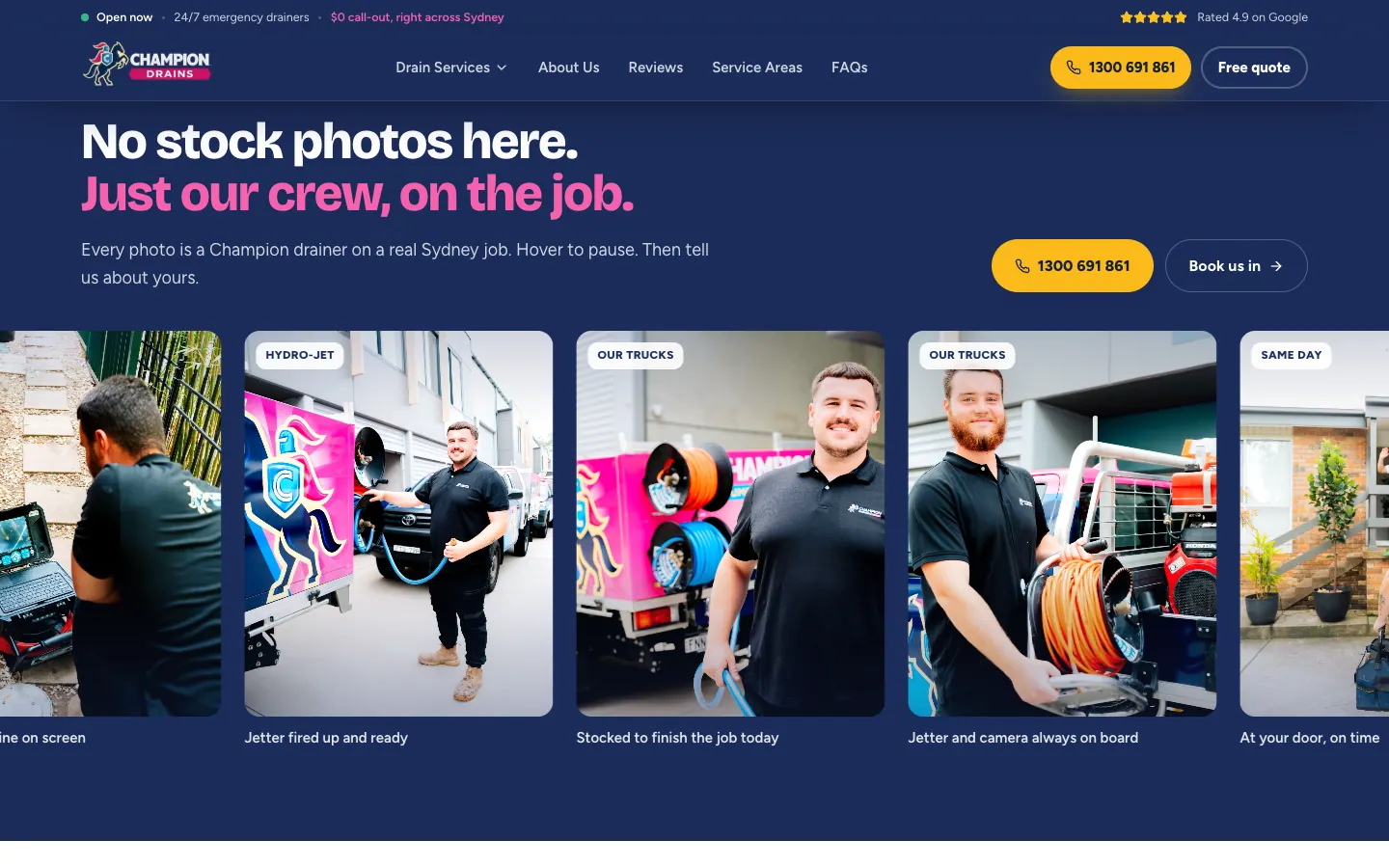
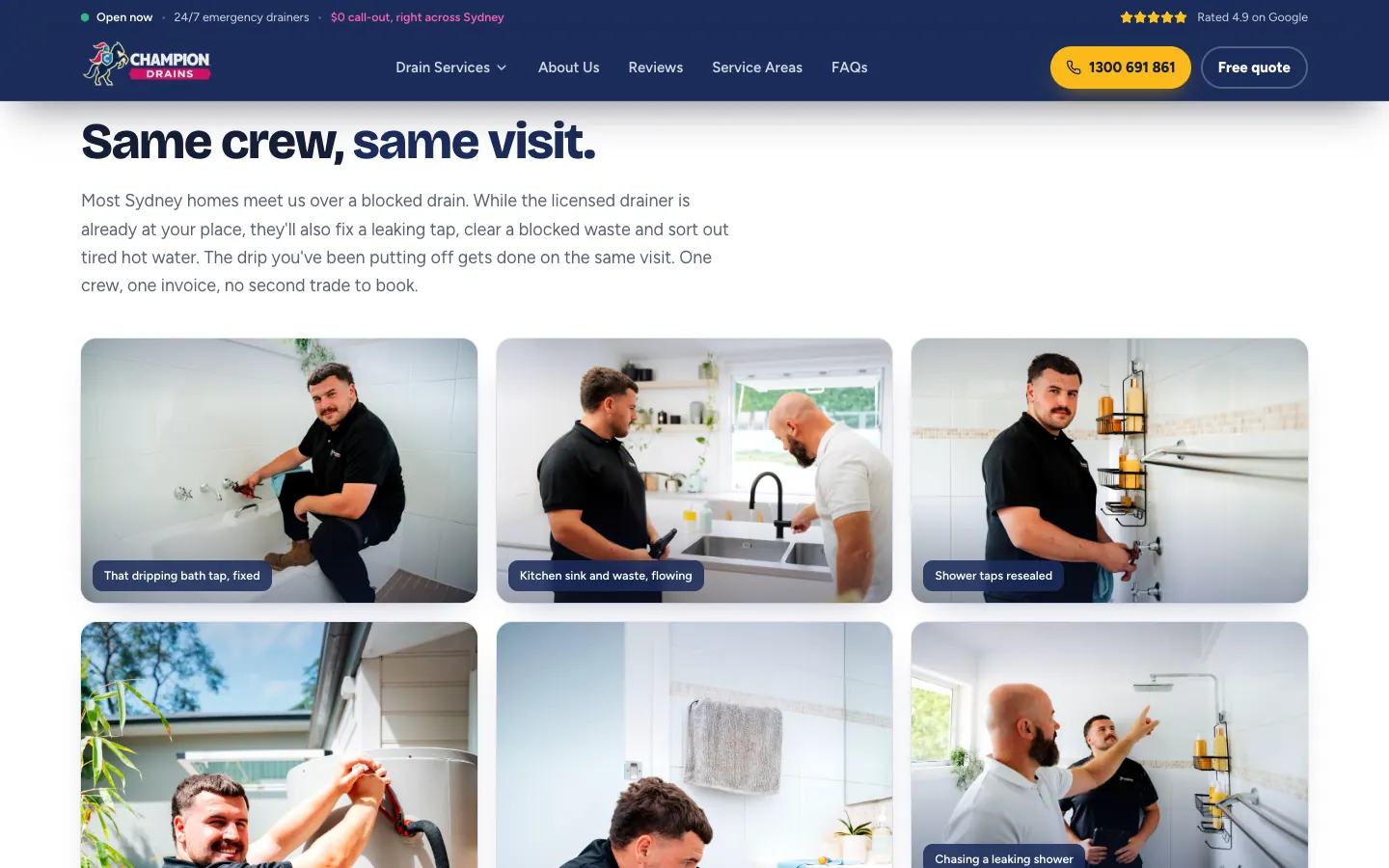
    The site shows the people who turn up. The home page has a strip of crew photos captioned by task, from the drain camera to the jetter and the trucks, a section of short video clips from Sydney jobs, and a section on the extra work the same drainer can do on the visit, such as a dripping tap or a blocked vanity waste, on one invoice. The about page introduces the family behind the business and the truck that arrives ready.

    The home, service, region and suburb pages then repeat the same three steps: tell us what is going on, see the price before we start, and a drain fixed, tested and guaranteed. A section on the no call-out promise, the family crew and common questions answered straight close it out.

    Built for phones

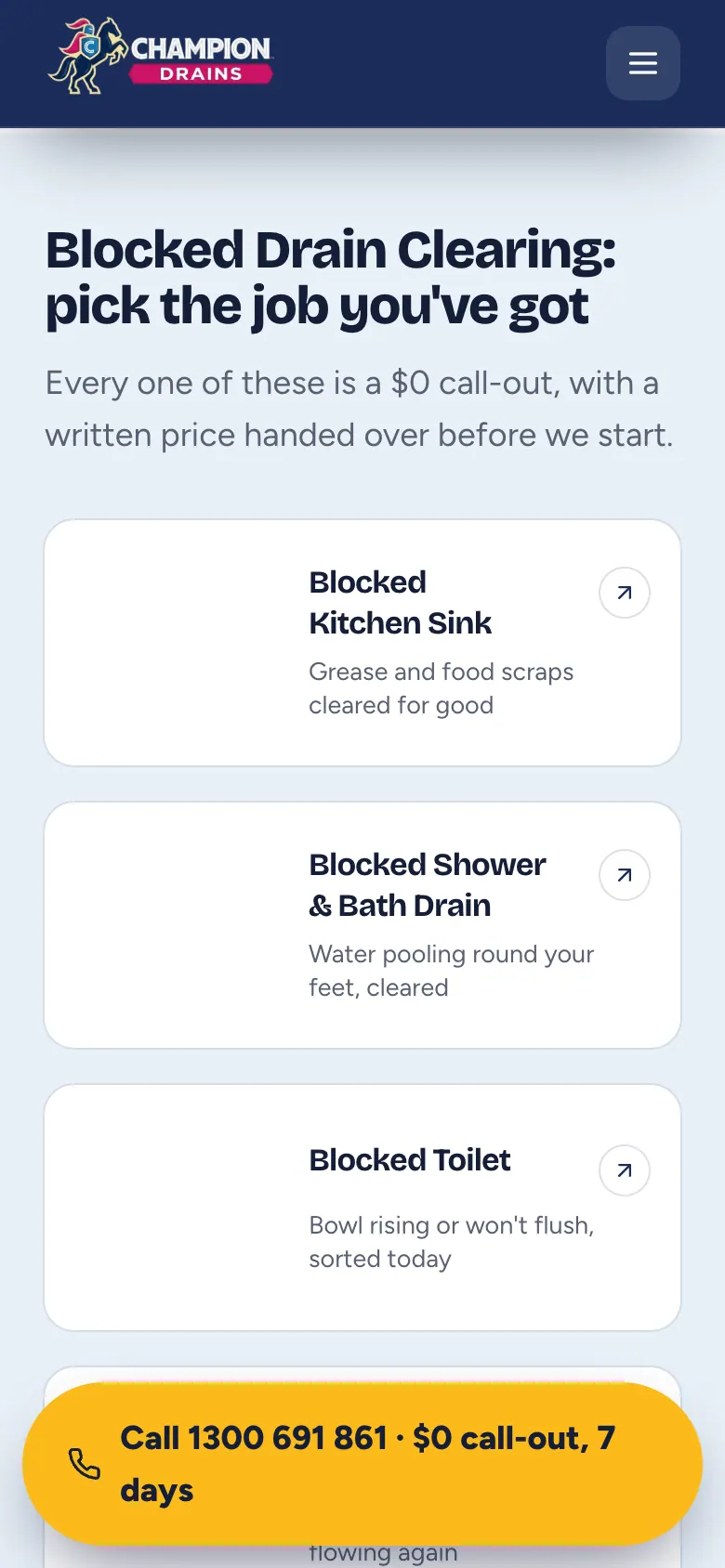
    On a phone the header shrinks to the logo and the menu, and the first screen holds the headline, the promises and a full-width call button above the Google rating. Once the visitor scrolls, a floating call button with the no call-out promise stays at the bottom of the screen, so the number is in reach on the long service and suburb pages.

    Connected to the drain campaigns

    These service pages also support the dedicated Champion Drains search campaigns, carrying the selected drain service into the quote form. The broader plumbing business has its own site, covered in the Champion Plumbing website case study. Explore our website design services and marketing for plumbing businesses.


    Key design decisions
    • A Drain Services menu that lists the specific jobs inside each service, with call and quote buttons.
    • Region pages described by their pipes and suburb pages that name the drainers working nearby.
    • Crew photos and job clips across the site, and a floating call button on phones.
    • A 774-page drain site: ten services, 47 specific jobs, 20 regions and 688 suburbs.

    Tags

    • Website design
    • Drain services
    • Sydney, NSW

    A website built around your business.

    Tell us about your services, your customers and the next step you want them to take. We will shape the design and page structure around that brief.

    The work

    Select a screenshot to enlarge it.

    • Champion Drains home page with the headline, a call button, a crew photo and a quote form
      Champion Drains home page with the headline, a call button, a crew photo and a quote form
    • Drain Services menu with blocked drain clearing open on its five specific jobs
      Drain Services menu — Ten services on the left; pointing at one lists its specific jobs, with call and quote buttons beneath.
    • Blocked drain clearing page with the service already selected in the quote form
      Blocked drain clearing page — The service in the headline and already chosen in the quote form.

    More project detail

    Project highlights

    Project highlights

    What we delivered for Champion Drains.

    A closer look at the services and features delivered. Open a tile for the source behind each detail.

    • Project highlight

      Meet the crew

      drain service pages, local coverage and job footage

      Website delivery

    • 774

      Pages on the live site: 57 services, 20 regions, 688 suburbs and nine core pages

      Live site count

    • 688

      Suburb pages, each naming its suburb and the drainers working nearby

      Live site count

    • 57

      Service pages: ten drain services and 47 specific jobs beneath them

      Live site count

    • 20

      Region pages, each opening with a line on the pipes in that part of Sydney

      Live site count

    • 3

      Steps on every service, region and suburb page, from the problem to a tested drain

      Counted on the live site

    Project notes

    Page counts are the pages reached through the site's own menus, service lists and area links. Screenshots show the delivered website. Campaign outcomes, where included, use the periods and definitions in the linked advertising case study.

    Quick summary
    Inside the build

    Insights

    Inside the build

    Details from the Champion Drains project. Open a card for the finding and its source.

    • The build

      89%

      Nine in ten pages are suburb pages, each tied to one of 20 regions

      • Suburb pages89%
      • Service pages7%
      • Region pages3%
      • Home and core pages1%

      Each suburb page names the suburb, the region run it sits on and the drainers working nearby. The 57 service pages carry the detail on the work, so a visitor can start from where they live or from what the drain is doing.

    • The build

      47

      The Drain Services menu goes down to the job, not just the service

      Pointing at one of the ten services opens its specific jobs beside it, each with one line on what gets fixed, such as a blocked toilet or a main sewer blockage. The call and quote buttons sit under the list, so the menu itself can start the enquiry.

    • The build

      20

      Twenty regions, each described by the pipes in it

      The service areas page splits Sydney into 20 regions, and each card opens with what is hard on drains there: salt air and old trees in the Eastern Suburbs, century-old terraces and clay pipes in the Inner West. Each card leads to a region page with its own quote form and suburb list.

    Full-page and device views
    Design details

    Inside the website

    The thinking behind the pages.

    1. Website detail

      A menu that goes down to the job

      Ten services on the left; pointing at one lists its specific jobs, each with one line on what gets fixed. A call button and a quote button sit under every list, so the menu can start the enquiry.

      Drain Services menu with blocked drain clearing open on its five specific jobs
      Open full-size screenshot
    2. Website detail

      Service pages that split into the job

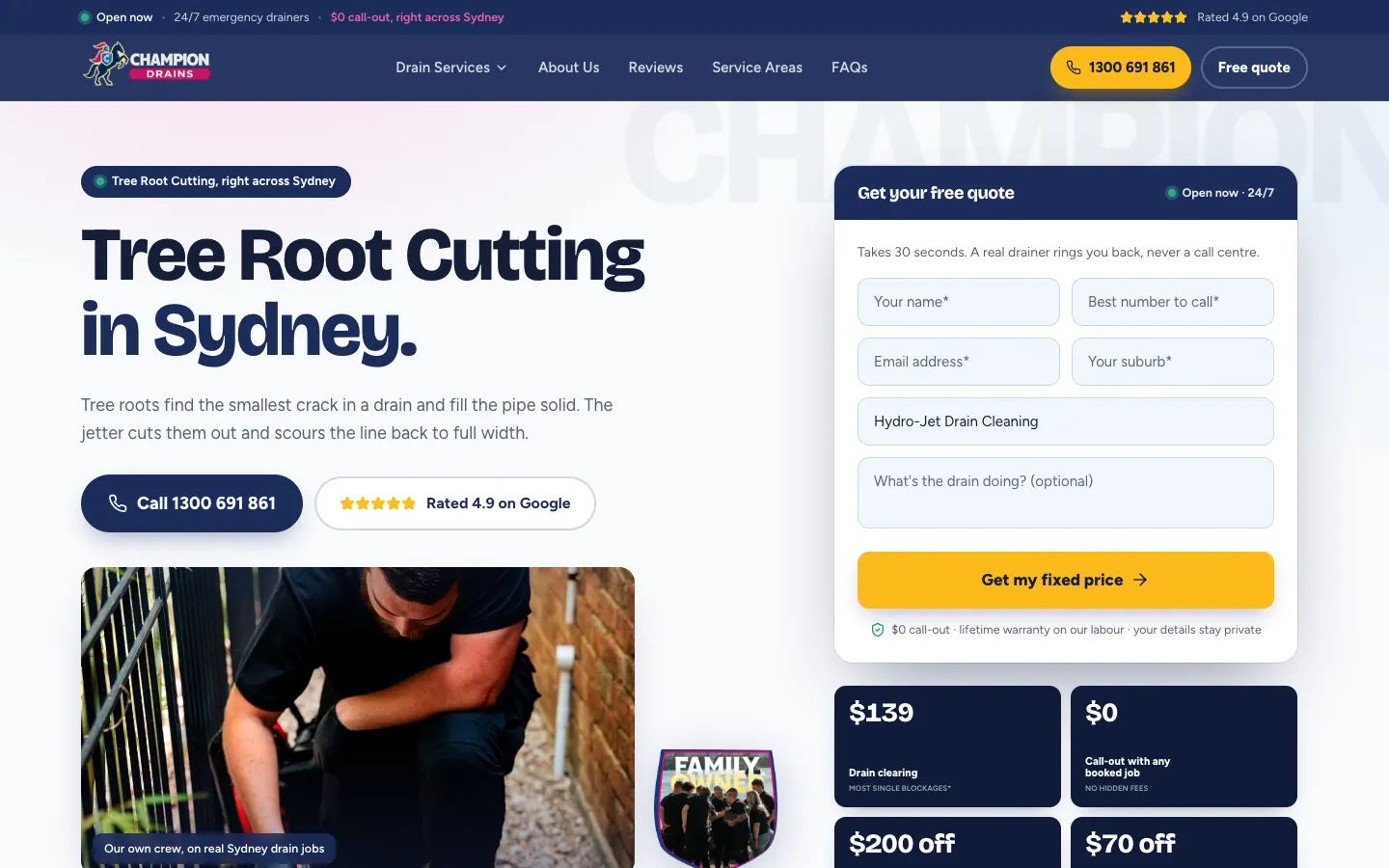
      Each service page lets the visitor pick the job they have, and each specific job has its own page. Tree root cutting, for example, sits under hydro-jet drain cleaning, with that service already chosen in the quote form.

      Tree root cutting page with hydro-jet drain cleaning already chosen in the quote form
      Open full-size screenshot
    3. Website detail

      Twenty regions, described by their pipes

      The service areas page splits Sydney into 20 regions. Each card opens with a line on local drains and leads to a region page with its own quote form and suburb list.

      Service areas page with region cards, each describing the drains in that region
      Open full-size screenshot
    4. Website detail

      A page for every suburb

      Each of the 688 suburb pages names the suburb in the headline, opens with the quote form and names the region run and nearby suburbs the drainers are already working in.

      Bondi suburb page with Bondi in the headline beside a quote form
      Open full-size screenshot
    5. Website detail

      Crew photos, not stock photos

      A strip of photos of the drainers at work, captioned by task, runs across the home, service, region and suburb pages. The home page adds short video clips from Sydney jobs.

      Strip of crew photos captioned by task, from the drain camera to the jetter and trucks
      Open full-size screenshot
    6. Website detail

      One visit, one invoice

      A section shows the extra work the same drainer can do while on site, from a dripping bath tap to a blocked vanity waste, so a second trade does not need booking.

      Section showing the extra plumbing a drainer can do on the same visit
      Open full-size screenshot
    7. Mobile experience

      A floating call button on phones

      On a phone the first screen holds a full-width call button. Once the visitor scrolls, a floating call button with the no call-out promise stays at the bottom of the screen.

      Blocked drain jobs on a phone with a floating call button at the bottom of the screen
      Open full-size screenshot
    Project journey
    Champion Drains

    Campaign work · Champion Drains

    The campaign behind the enquiries.

    See the advertising work for Champion Drains, with the results and measurement explained in each campaign case study.

    Campaign case study

    Champion Drains: a short drains-only Google Ads test in Sydney

    Champion Drains: a short drains-only Google Ads test in Sydney. See the campaigns, customer journey and measured results.

    Read the campaign case study
    FAQ

    The questions this raises.

    The brief, the design and how the website supports the wider customer journey.

    The first call is free and there is no deck.

    Book a call
    Why does the Champion Drains website have 774 pages?

    People look for help with a specific drain problem in their own suburb. Giving each of the 57 services and specific jobs, each of the 20 regions and each of the 688 suburbs a page means a visitor lands on something about their job or their area, with the quote form at the top.

    What makes the Drain Services menu different?

    It goes down to the job. Pointing at one of the ten services opens its specific jobs, each with one line on what gets fixed, and a call button and quote button sit under every list.

    What does a suburb page show?

    The suburb in the headline, the region run it sits on, the nearby suburbs the drainers are already working in and the rest of the suburbs in that region, followed by the services, promises, steps and common questions.

    How does the site work on a phone?

    The first screen holds the headline and a full-width call button. Once the visitor scrolls, a floating call button with the no call-out promise stays at the bottom of the screen.

    What did SoudCoh deliver for Champion Drains?

    774 pages: ten services, 47 specific jobs, 20 regions, 688 suburbs and nine core pages. A Drain Services menu that lists the specific jobs inside each service, with call and quote buttons. Region pages described by their pipes and suburb pages that name the drainers working nearby. Crew photos and job clips across the site, and a floating call button on phones.

    Ready for your next website?

    Tell us about your business, your services and what your website needs to do. We’ll help you decide what to build next.

    A clear scope, a considered design and a practical next step.