Proof
    Aussie Plumbing — ad spend scaled 1.8× with enquiries up 2.1×, so each enquiry cost lessI-ELEC — a 231-page electrician website for Inner SydneyWhat a plumbing lead costs on Google AdsWhat a lead costs on Google Ads, industry by industrySLS Solicitors — cost per recorded Google Ads conversion down 58.48%Wilco Plumbing — a 516-page plumbing website for SydneyHow much should a trade business spend on marketing?State Choice Plumbing — a drains, hot water and gas websiteAussie Drains — a 600-page drain website for SydneyWhat an electrician lead costs on Google AdsAussie Electrical — a 650-page electrical website for SydneyThe most efficient ways for a trade business to get leadsEOL Melbourne — click-to-enquiry rate up from 28% to 33.4%What a cleaning lead costs on Google AdsAlliance Plumbing — ad spend scaled 1.8× with enquiries up 2.1×, so each enquiry cost lessImpress Blinds — cost per recorded Google Ads conversion down 62.63%FixCare Property — cost per enquiry down 56.36%Rubbish Removal WA — cost per enquiry down 53.18%Floral Cakery — cost per enquiry down 49.82%ILLUMINATE Laser Emporium — cost per enquiry down 48.54%Sydney Fence Painting — cost per enquiry down 33.68%Alliance Plumbing — cost per enquiry down 29.6%Gridless Build Solutions — cost per enquiry down 29.16%FacilityWorx — cost per enquiry down 23.62%Cornerstone Roofing — cost per enquiry down 20.47%Council finance — budgeting and workforce designCouncil planning — clearer approvals and reportingCultural audiences — media strategy and creative conceptsCommunity participation — surveys, maps and project pagesPublic-sector research — survey design and analysisPublic art — site studies and visual conceptsRegional identity — visitor guides and wayfinding conceptsCouncil systems — integration and migration planningA pressure washing business — service-led search campaignsA pressure washing business — a clear enquiry journeyA carpet cleaner — Google Ads built around cleaning servicesA roofing company — campaigns for repairs and restorationA CCTV installer — campaigns for security enquiriesA fence painter — search campaigns for specific surfacesA maintenance business — live in 8 weeks, 3 stacks gone5.0 across every Google review$120M+ in media under management250+ active engagements across five countries
    247 Service Mate

    Electrical services · Melbourne, VIC

    247 Electrician Mate: an electrician website with safety-led menus and booking tools

    We built symptom-first mega menus and a header search for a problem, service or suburb. We also added an electrical problem finder, an interactive house diagram and a suburb map with search.

    Services
    Website rebuild · Service and suburb page structure · Guides and interactive tools · Mobile design
    Talk to us about your website

    Project highlights

    What we delivered for 247 Electrician Mate.

    A closer look at the services and features delivered. Open a tile for the source behind each detail.

    • Project highlight

      From symptom

      to the electrical service and booking form

      Website delivery

    • 599

      pages live in one electrical website

      Live sitemap count

    • 407

      suburb pages, grouped under 12 region pages

      Live sitemap count

    • 117

      service pages: 22 main services and 95 specific jobs, in 10 groups

      Live sitemap count

    • 36

      guides that answer electrical questions in plain English

      Live sitemap count

    • 15

      parts of a home's power explained in an interactive house

      On the live site

    Project notes

    Page counts are the unique page addresses in the website's live sitemap, checked when these screenshots were taken. Screenshots show the delivered website. Campaign outcomes, where included, use the periods and definitions in the linked advertising case study.

    In one minute

    The 60-second version

    247 Electrician Mate, from the brief to the result in 5 short slides.

    1. The business

      A 24/7 electrician across Melbourne

      247 Electrician Mate answers around the clock across Melbourne, Geelong and the Mornington Peninsula, from no-power call-outs and burning smells to switchboards, lighting, alarms and mains work.

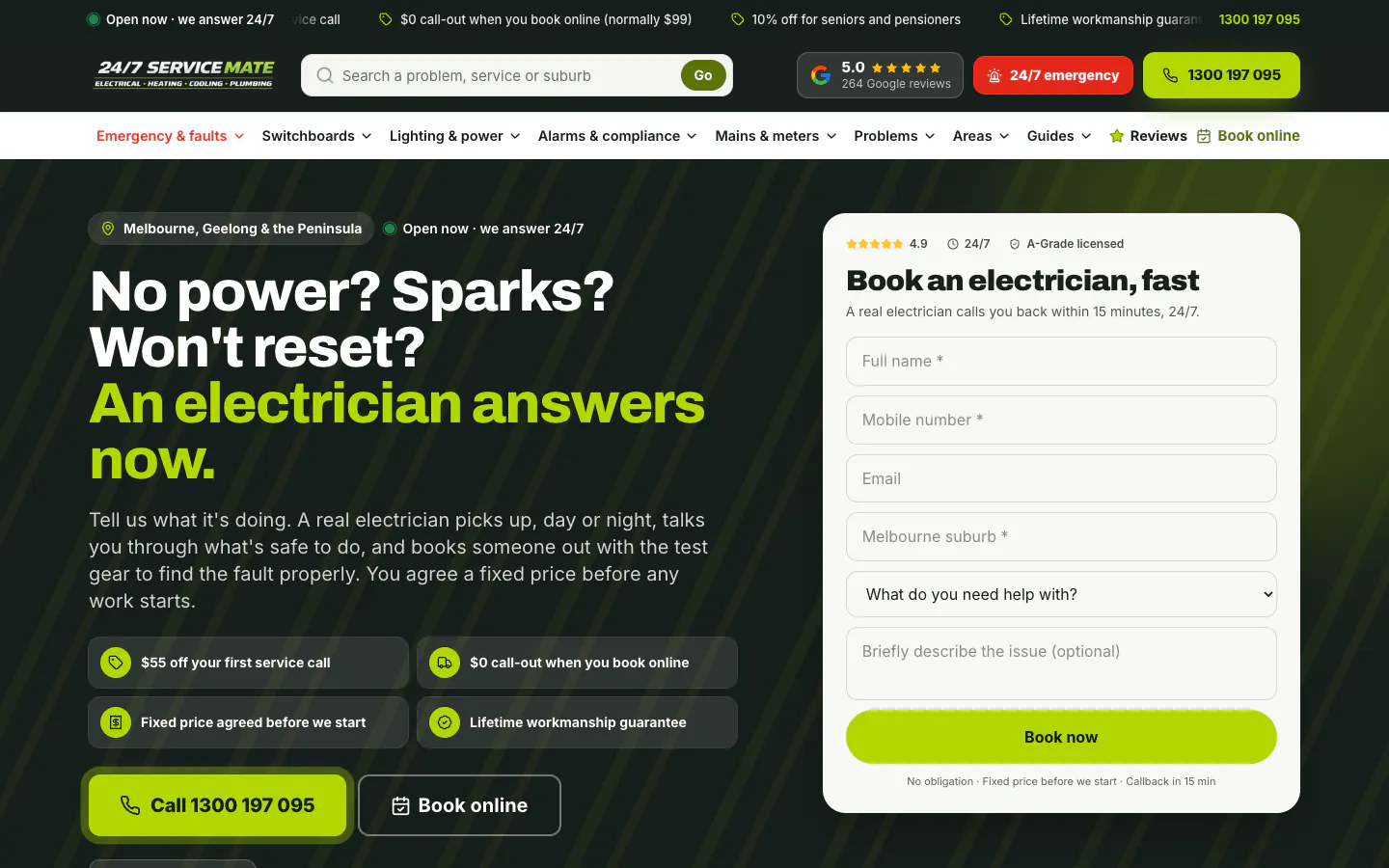
      247 Electrician Mate home page on desktop
    2. The problem

      People describe symptoms, not services

      Someone with no power or a burning smell does not know which service they need. The site had to start from what they can see, put safety first, and still give planned work its own pages.

    3. What we built

      599 pages, symptom-first menus and tools that help

      117 service pages, 407 suburb pages in 12 regions, 36 guides, a problem finder, an interactive house and a suburb map, with the offers, call and callback form in the same place on every page.

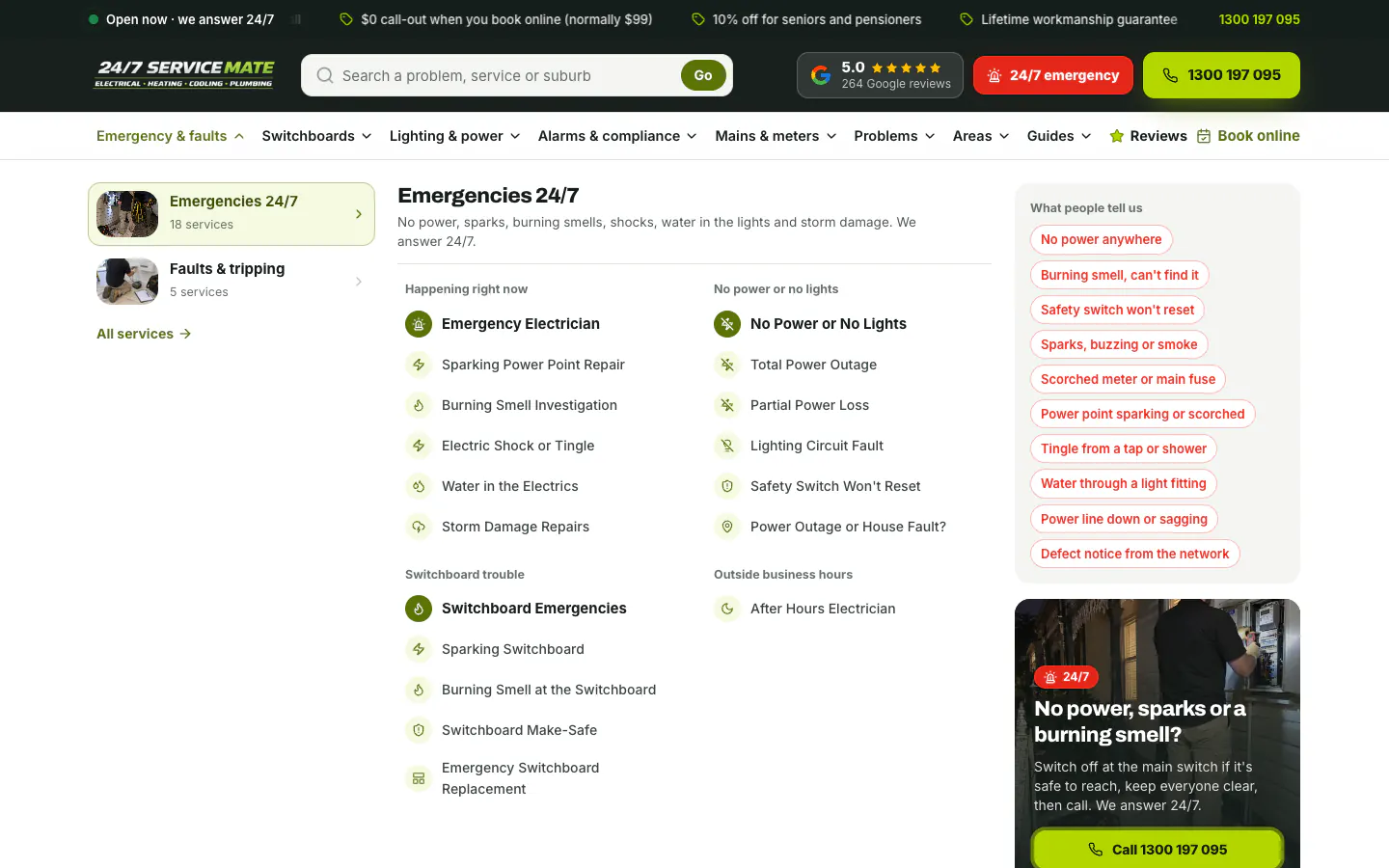
      Emergency and faults mega menu with a symptom list and call panel
    4. What happened

      599 pages live, every one checked

      The live sitemap lists 599 page addresses and every one returns a working page. Seven in ten are local pages for a suburb or a region.

      599pages live

    5. What we learned

      Lead with safety, then make the call easy

      A visitor with sparks or smoke needs a safe next step before anything else. The menu, the problem finder and the emergency prompt each give one, with a call button beside it.

      Electrical emergency prompt with safety steps and a call button

    Insights

    Inside the build

    Details from the 247 Electrician Mate project. Open a card for the finding and its source.

    • The build

      70%

      Seven in ten pages are local: a page for each of 407 suburbs and 12 regions

      • Suburb and region pages70%
      • Service pages and hubs21%
      • Guides6%
      • Other pages3%

      Each suburb page sits under its region in the breadcrumb, names the suburb in the headline and lists the kinds of property and jobs the team handles there. The offers, the call button and the callback form sit in the same places as on every other page, so a visitor who starts on a suburb page can call or book as easily as one who starts on the home page.

    • The build

      8

      Eight menus sort the site, and the emergency menu starts from the symptoms people describe

      The menus cover emergencies and faults, switchboards, lighting and power, alarms and compliance, mains and meters, problems, areas and guides. The emergency menu groups its services under happening right now, no power or no lights, switchboard trouble and outside business hours, beside the symptoms people describe and a call panel that opens with a safety step.

    • The build

      15

      A problem finder and a 15-part house help visitors before they call

      The problem finder asks one question at a time, starting with sparks, smoke, heat or a shock, and ends with the likely cause, what is safe to do and the page to read. The house diagram explains 15 parts of a home's power, from the service line to the EV charger, each with what goes wrong, the matching services and a call button.

    • The build

      1 tap

      On a phone, Book and Call stay pinned to the bottom of the screen

      The mobile header keeps the logo, a call button and the menu, and a Book and Call bar stays at the bottom as the visitor scrolls. Someone standing at a tripped switchboard can ring an electrician in one tap from any point on the page.

    247 Service Mate

    Campaign work · 247 Electrician Mate

    The campaign behind the enquiries.

    See the advertising work for 247 Electrician Mate, with the results and measurement explained in each campaign case study.

    Campaign case study

    247 Service Mate: 1 in 10 Google Ads clicks became an enquiry

    247 Service Mate: 1 in 10 Google Ads clicks became an enquiry. See the campaigns, customer journey and measured results.

    Read the campaign case study

    The website, working

    247 Electrician Mate’s website, up close.

    The real pages on desktop and phone. Select any screenshot to see it full size.

    The home page, top to bottom

    The 247 Electrician Mate home page from top to bottom
    The whole home page, top to bottom. Click or tap the frame to scroll it yourself.

    The details that matter, 1 of 2

    Emergency and faults mega menu, annotated
    1. Grouped by urgency The left column splits the menu into emergencies and faults, with the number of services in each.
    2. Happening right now Emergency services come first, from sparking power points to water in the electrics and storm damage.
    3. No power or no lights Power faults have their own group, including a page that helps tell a street outage from a fault in the house.
    4. What people tell us The symptoms customers describe, in their own words, beside the services that fix them.
    5. Safety first, then the call The call panel opens with a safety step: switch off at the main switch if it is safe to reach and keep everyone clear.

    The details that matter, 2 of 2

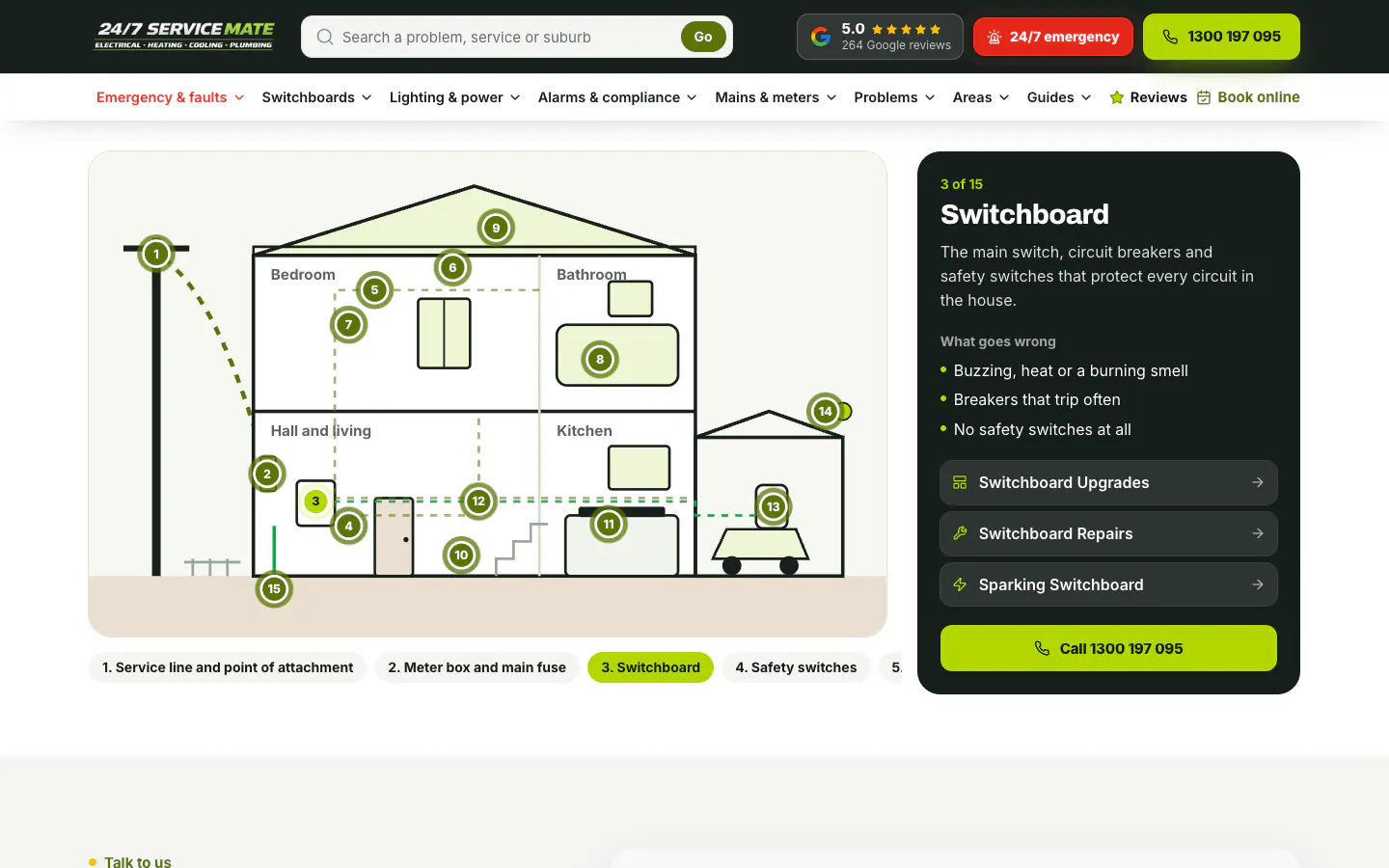
    Interactive house diagram with the switchboard panel open, annotated
    1. 15 numbered parts Each numbered pin opens a panel. Here, part 3 is the switchboard.
    2. What it is A plain description of the switchboard and the circuits it protects.
    3. The services that fix it Links to the switchboard upgrade, switchboard repair and sparking switchboard pages.
    4. A call button in the panel The visitor can ring an electrician straight from the diagram.
    5. Every part in a row Labelled buttons step through the parts, from the service line and meter box to the safety switches.

    Inside the website

    The thinking behind the pages.

    1. Website detail

      Menus that start from the symptom

      The emergency menu groups its services under what is happening: right now, no power or no lights, switchboard trouble and after hours. Beside them sit the symptoms people describe and a call panel that opens with a safety step.

      Emergency and faults mega menu with grouped services, a symptom list and a call panel
      Open full-size screenshot
    2. Website detail

      A page for every service

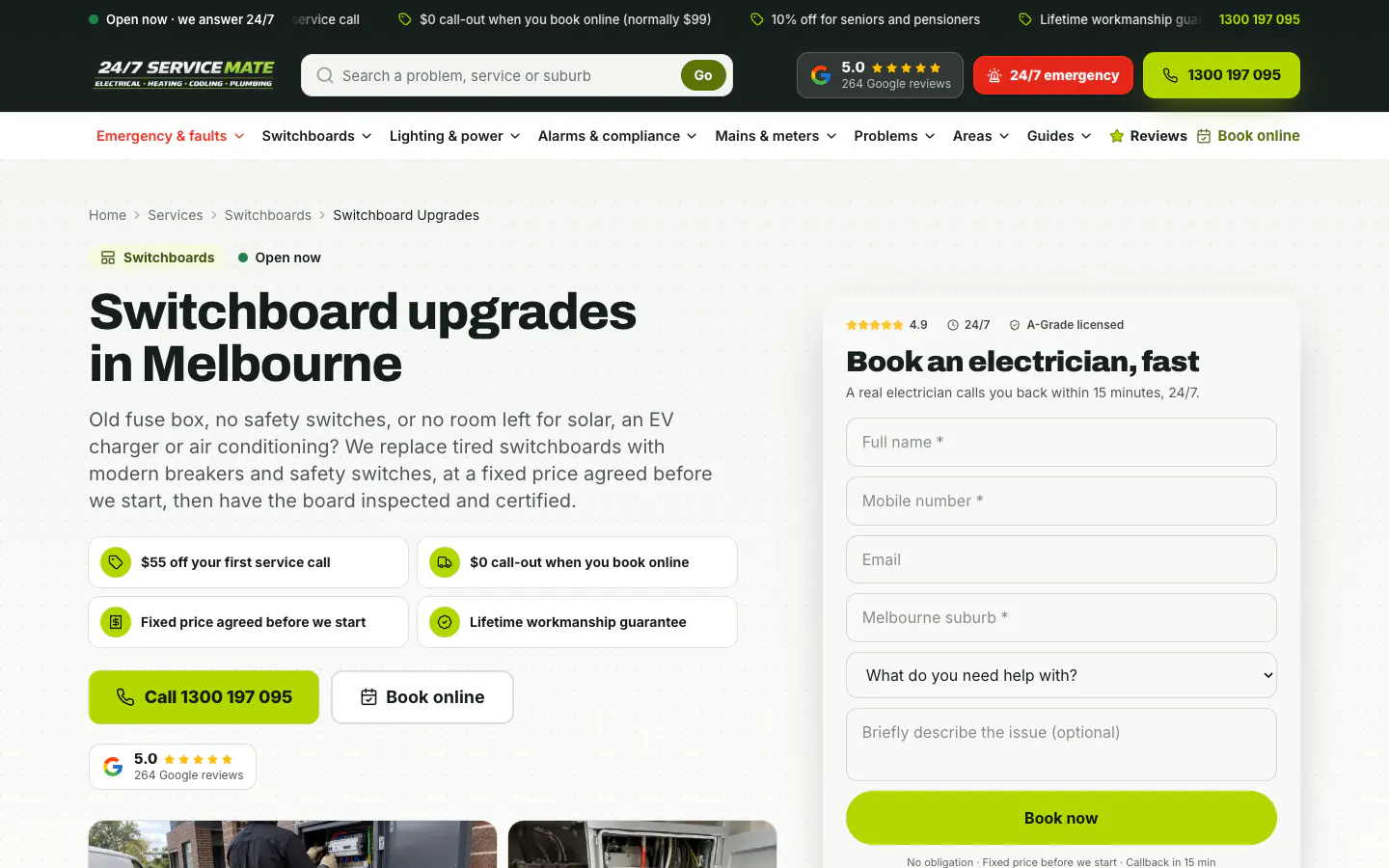
      Each of the 117 service pages opens with a breadcrumb, the job and the city in the headline, a plain-English introduction, the offers, call and booking buttons, and the callback form.

      Switchboard upgrades service page with offers and a callback form
      Open full-size screenshot
    3. Website detail

      407 suburb pages, filed by region

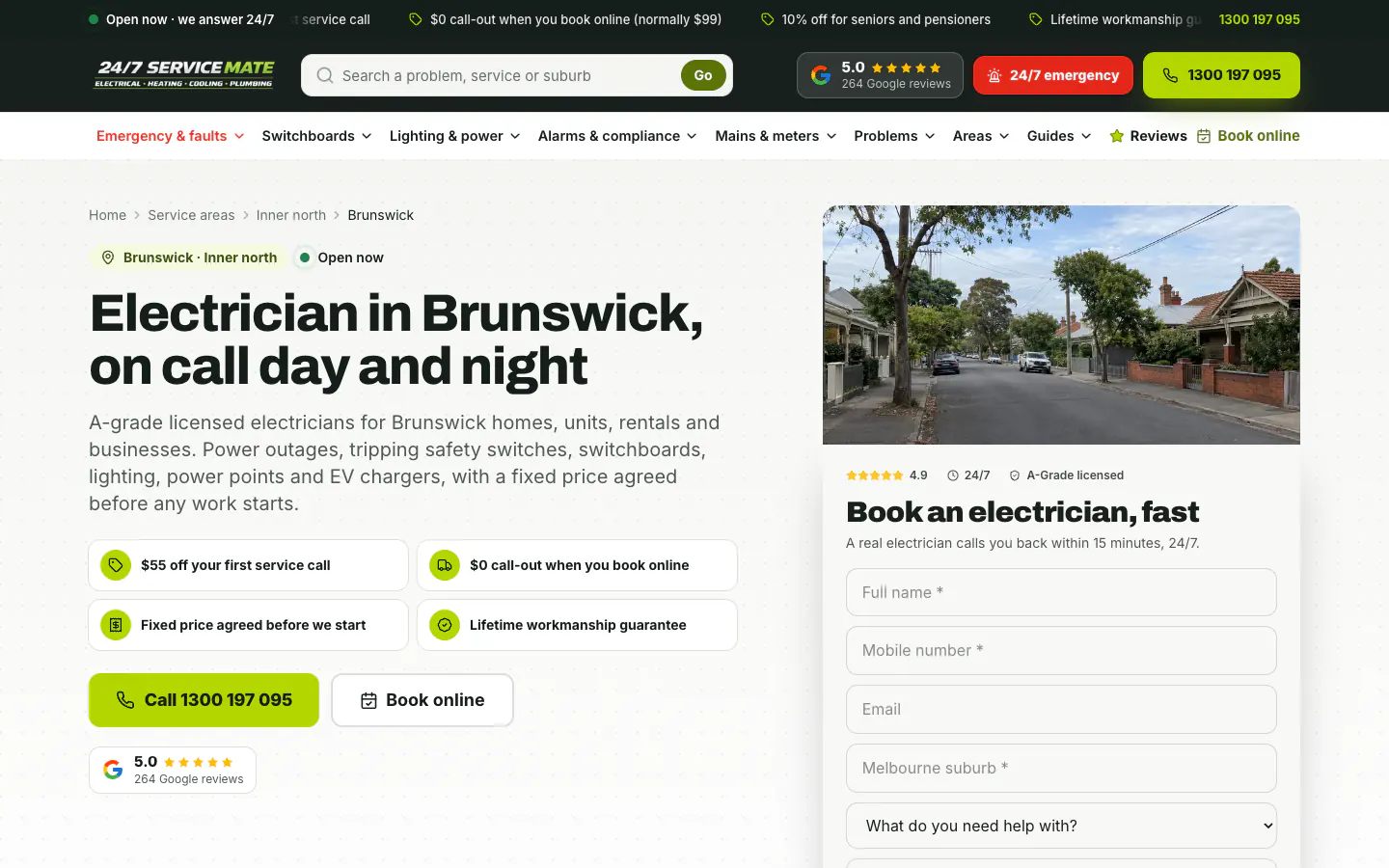
      Suburb pages name the suburb and its region, list the kinds of property and the common jobs, and show a local street photo beside the same offers and callback form as every other page.

      Brunswick electrician page with a local street photo and callback form
      Open full-size screenshot
    4. Website detail

      The whole service area on one map

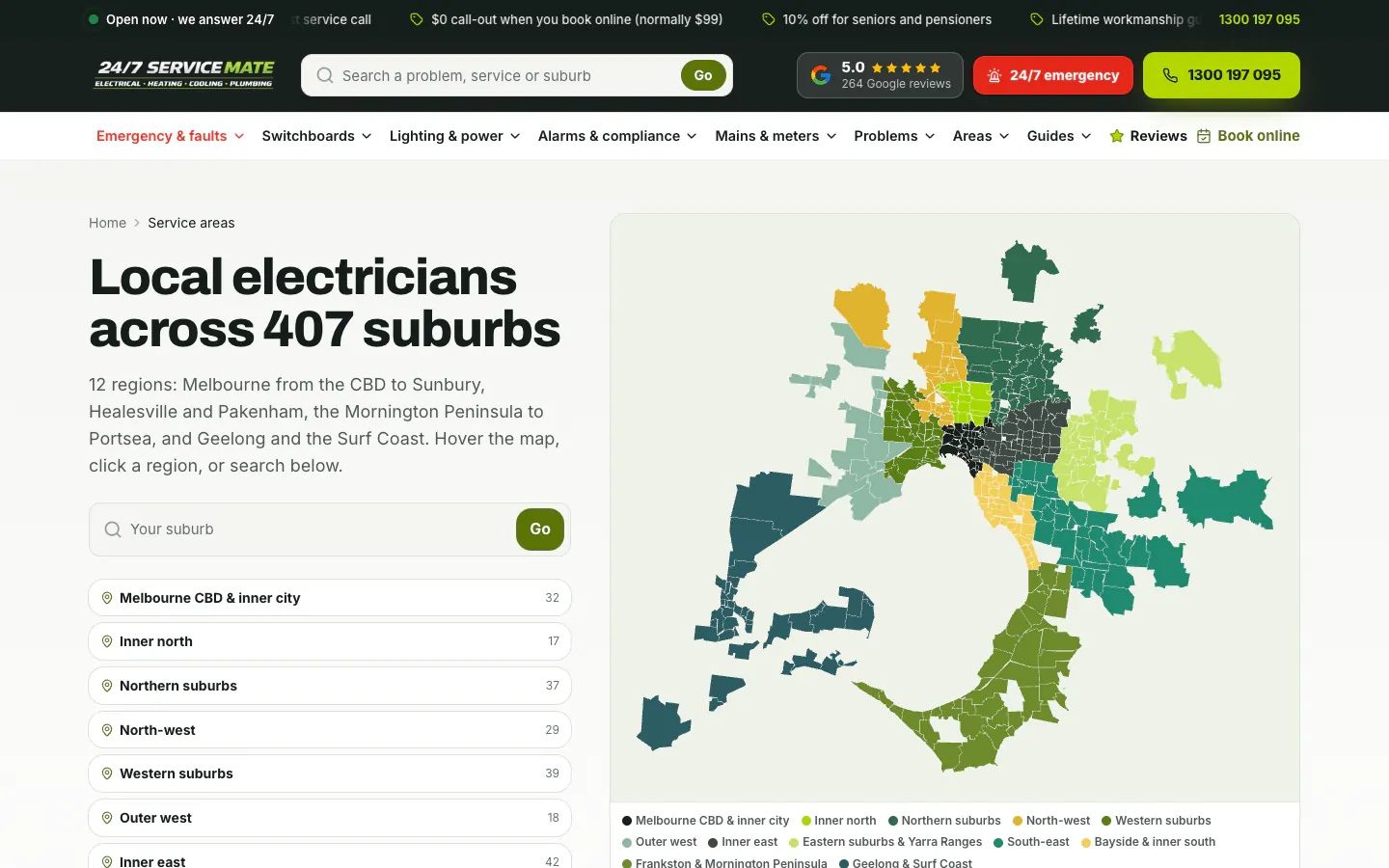
      A map colours every suburb by region, from the CBD to Geelong, the Surf Coast and the Mornington Peninsula. Visitors can hover, click a region or search for their suburb.

      Service areas map of Melbourne suburbs coloured by region, with a suburb search
      Open full-size screenshot
    5. Website detail

      Safety questions before anything else

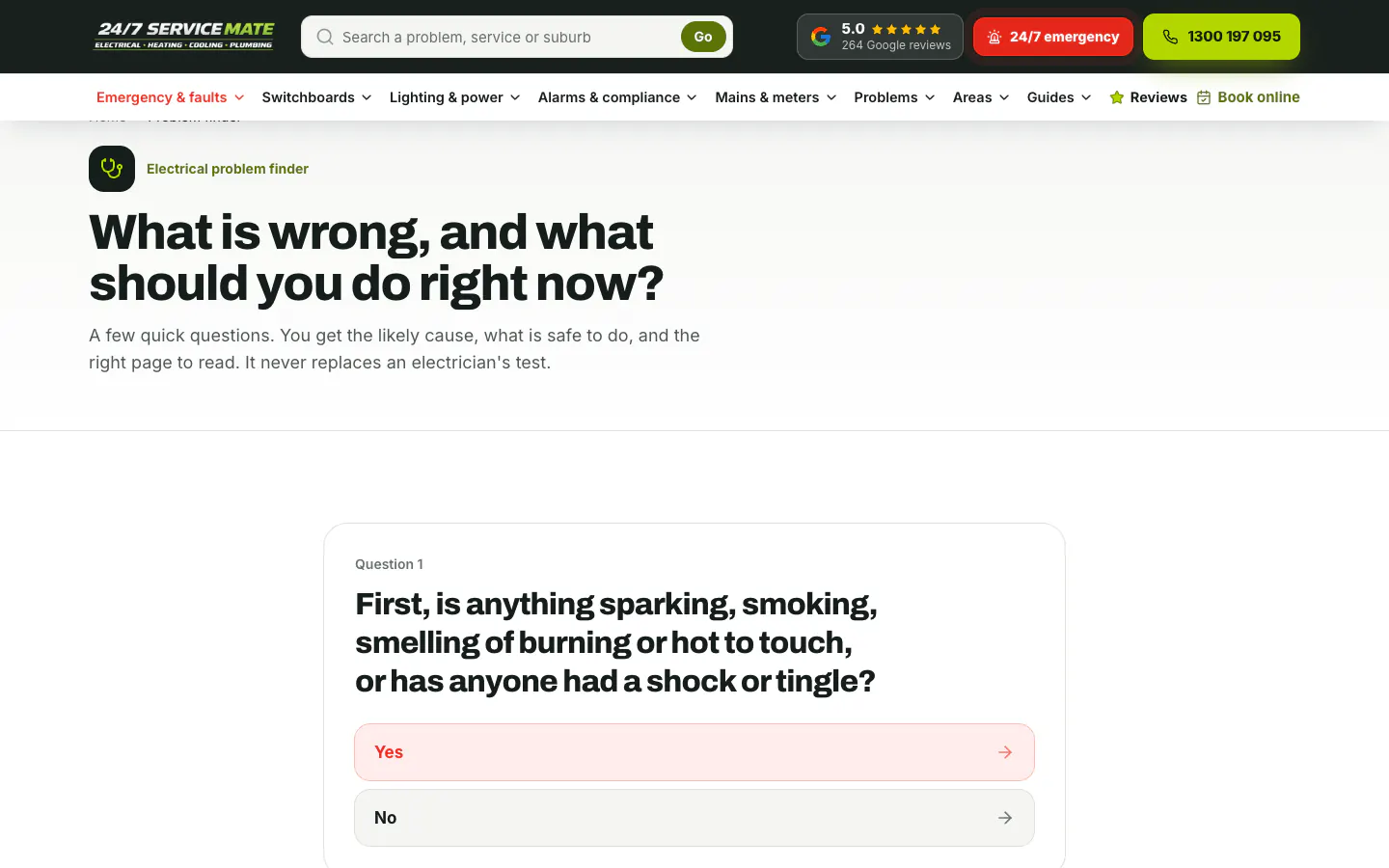
      The problem finder asks one question at a time and starts with danger: sparks, smoke, a burning smell, heat or a shock. It ends with the likely cause, what is safe to do and the page to read.

      Electrical problem finder opening with a safety question
      Open full-size screenshot
    6. Website detail

      How a home's power works

      An interactive house explains 15 parts of a typical home's power, from the service line to the EV charger. Each part shows what goes wrong, links to the services that fix it and has a call button.

      Interactive house diagram with the switchboard panel open
      Open full-size screenshot
    7. Website detail

      Booking on a focused page

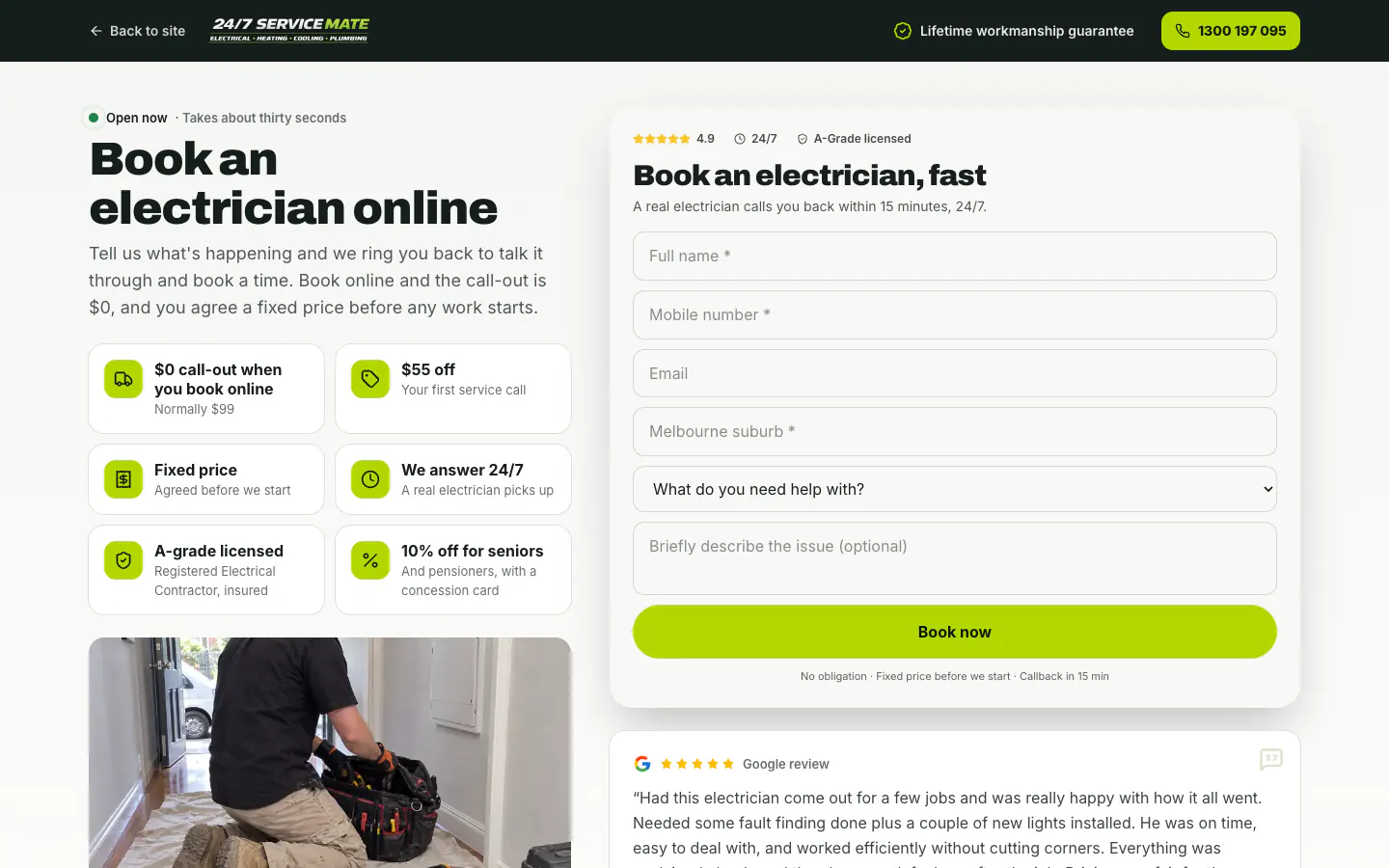
      The booking page drops the menus and keeps a back link, the logo, the workmanship guarantee and the call button, so the visitor can finish the form. Tiles beside it restate the offers, the fixed price and the licence.

      Online booking page with the callback form and offer tiles
      Open full-size screenshot
    8. Mobile experience

      Book and Call on every phone screen

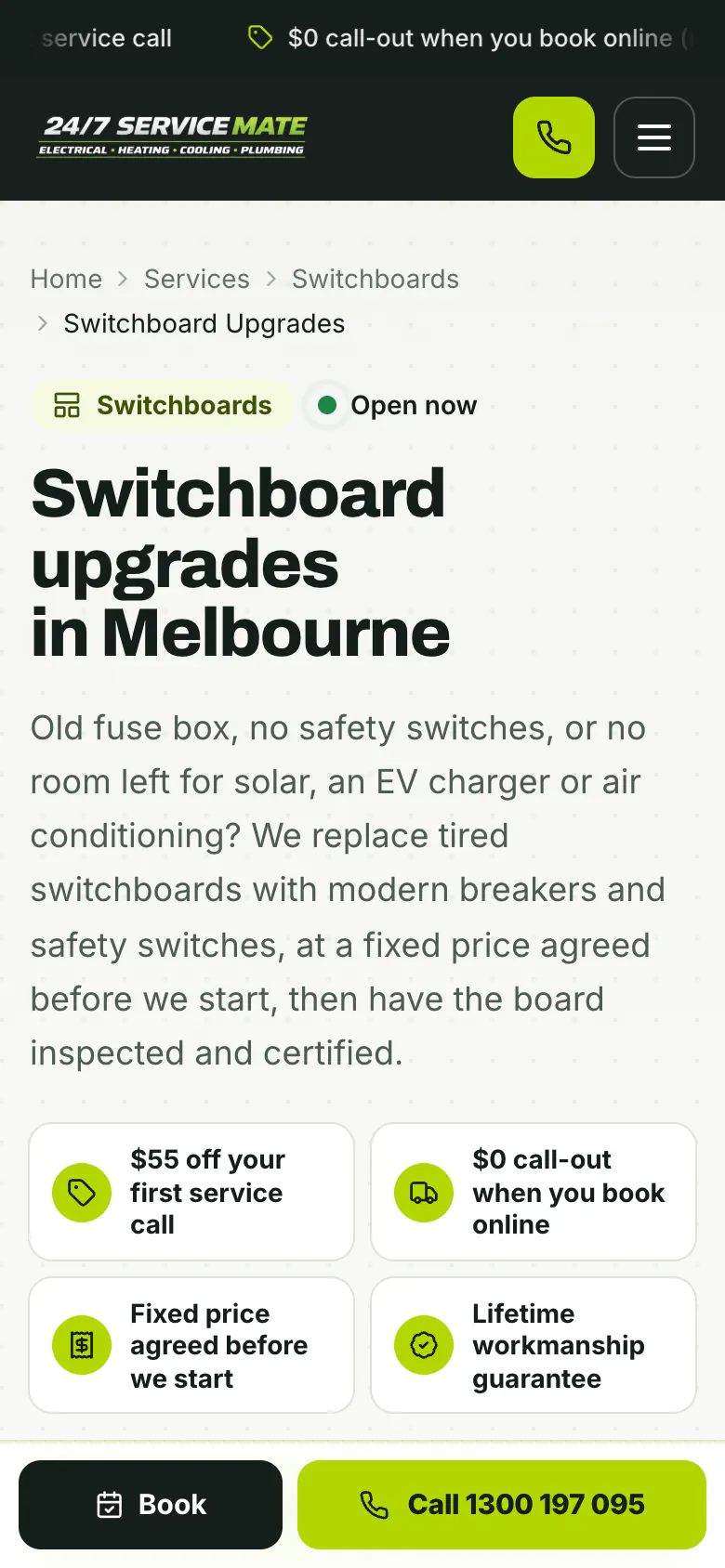
      On a phone the header keeps the logo, a call button and the menu, and a Book and Call bar stays pinned to the bottom of the screen as the visitor scrolls.

      Switchboard upgrades page on a phone with the Book and Call bar
      Open full-size screenshot

    The case study

    The project, connected.

    The brief, the work and what it delivered.

    1. The starting point

      247 Electrician Mate

      247 Electrician Mate is a 24/7 electrician covering Melbourne, Geelong and the Mornington Peninsula, from emergency faults to switchboards, lighting, alarms and mains work.

      Electrical services · Melbourne, VIC

      247 Service Mate

      SoudCoh services

      • Website rebuild
      • Service and suburb page structure
      • Guides and interactive tools
      • Mobile design
    2. What we put in place

      The website experience

      • 599 pages: 117 services, 10 service group hubs, 407 suburbs, 12 regions and 36 guides.
      • Symptom-first mega menus and a header search for a problem, service or suburb.
      • An electrical problem finder, an interactive house diagram and a suburb map with search.
      • A booking page, an offers page, a reviews page and a pinned Book and Call bar on phones.
      247 Electrician Mate home page on desktop with offer tiles and a callback form
      The home page on desktop: a headline that names the faults people call about, offer tiles, call and booking buttons, and a callback form on the right.Explore the website screenshots
    3. What the project delivered

      The outcome

      We built symptom-first mega menus and a header search for a problem, service or suburb. We also added an electrical problem finder, an interactive house diagram and a suburb map with search.

    In this case study

    White paper · PDF

    Marketing for home services in Australia

    58 pages · 2.3 MB

    Download this PDFRead it on the page

    We built symptom-first mega menus and a header search for a problem, service or suburb. We also added an electrical problem finder, an interactive house diagram and a suburb map with search.

    599
    published pages
    407
    suburb pages
    117
    electrical service pages
    36
    guides
    12
    region pages
    10
    service groups

    The business

    247 Electrician Mate is a 24/7 electrical business working across Melbourne, Geelong and the Mornington Peninsula. Its A-grade licensed electricians handle everything from no-power call-outs, burning smells and tripping safety switches to switchboard upgrades, lighting, smoke alarms, EV chargers and mains and meter work. The brand's wordmark reads 24/7 Service Mate; this website is for its electrical work.

    Many of its customers arrive mid-problem. The lights are out, a safety switch will not reset or something smells hot, and they are reading on a phone. Others are planning work, such as a new switchboard before solar or an EV charger, and want to understand the job before they ask for a price.

    The brief

    The brief was to rebuild the website so it starts from what the customer can see, tells them what is safe to do, and then makes the call easy. It also had to cover every electrical service the business offers and every suburb it travels to, with a page for each, without losing the planned work in a site built for emergencies.

    Every page needed the same working parts in the same places: the offers, the guarantee, a tap-to-call number, online booking and a short callback form. A visitor who lands on a suburb page from a search should be able to act as quickly as one who starts on the home page.

    What we built

    The live sitemap lists 599 pages. There are 117 service pages, made up of 22 main services and 95 specific jobs, sorted into 10 service groups that each have a hub page. There are 407 suburb pages grouped into 12 region pages, 36 guides, and 17 other pages including the home page, booking, offers, reviews, the tools and a page of printable service brochures.

    Menus and search that start from the problem

    Eight mega menus cover emergencies and faults, switchboards, lighting and power, alarms and compliance, mains and meters, problems, areas and guides. The emergency menu groups its services under what is happening right now, no power or no lights, switchboard trouble and after hours. Beside them sits a list of the symptoms people describe in their own words, and a call panel that starts with a safety step. A search box in the header takes a problem, a service or a suburb.

    Service, suburb and region pages

    Every service page opens with a breadcrumb, the job and the city in the headline, and a plain-English introduction that names the signs and the fix. The offer tiles, call and booking buttons, a Google rating badge and the callback form follow, with job photos below. Suburb pages are filed under their region in the breadcrumb, name the kinds of property and the common jobs in that suburb, and show a local street photo. The service areas page puts all 407 suburbs on one map, coloured by region, with a suburb search and the region list beside it.

    Tools that help before the call

    The electrical problem finder asks one question at a time. Its first question checks for sparks, smoke, a burning smell, heat or a shock, and it ends with the likely cause, what is safe to do and the right page to read. It says plainly that it never replaces an electrician's test. The interactive house explains 15 parts of a home's power, from the service line and meter to the switchboard, circuits, smoke alarms and EV charger. Each part opens a panel with what goes wrong, links to the services that fix it and a call button.

    A home page that sorts the visit

    The home page leads with the faults people call about and an offer row, then asks what is happening at the visitor's place. Sixteen symptom tiles cover the common problems, with the urgent ones in red, and a second set filters by room, from the switchboard and meter box to the kitchen, the garage, and letters and paperwork. Further down, the ten service groups open as tabs, a switchboard section explains why an old fuse box causes so many faults, and before-and-after sliders, each one labelled as an illustration of a typical job, show what finished work looks like.

    Booking has a page of its own with the menus removed, so the form is the only task on screen. The offers page sets out the first-service discount, the online-booking offer, the seniors and pensioners discount and the workmanship guarantee. The reviews page shows the Google rating with filters by topic. A floating Google rating button opens a reviews drawer, and short review pop-ups appear while a visitor reads.

    Built for phones

    On a phone the header shrinks to the logo, a call button and a menu button. A Book and Call bar stays pinned to the bottom of the screen as the visitor scrolls, so the next step is one tap away on any part of any page. The offer tiles stack two to a row and the breadcrumbs wrap, so the job, the offers and the call all fit without zooming.

    The callback form needs a name, a mobile number and the suburb; the email address and a description of the issue are optional. On desktop, a floating call button stays in the lower left corner, and an emergency prompt with safety steps and a call button appears once per visit after the visitor has scrolled part way down the home page.

    What it connects to

    Because every service and every suburb has its own address, an ad or a search about switchboard upgrades can land on the switchboard upgrades page, and one naming Brunswick can land on the Brunswick page, rather than the home page. The Google Ads work for the business is described in the 247 Electrician Mate campaign case study.

    Reviews come from the business's Google profiles, and each review card links to the original on Google. The callback form and the booking page send the request to the team, who ring the customer back. Every tool and guide carries a call button or a link to the matching service page, so reading leads somewhere useful.

    To plan a website like this for your business, see our website design work and our marketing for electricians.


    Key design decisions
    • Symptom-first mega menus and a header search for a problem, service or suburb.
    • An electrical problem finder, an interactive house diagram and a suburb map with search.
    • A booking page, an offers page, a reviews page and a pinned Book and Call bar on phones.
    • 599 live pages on one plan: 117 services, 407 suburbs, 12 regions and 36 guides, with the call and booking in the same place on every page.

    Tags

    • Website design
    • Electrical
    • Melbourne, VIC

    A website built around your business.

    Tell us about your services, your customers and the next step you want them to take. We will shape the design and page structure around that brief.

    FAQ

    The questions this raises.

    The brief, the design and how the website supports the wider customer journey.

    The first call is free and there is no deck.

    Book a call
    How is the menu organised?

    Eight menus cover emergencies and faults, switchboards, lighting and power, alarms and compliance, mains and meters, problems, areas and guides. The emergency menu groups its services under happening right now, no power or no lights, switchboard trouble and after hours, beside the symptoms people describe and a call panel that starts with a safety step.

    How are the suburb pages built?

    Each one sits under its region in the breadcrumb, names the suburb in the headline, lists the kinds of property and the common jobs there, and shows a local street photo beside the same offers, call button and callback form as every other page. A map of all 407 suburbs, coloured by region, has a suburb search.

    What does the site do for someone with an electrical emergency?

    A red 24/7 emergency button sits in the header. The problem finder's first question checks for sparks, smoke, heat or a shock, and on desktop an emergency prompt with safety steps and a call button appears once a visitor has scrolled part way down the home page.

    How does the site work on a phone?

    The header keeps the logo, a call button and the menu, and a Book and Call bar stays pinned to the bottom of the screen. The offer tiles stack two to a row and the breadcrumbs wrap, so the job and the next step are visible without zooming.

    Are the before-and-after photos specific jobs?

    No. The site labels each before-and-after slider as an illustration of a typical job, so visitors know what to expect without mistaking it for a particular customer's work.

    What did SoudCoh deliver for 247 Electrician Mate?

    599 pages: 117 services, 10 service group hubs, 407 suburbs, 12 regions and 36 guides. Symptom-first mega menus and a header search for a problem, service or suburb. An electrical problem finder, an interactive house diagram and a suburb map with search. A booking page, an offers page, a reviews page and a pinned Book and Call bar on phones.

    Ready for your next website?

    Tell us about your business, your services and what your website needs to do. We’ll help you decide what to build next.

    A clear scope, a considered design and a practical next step.