Proof
    Aussie Plumbing — ad spend scaled 1.8× with enquiries up 2.1×, so each enquiry cost lessI-ELEC — a 231-page electrician website for Inner SydneyWhat a plumbing lead costs on Google AdsWhat a lead costs on Google Ads, industry by industrySLS Solicitors — cost per recorded Google Ads conversion down 58.48%How much should a trade business spend on marketing?State Choice Plumbing — a drains, hot water and gas websiteAussie Drains — a 600-page drain website for SydneyWhat an electrician lead costs on Google AdsAussie Electrical — a 650-page electrical website for SydneyThe most efficient ways for a trade business to get leadsEOL Melbourne — click-to-enquiry rate up from 28% to 33.4%What a cleaning lead costs on Google AdsAlliance Plumbing — ad spend scaled 1.8× with enquiries up 2.1×, so each enquiry cost lessImpress Blinds — cost per recorded Google Ads conversion down 62.63%FixCare Property - cost per enquiry down 28%Rubbish Removal WA — cost per enquiry down 53.18%Floral Cakery — cost per enquiry down 49.82%ILLUMINATE Laser Emporium — cost per enquiry down 48.54%Sydney Fence Painting — cost per enquiry down 33.68%Alliance Plumbing — cost per enquiry down 29.6%Gridless Build Solutions — cost per enquiry down 29.16%FacilityWorx — cost per enquiry down 23.62%Cornerstone Roofing — cost per enquiry down 20.47%Council finance — budgeting and workforce designCouncil planning — clearer approvals and reportingCultural audiences — media strategy and creative conceptsCommunity participation — surveys, maps and project pagesPublic-sector research — survey design and analysisPublic art — site studies and visual conceptsRegional identity — visitor guides and wayfinding conceptsCouncil systems — integration and migration planningA pressure washing business — service-led search campaignsA pressure washing business — a clear enquiry journeyA carpet cleaner — Google Ads built around cleaning servicesA roofing company — campaigns for repairs and restorationA CCTV installer — campaigns for security enquiriesA fence painter — search campaigns for specific surfacesA maintenance business — live in 8 weeks, 3 stacks goneFinalist — Best Start-Up Agency5.0 across every Google review$120M+ in media under management250+ active engagements across five countries
    Newcastle Plumbing

    Plumbing · Newcastle and the Hunter, NSW

    Newcastle Plumbing: a plumbing website with job stories, search and local booking

    We built 92 service pages in five groups, each with a step-by-step job story. We also added 280 suburb pages with boundary maps, in six regions.

    Visit website
    Services
    Website design · Service pages · Location pages · Guides · Interactive tools · Online booking · Mobile design
    Talk to us about your website

    The case study

    In this case study

    White paper · PDF

    Marketing for home services in Australia

    58 pages · 2.3 MB

    Download this PDFRead it on the page

    We built 92 service pages in five groups, each with a step-by-step job story. We also added 280 suburb pages with boundary maps, in six regions.

    The business

    We built Newcastle Plumbing a 449-page website for the Hunter: 92 service pages, 280 suburb pages on real maps, 50 guides and online booking.

    Newcastle Plumbing is a local plumbing business with its own licensed plumbers. It takes on blocked drains, hot water, leaks, burst pipes and gas work across Newcastle, Lake Macquarie, Maitland, Port Stephens, Cessnock and the Hunter Valley, and the northern end of the Central Coast. Its promise to customers is simple: a written, fixed price before any work starts.

    449
    published pages
    280
    suburb pages with real maps
    92
    service pages
    50
    guides
    6
    regions
    90
    answered questions

    The brief

    People with a plumbing problem rarely know the trade name for the job. They describe what they can see, such as a gurgling drain or no hot water, and where they live. The brief was a site with a proper page for each of those starting points, built on one plan so that the phone number, the quote form and the booking button sit in the same places on every page.

    The site also launched with a new logo, a red N mark beside the name, carried through a red, navy and yellow design.

    Services that start from the problem

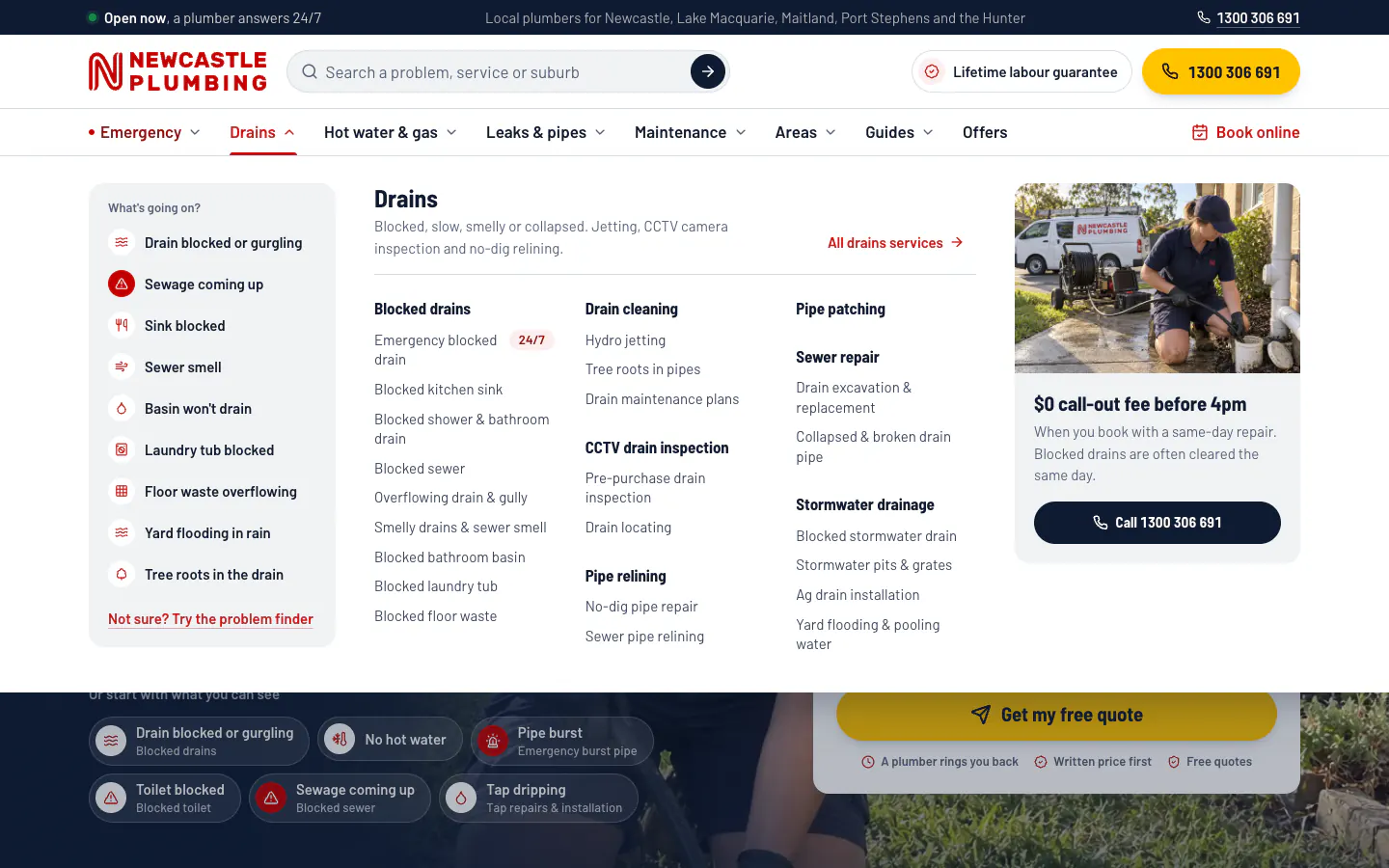
    The 92 service pages sit in five groups: Emergency, Drains, Hot water and gas, Leaks and pipes, and Maintenance. Each group has a menu that opens with a list of problems a homeowner can see, beside every service in that group and an offer panel with a call button. Service pages open with the problem in plain words, a fixed-price offer where one applies, a call button and a quote form already set to that service.

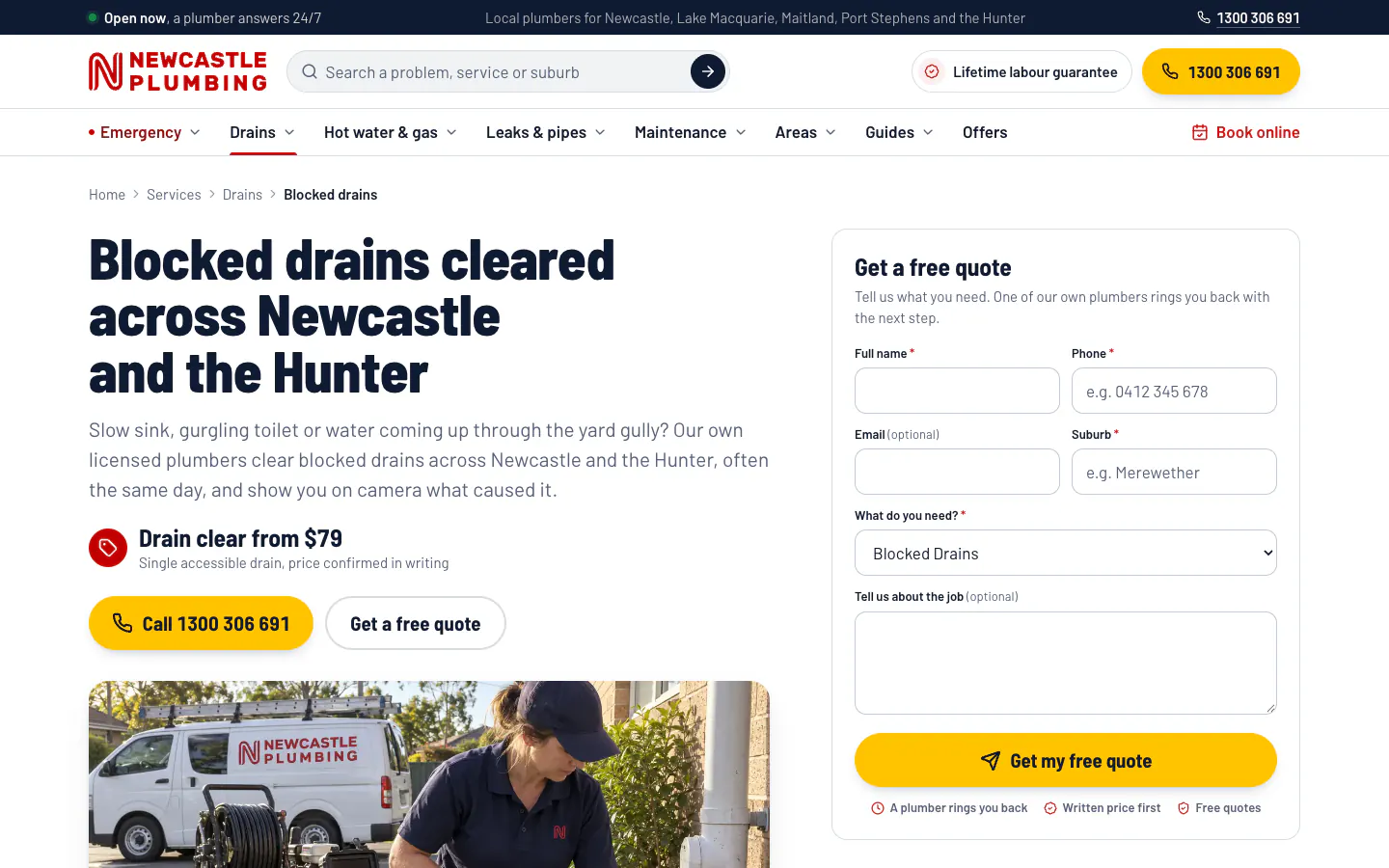
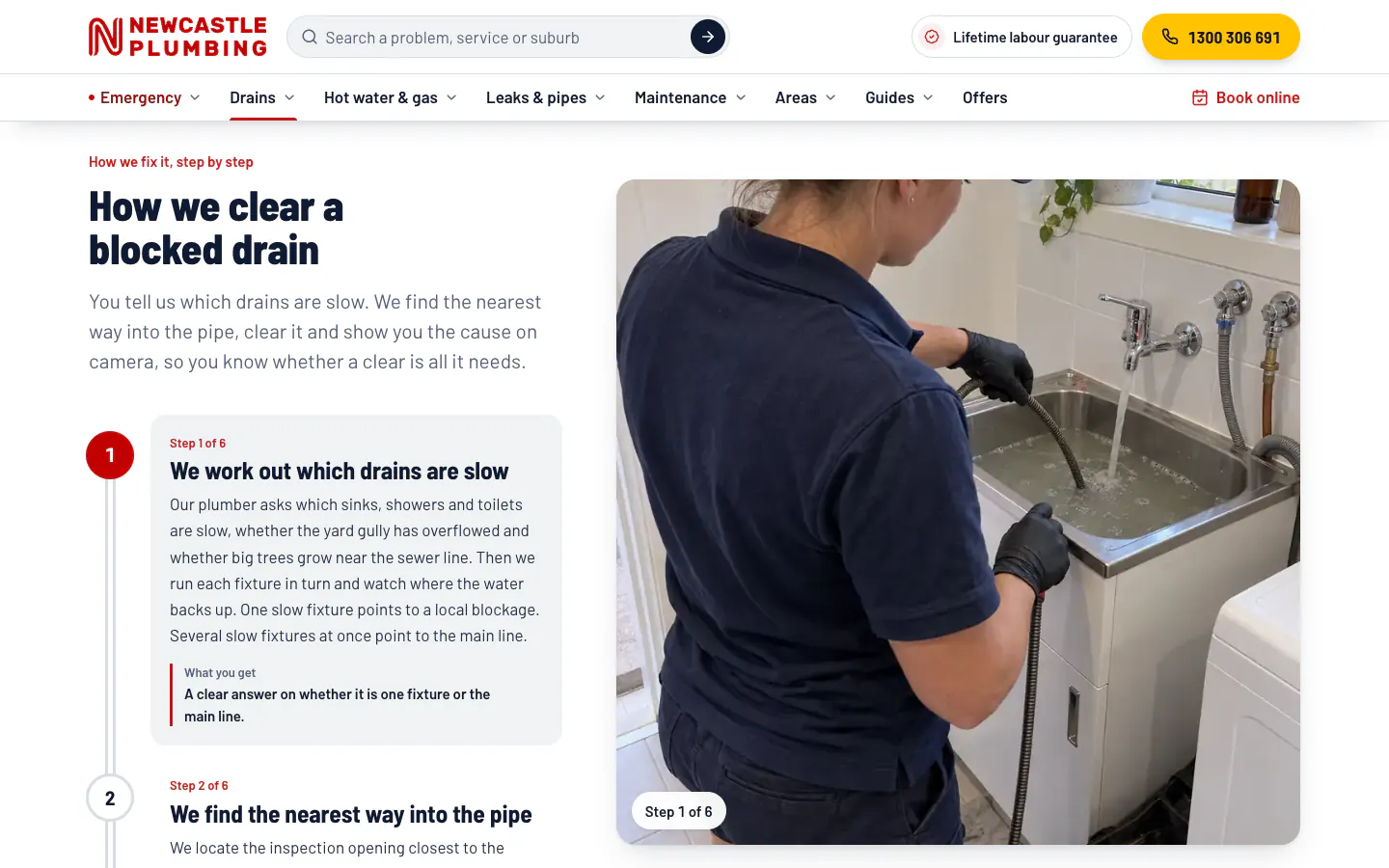
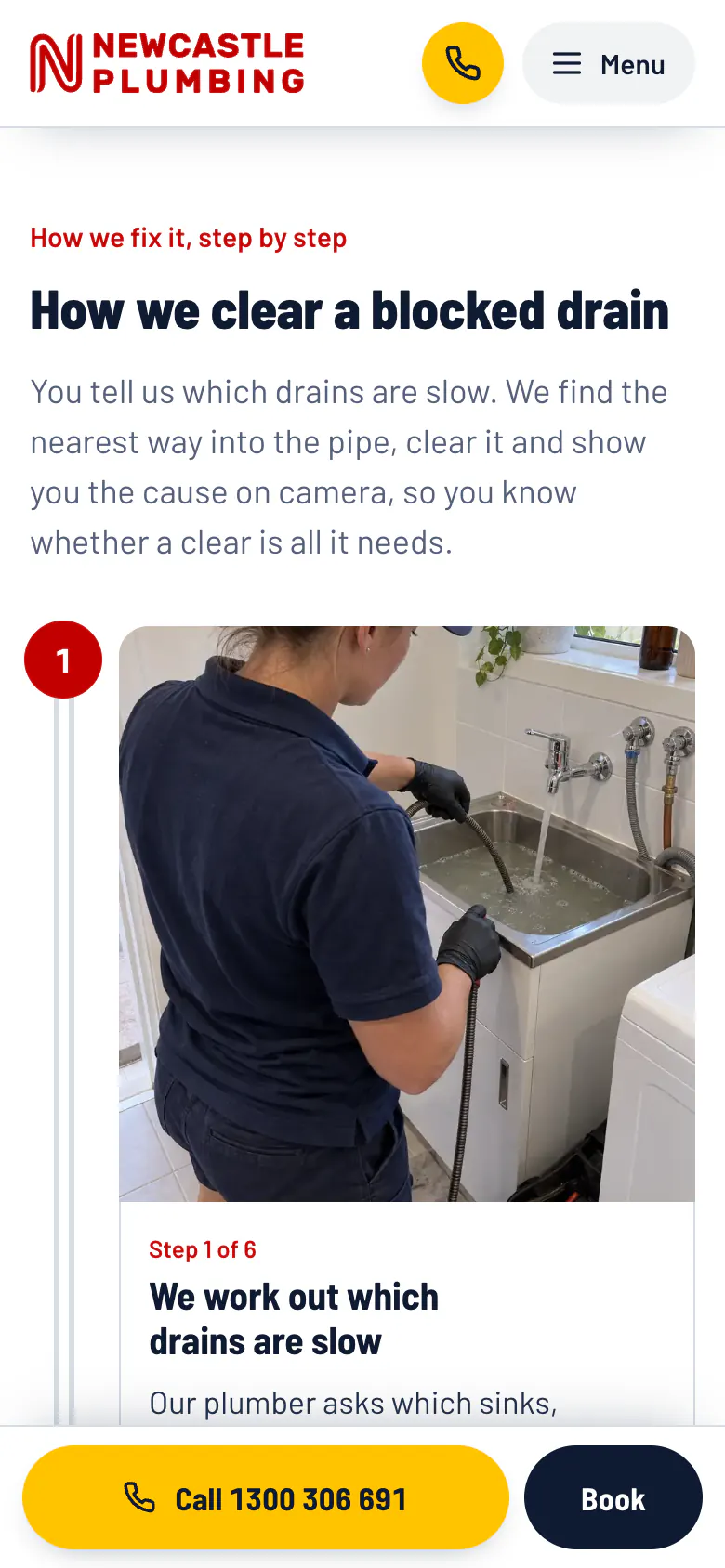
    Further down, every service page tells the job as a story: five or six numbered steps, each with a photo and a note on what the customer gets at that point. On the Blocked Drains page, the story runs from working out which drains are slow to clearing the pipe and showing the cause on camera.

    280 suburbs, each on a real map

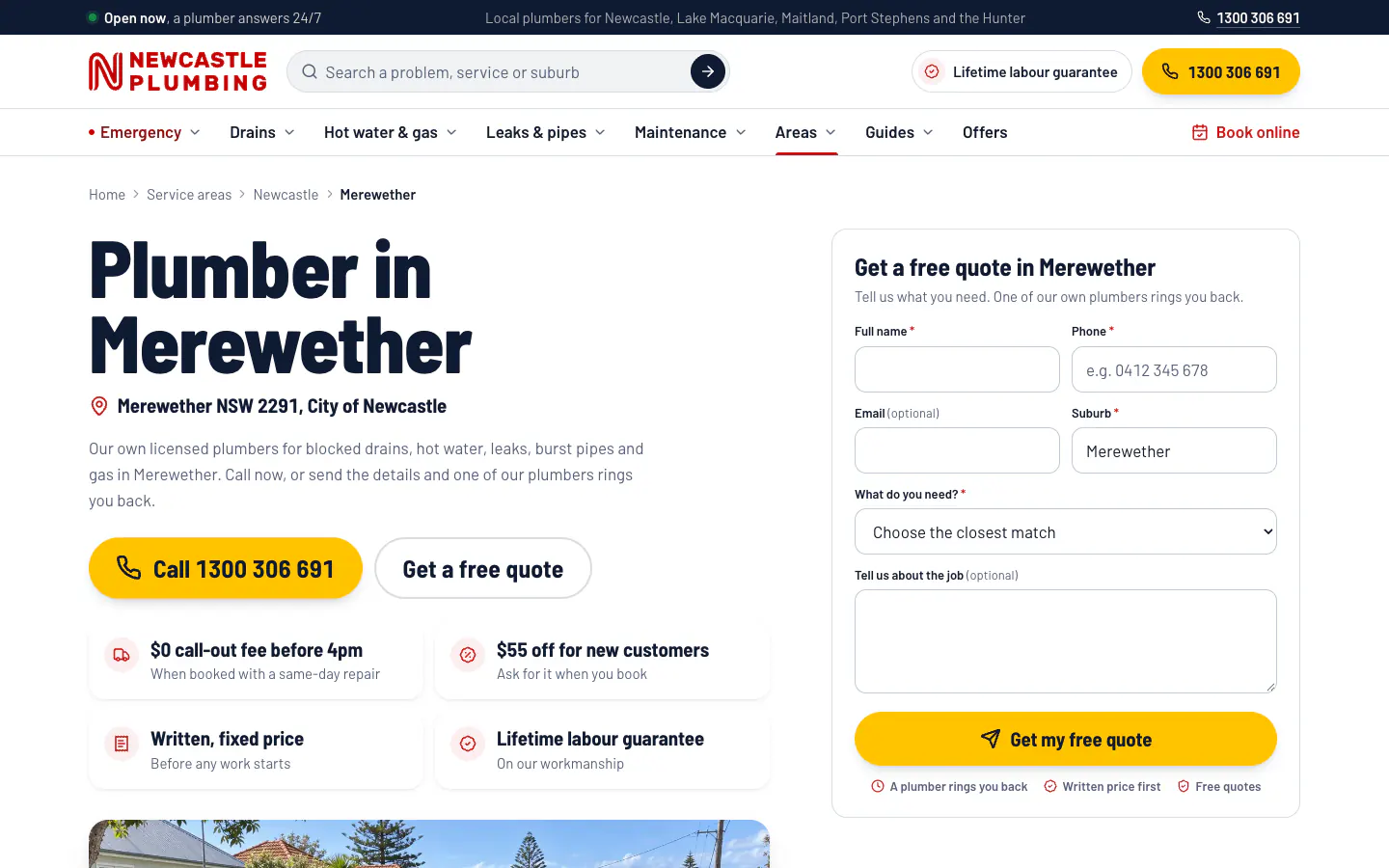
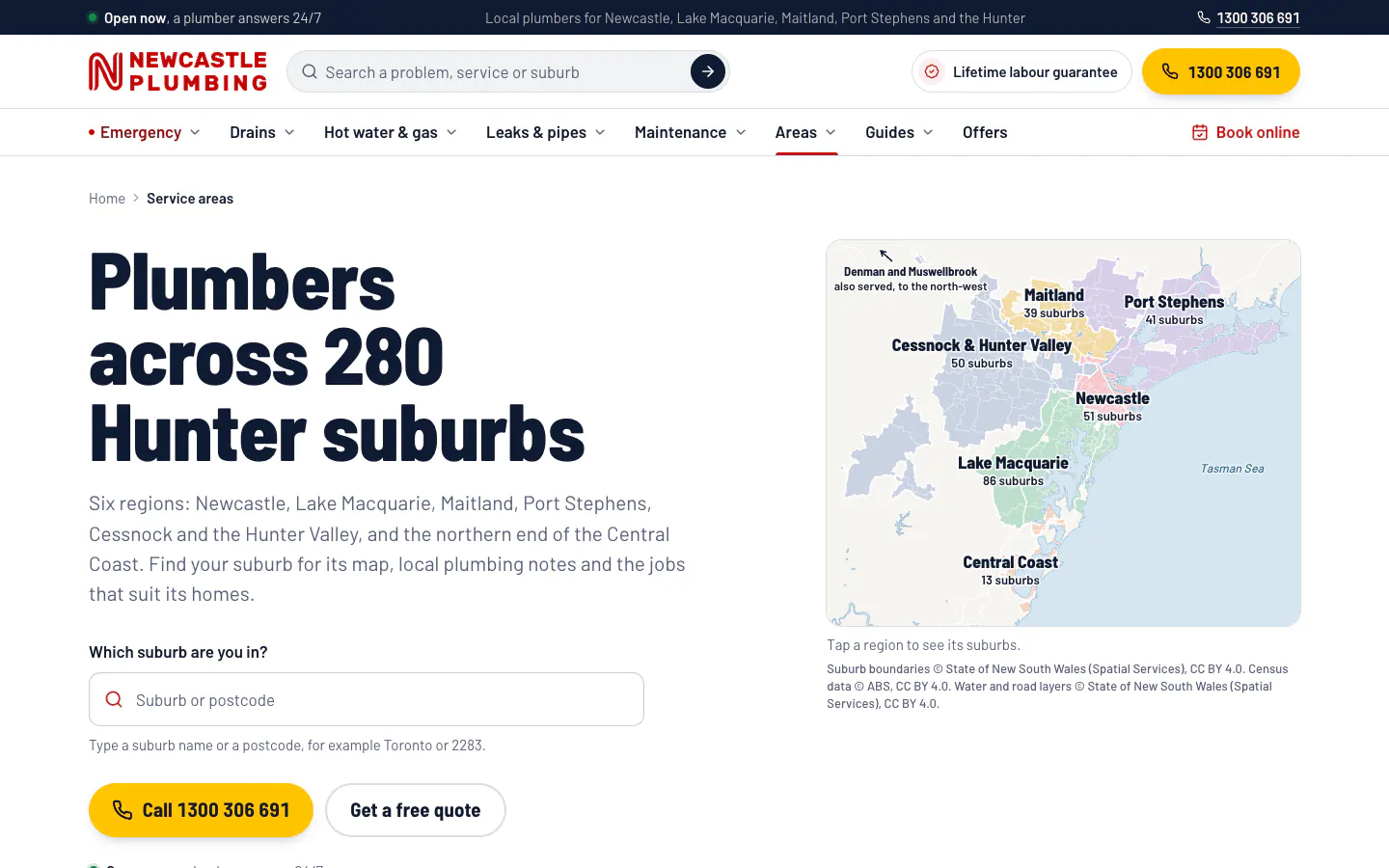
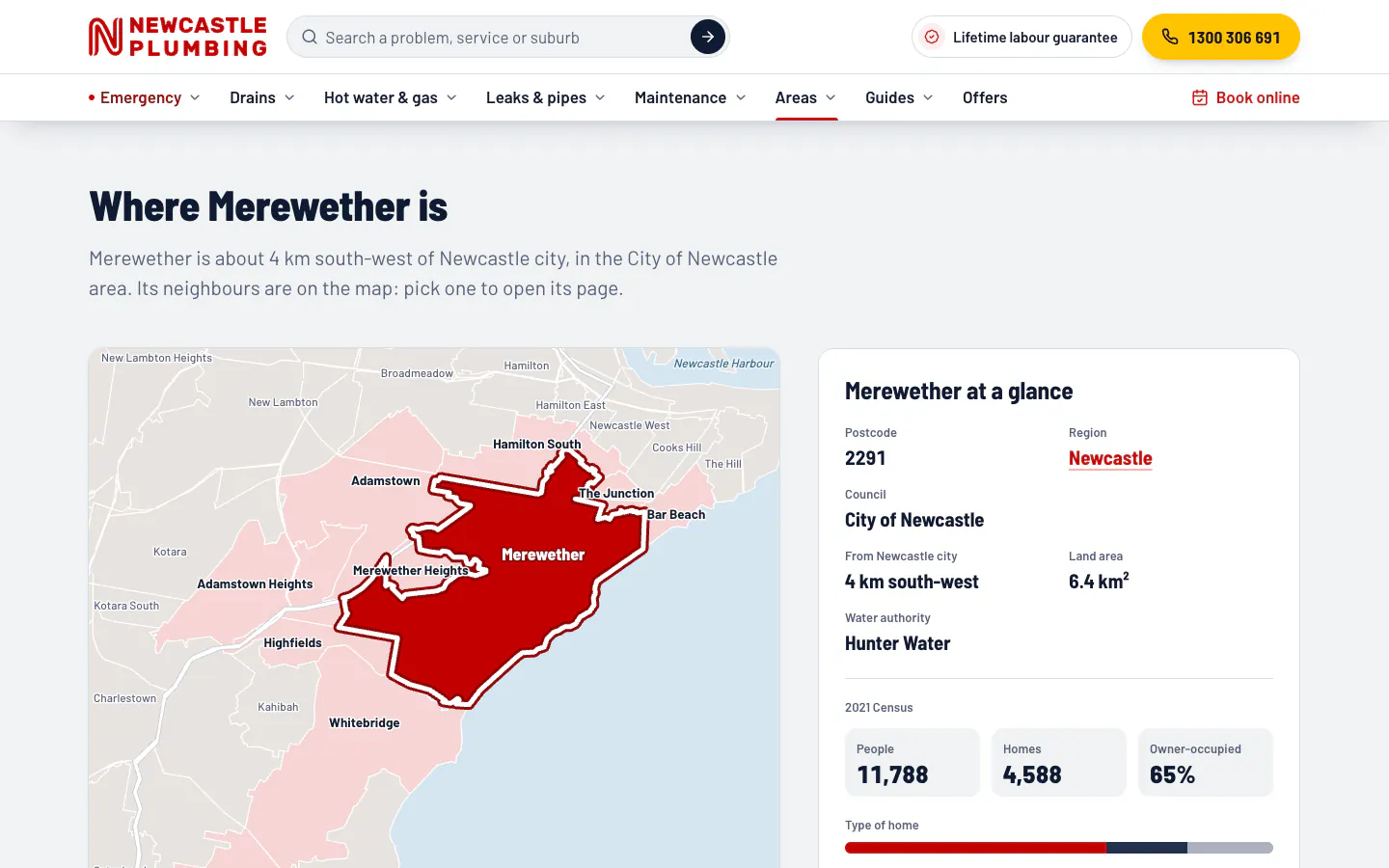
    Every suburb page names the postcode and council, shows the offers and the guarantee as four short cards, and fills the suburb into the quote form. Further down, the suburb sits on a boundary map with its neighbours, and each neighbour opens its own page. A panel beside the map gives the distance from Newcastle city, the land area, the water authority and census figures on the people and homes there. Six region pages group the suburbs, and the service-areas page maps all six regions with a suburb or postcode finder beside the map.

    Tools that help before the call

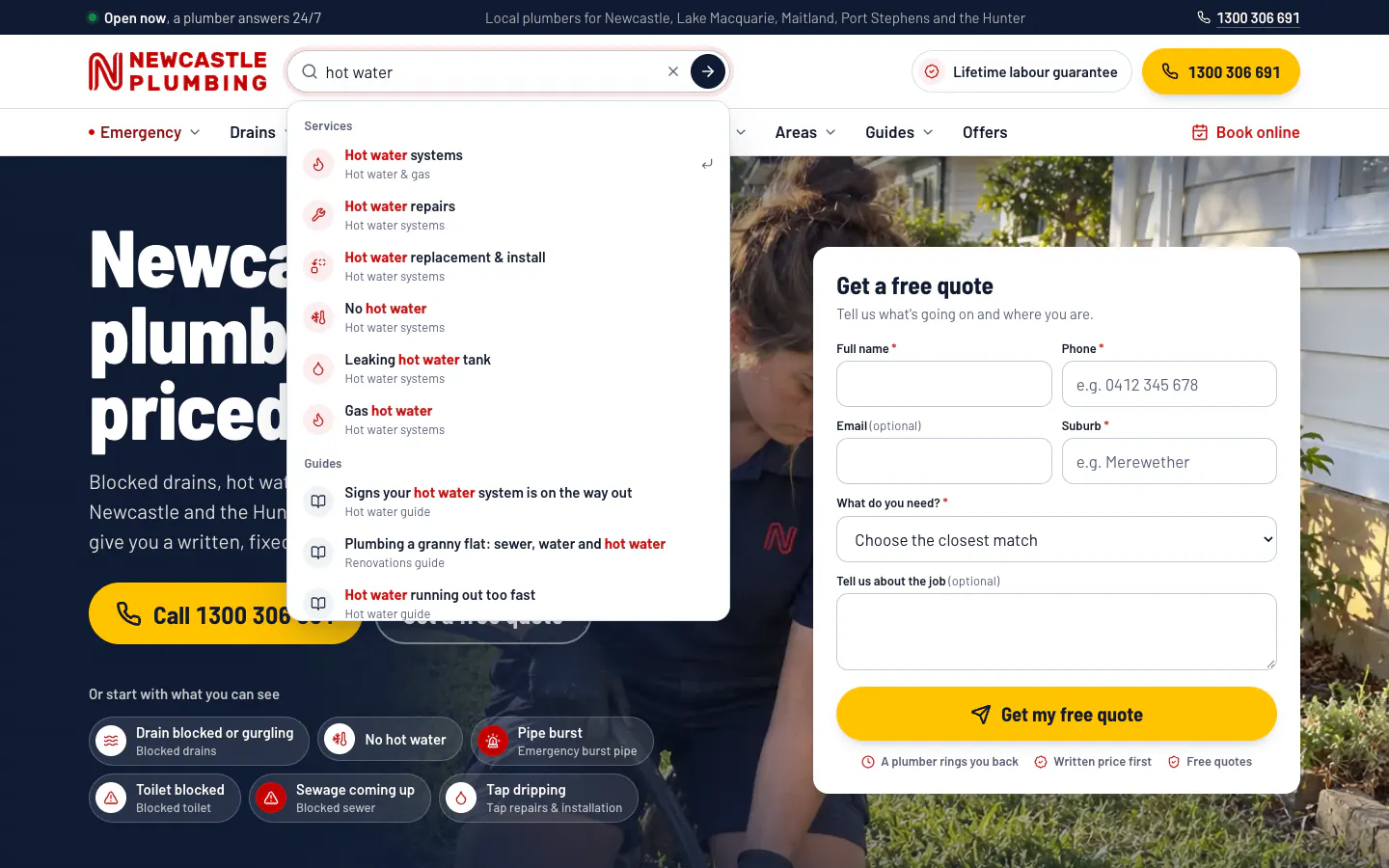
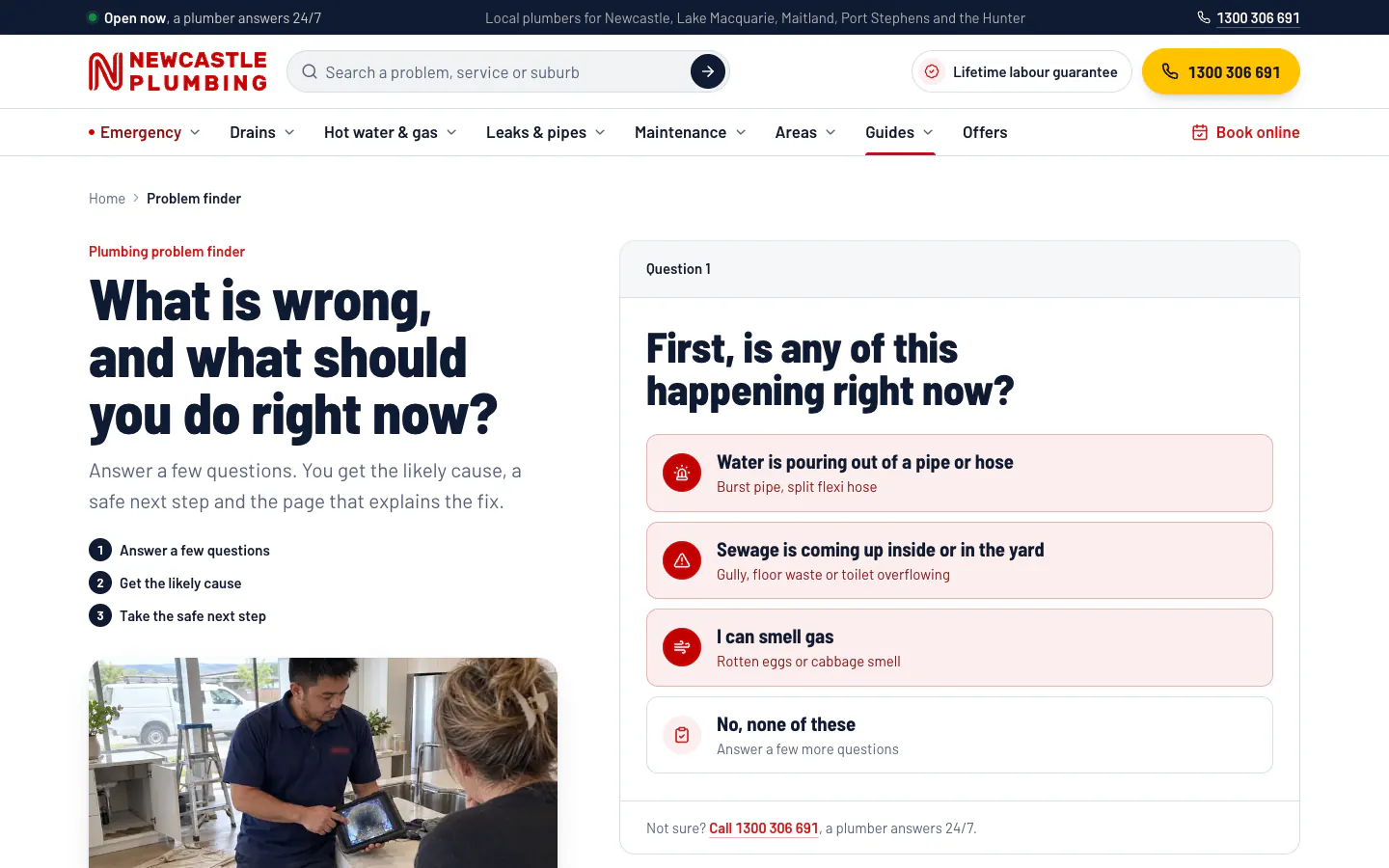
    A problem finder asks first whether anything dangerous is happening right now: water pouring out, sewage coming up or a smell of gas. Only then does it move on to the likely cause, a safe next step and the page that explains the fix. A numbered cut-away of a house explains 14 parts of a home's plumbing, from the water meter to the hot water system. The FAQ hub holds 90 answers in nine topics with its own search box, and the header search lists matching services and guides as the visitor types.

    Fifty guides

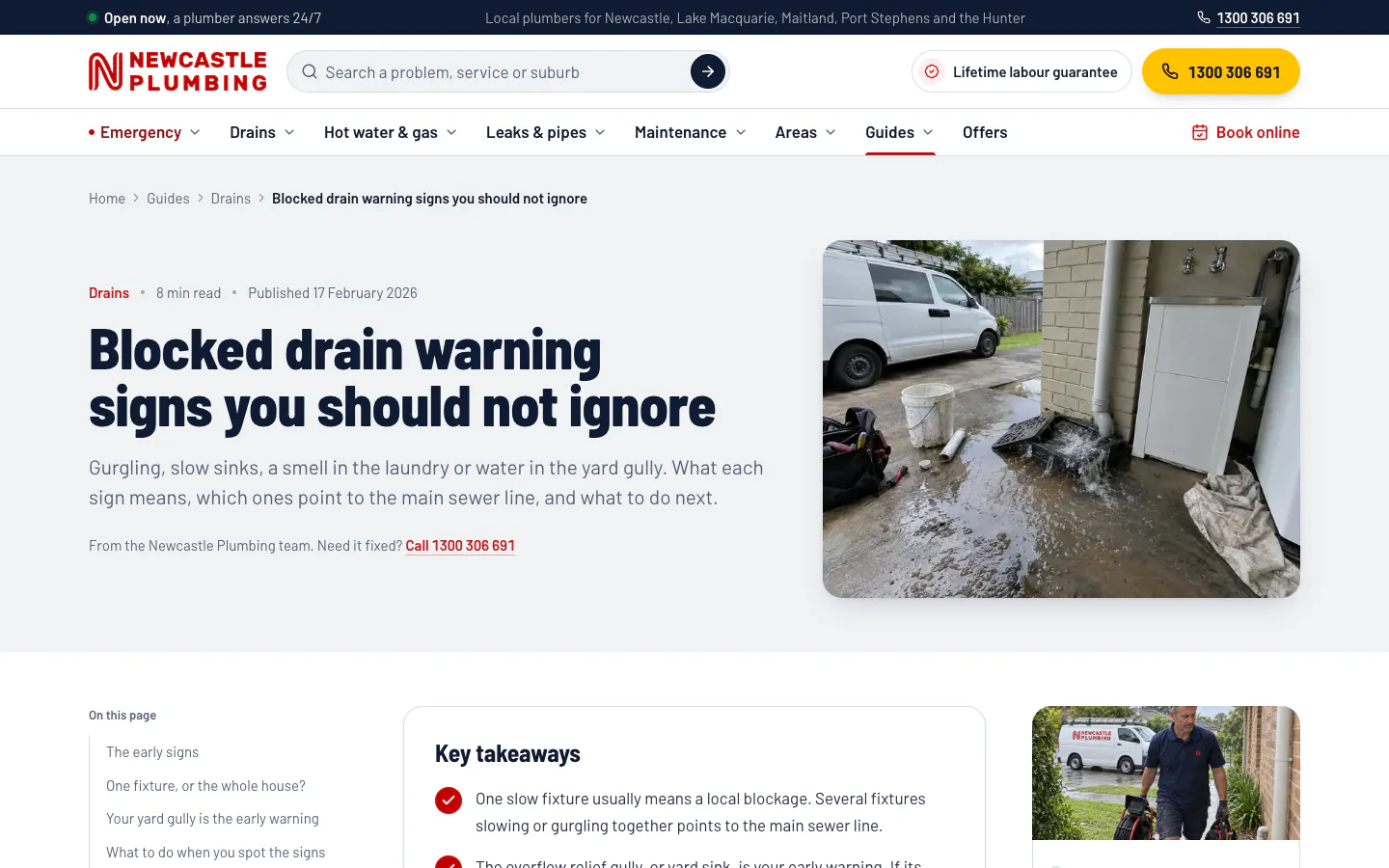
    The 50 guides explain plumbing problems before anyone needs to call. Each opens with its topic, reading time and a photo, then a contents list and key takeaways. The guide on blocked drain warning signs, for example, explains which signs point to one fixture and which point to the main sewer line.

    Built for phones

    The phone layout is built for someone standing next to the problem. The header keeps a round call button beside the menu button. The home page stacks the headline, a full-width call button and the quote button above the problem shortcuts. On service pages, a Call and Book bar stays fixed to the bottom of the screen while the visitor reads, so ringing or booking never means scrolling back to the top.

    On a desktop screen, a small emergency panel appears in the corner once the visitor has scrolled well down the home page, with first-step advice for a burst pipe or a gas smell and a call button.

    What it connects to

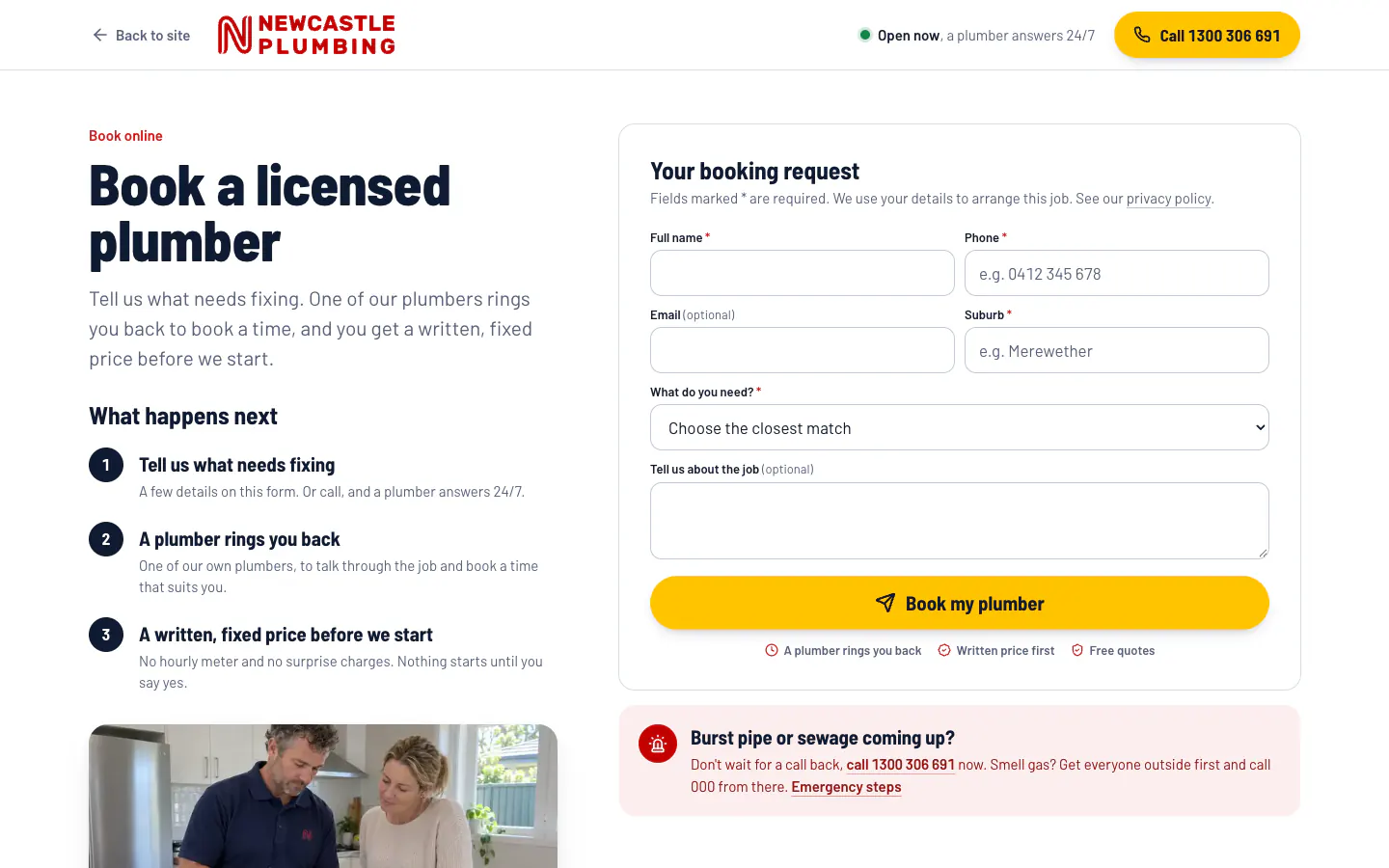
    Every route through the site reaches the same team. The call buttons, the quote form and the booking page all lead to one of the business's own plumbers, and both forms ask for the suburb and the job, so the plumber who rings back already knows where and what. The booking page sets out what happens next in three steps: tell us what needs fixing, a plumber rings back, and a written, fixed price comes before any work starts.

    Because every service and every suburb has its own page, advertising for a particular job or area has a matching page to land on. New services, suburbs and guides slot into the same plan without a redesign.

    To plan a website like this for your business, see our website design work or our marketing for plumbing businesses.


    Key design decisions
    • 92 service pages in five groups, each with a step-by-step job story.
    • 280 suburb pages with boundary maps, in six regions.
    • 50 guides, a problem finder, a plumbing explainer and a searchable FAQ hub.
    • 449 pages on one plan, with the call button, quote form and booking in the same places on every page.

    Tags

    • Website design
    • Plumbing
    • Newcastle and the Hunter, NSW

    A website built around your business.

    Tell us about your services, your customers and the next step you want them to take. We will shape the design and page structure around that brief.

    The work

    Select a screenshot to enlarge it.

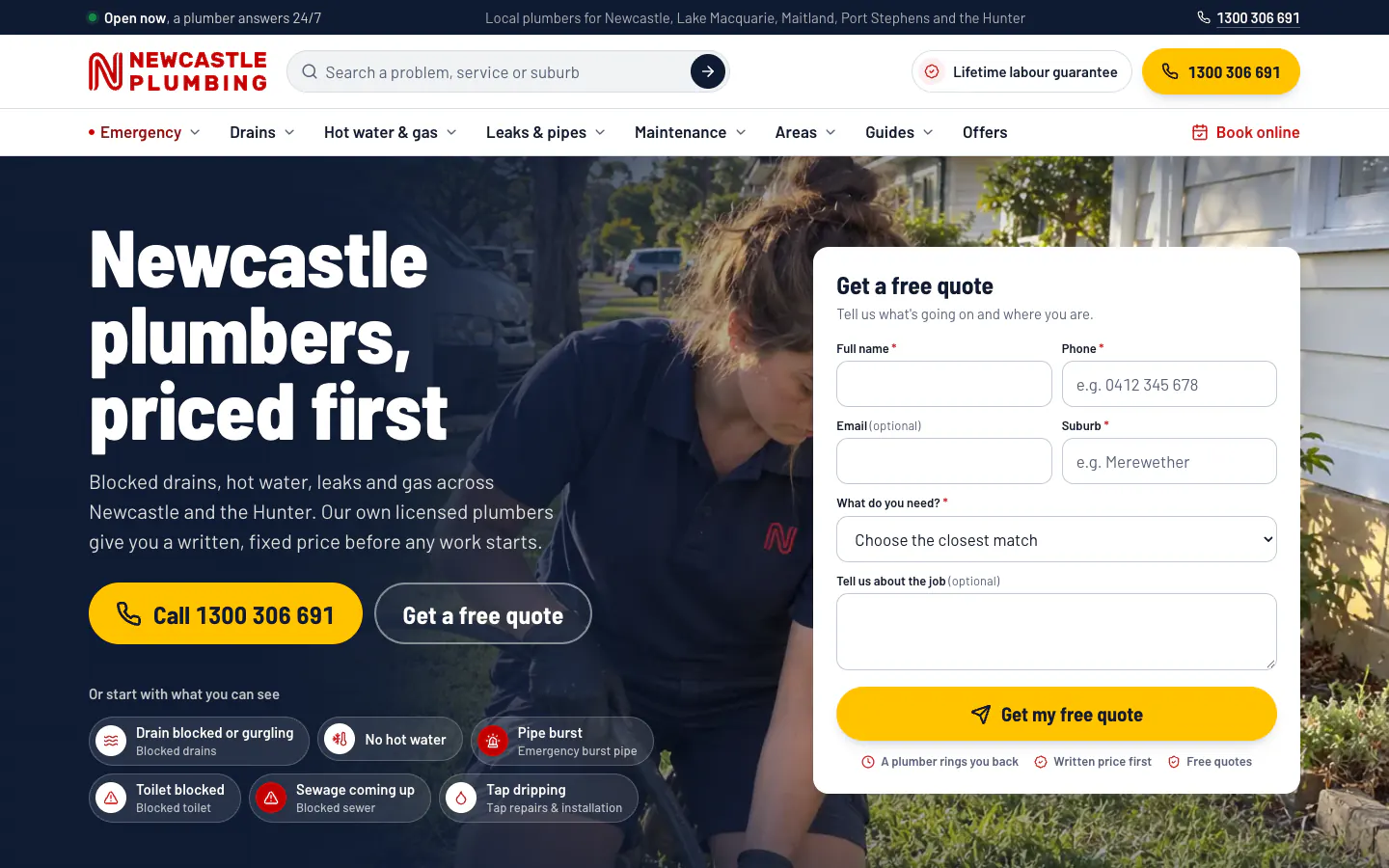
    • Newcastle Plumbing home page with call and quote buttons, problem shortcuts and a quote form
      Newcastle Plumbing home page with call and quote buttons, problem shortcuts and a quote form
    • Newcastle Plumbing Blocked Drains service page with a fixed-price offer and a quote form
      Service pages that open with the job — The Blocked Drains page explains the problem in two sentences, shows a fixed-price offer confirmed in writing, and sets the quote form to Blocked Drains.
    • Newcastle Plumbing Merewether suburb page with offer cards and a quote form
      Suburb pages with local detail first — Each suburb page names the postcode and council, shows the offers and guarantee as four cards, and fills the suburb into the quote form.

    More project detail

    Project highlights

    Project highlights

    What we delivered for Newcastle Plumbing.

    A closer look at the services and features delivered. Open a tile for the source behind each detail.

    • Project highlight

      Follow the job

      service explainers, search tools and online booking

      Website delivery

    • 449

      pages in one plumbing website: services, suburbs, regions and guides

      Live sitemap count

    • 280

      suburb pages, each with a boundary map, local facts and a quote form

      Live sitemap count

    • 92

      service pages in five groups, each with a step-by-step job story

      Live sitemap count

    • 50

      guides that explain the problem before the call

      Live sitemap count

    • 90

      answered questions in a searchable FAQ hub, in nine topics

      Live FAQ hub

    Project notes

    Page counts are the unique page addresses in the live sitemap index and its four child sitemaps: 16 core pages, 5 service group pages, 92 service pages, 6 region pages, 280 suburb pages and 50 guides, 449 in all. Screenshots show the delivered website. Campaign outcomes, where included, use the periods and definitions in the linked advertising case study.

    Quick summary
    Inside the build

    Insights

    Inside the build

    Details from the Newcastle Plumbing project. Open a card for the finding and its source.

    • The build

      62%

      Six in ten pages are suburb pages: each suburb covered has a page of its own.

      • Suburb pages62%
      • Service pages20%
      • Guides11%
      • Regions, groups and core pages6%

      Of the 449 pages, 280 are suburb pages, 92 are service pages and 50 are guides. The rest are region pages, service group pages and core pages such as booking, offers and the FAQ hub. Each page type has one job, so a visitor lands on the page that matches what they need.

    • The build

      5

      The 92 services sit in five menus, and each menu starts with problems a homeowner can see.

      The menus are Emergency, Drains, Hot water and gas, Leaks and pipes, and Maintenance. Each opens with a short list of problems, such as a blocked sink or sewage coming up, beside every service in the group and an offer panel. A homeowner who does not know the trade name for the job can still find the right page.

    • The build

      31%

      The 280 suburb pages sit in six regions, and Lake Macquarie holds almost a third of them.

      • Lake Macquarie31%
      • Newcastle18%
      • Cessnock and Hunter Valley18%
      • Port Stephens15%
      • Maitland14%
      • Central Coast5%

      Lake Macquarie has 86 suburb pages, Newcastle 51, Cessnock and the Hunter Valley 50, Port Stephens 41, Maitland 39 and the northern Central Coast 13. The service-areas map shows each region's count before the visitor clicks, with a suburb or postcode finder beside it for anyone who would rather type.

    • The build

      1 tap

      On a phone, a call is one tap away: in the header, and in a fixed Call and Book bar on service pages.

      The phone layout keeps a round call button beside the menu at the top of the page. On service pages, a Call and Book bar stays fixed to the bottom of the screen while the visitor reads the job story. Someone standing next to the problem can ring or book without scrolling back up.

    Full-page and device views
    Design details

    Inside the website

    The thinking behind the pages.

    1. Website detail

      Search that answers as you type

      The header search lists matching service pages and guides in a dropdown as the visitor types, with services listed first and guides below them.

      Newcastle Plumbing header search showing matching services and guides
      Open full-size screenshot
    2. Website detail

      Menus that start from the problem

      Each of the five service menus opens with problems a homeowner can see, such as a basin that will not drain or a sewer smell, beside every service in the group and an offer panel.

      Newcastle Plumbing Drains menu with a problem list, drain services and an offer panel
      Open full-size screenshot
    3. Website detail

      A job story on every service page

      All 92 service pages explain the job in five or six numbered steps, each with a photo and a short note on what the customer gets at that step.

      Step one of six in the blocked drain job story
      Open full-size screenshot
    4. Website detail

      Suburb pages on real maps

      Each of the 280 suburb pages shows the suburb on a boundary map with clickable neighbours, beside its postcode, council, distance from the city, water authority and census figures.

      Boundary map of Merewether and its neighbours beside a panel of local facts
      Open full-size screenshot
    5. Website detail

      A problem finder that checks for danger first

      A short question flow starts by ruling out a burst pipe, sewage or gas, then points to the likely cause, a safe next step and the page that explains the fix.

      Newcastle Plumbing problem finder, first question about urgent problems
      Open full-size screenshot
    6. Website detail

      Fifty guides that explain the problem first

      Each guide opens with its topic, reading time and a photo, then a contents list and key takeaways, with a call link for anyone who would rather have it fixed.

      Newcastle Plumbing guide on blocked drain warning signs with a contents list and key takeaways
      Open full-size screenshot
    7. Website detail

      A booking request in one short form

      The booking page asks for name, phone, suburb and the job, then explains what happens next: a plumber rings back, books a time and gives a written, fixed price first.

      Newcastle Plumbing booking page with a booking request form and three next steps
      Open full-size screenshot
    8. Mobile experience

      Call and Book in reach on a phone

      On a phone, the header keeps a call button beside the menu, and service pages add a Call and Book bar fixed to the bottom of the screen.

      Newcastle Plumbing service page on a phone with a fixed Call and Book bar
      Open full-size screenshot
    Project journey
    Newcastle Plumbing

    Campaign work · Newcastle Plumbing

    The campaign behind the enquiries.

    See the advertising work for Newcastle Plumbing, with the results and measurement explained in each campaign case study.

    Campaign case study

    Newcastle Plumbing: 18% of Google Ads clicks became calls or forms

    Newcastle Plumbing: 18% of Google Ads clicks became calls or forms. See the campaigns, customer journey and measured results.

    Read the campaign case study
    FAQ

    The questions this raises.

    The brief, the design and how the website supports the wider customer journey.

    The first call is free and there is no deck.

    Book a call
    How are the suburb pages different from a list of suburb names?

    Each suburb page has a boundary map of the suburb and its neighbours, the postcode, council, distance from Newcastle city, land area, water authority and census figures on the homes there, plus a quote form with the suburb already filled in.

    What is a job story?

    A section on every service page that walks through the job in five or six numbered steps, each with a photo and a note on what the customer gets at that point. It shows how the plumber works before the customer calls.

    How does the site work on a phone?

    A call button sits in the header beside the menu, and service pages keep a Call and Book bar fixed to the bottom of the screen, so a visitor can ring or book from anywhere on the page.

    Where do the page counts come from?

    From the live sitemap: 449 unique page addresses across core pages, services, locations and guides. The job stories sit inside the service pages and are not counted as separate pages.

    What did SoudCoh deliver for Newcastle Plumbing?

    92 service pages in five groups, each with a step-by-step job story. 280 suburb pages with boundary maps, in six regions. 50 guides, a problem finder, a plumbing explainer and a searchable FAQ hub. An online booking page, a header search and a fixed Call and Book bar on phones.

    Ready for your next website?

    Tell us about your business, your services and what your website needs to do. We’ll help you decide what to build next.

    A clear scope, a considered design and a practical next step.