Proof
    Aussie Plumbing — ad spend scaled 1.8× with enquiries up 2.1×, so each enquiry cost lessI-ELEC — a 231-page electrician website for Inner SydneyWhat a plumbing lead costs on Google AdsWhat a lead costs on Google Ads, industry by industrySLS Solicitors — cost per recorded Google Ads conversion down 58.48%Wilco Plumbing — a 516-page plumbing website for SydneyHow much should a trade business spend on marketing?State Choice Plumbing — a drains, hot water and gas websiteAussie Drains — a 600-page drain website for SydneyWhat an electrician lead costs on Google AdsAussie Electrical — a 650-page electrical website for SydneyThe most efficient ways for a trade business to get leadsEOL Melbourne — click-to-enquiry rate up from 28% to 33.4%What a cleaning lead costs on Google AdsAlliance Plumbing — ad spend scaled 1.8× with enquiries up 2.1×, so each enquiry cost lessImpress Blinds — cost per recorded Google Ads conversion down 62.63%FixCare Property — cost per enquiry down 56.36%Rubbish Removal WA — cost per enquiry down 53.18%Floral Cakery — cost per enquiry down 49.82%ILLUMINATE Laser Emporium — cost per enquiry down 48.54%Sydney Fence Painting — cost per enquiry down 33.68%Alliance Plumbing — cost per enquiry down 29.6%Gridless Build Solutions — cost per enquiry down 29.16%FacilityWorx — cost per enquiry down 23.62%Cornerstone Roofing — cost per enquiry down 20.47%Council finance — budgeting and workforce designCouncil planning — clearer approvals and reportingCultural audiences — media strategy and creative conceptsCommunity participation — surveys, maps and project pagesPublic-sector research — survey design and analysisPublic art — site studies and visual conceptsRegional identity — visitor guides and wayfinding conceptsCouncil systems — integration and migration planningA pressure washing business — service-led search campaignsA pressure washing business — a clear enquiry journeyA carpet cleaner — Google Ads built around cleaning servicesA roofing company — campaigns for repairs and restorationA CCTV installer — campaigns for security enquiriesA fence painter — search campaigns for specific surfacesA maintenance business — live in 8 weeks, 3 stacks gone5.0 across every Google review$120M+ in media under management250+ active engagements across five countries
    Secure Home Loans

    Mortgage and finance broking · Australia

    Secure Home Loans: a broker website with 32 loan calculators and linked advice

    We built 32 calculators in six groups, each on its own page. We also added 22 loan pages in four groups.

    Services
    Website design and build · Loan page structure · Calculator pages · Enquiry form design
    Talk to us about your website

    Project highlights

    What we delivered for Secure Home Loans.

    A closer look at the services and features delivered. Open a tile for the source behind each detail.

    • Project highlight

      32 calculators

      linked to the relevant loan and consultation pages

      Website delivery

    • 32

      Loan and money calculators, each on its own page

      Counted on the live site

    • 22

      Loan pages, from first home buyers and refinancing to truck and asset finance

      Counted on the live site

    • 6

      Calculator groups: home loan, property, savings, income, personal loan and vehicle

      Counted on the live site

    • 61

      Pages in the site, counted by following every link from the home page

      Counted on the live site

    Project notes

    Calculator, loan and group counts were taken on the live site when this study was written, from its menus and calculators index. Screenshots show the delivered website. Campaign outcomes, where included, use the periods and definitions in the linked advertising case study.

    In one minute

    The 60-second version

    Secure Home Loans, from the brief to the result in 5 short slides.

    1. The business

      A family mortgage broker working across Australia

      Secure Home Loans helps Australians find a home, investment, business or vehicle loan, with brokers who compare lenders and guide the application through to settlement.

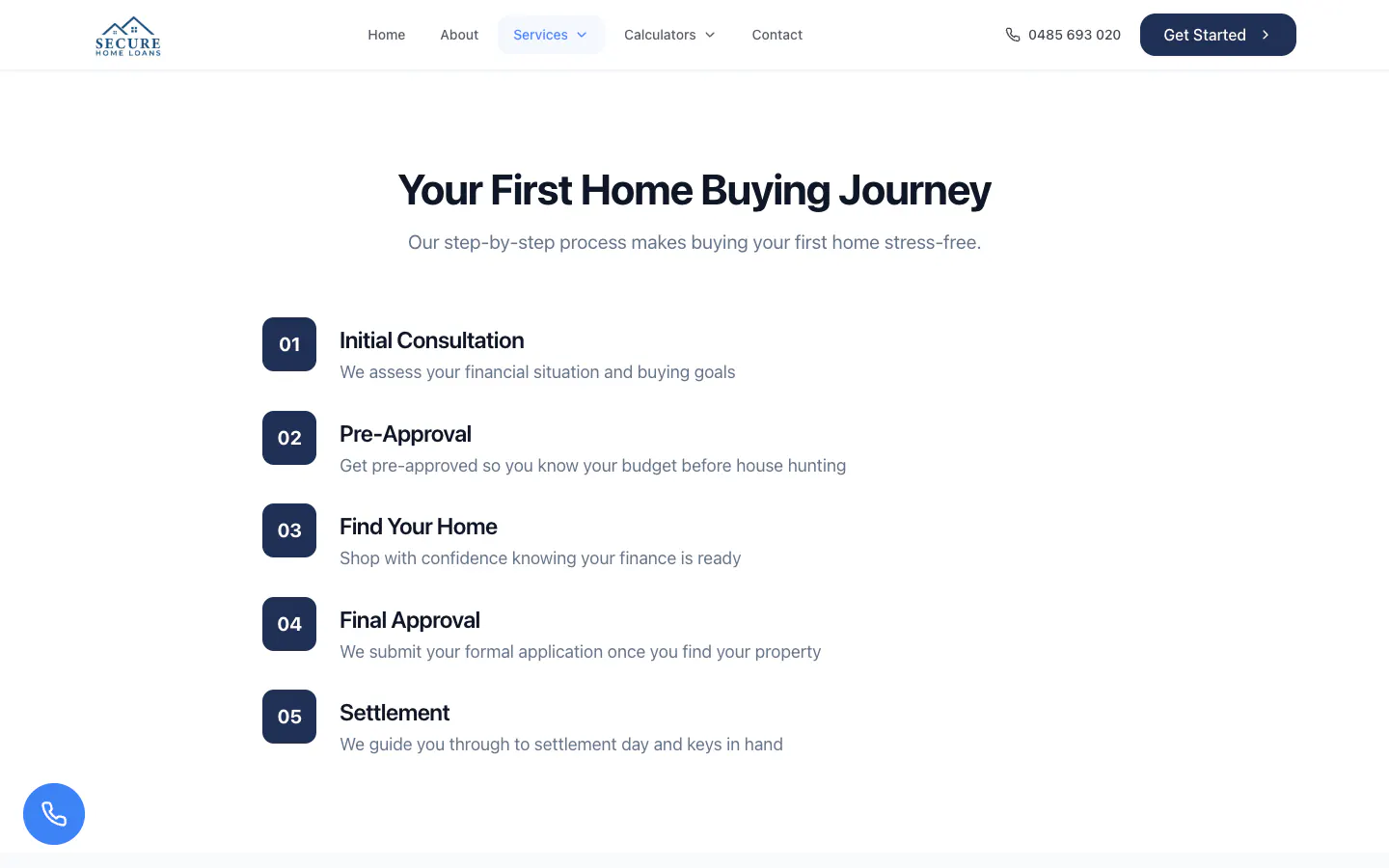
      Secure Home Loans four-step explanation from consultation to settlement
    2. The brief

      Let people work out the numbers first

      Borrowers want to know where they stand before they talk to a broker. The site had to explain each loan and give people the sums they need, then lead to one simple form.

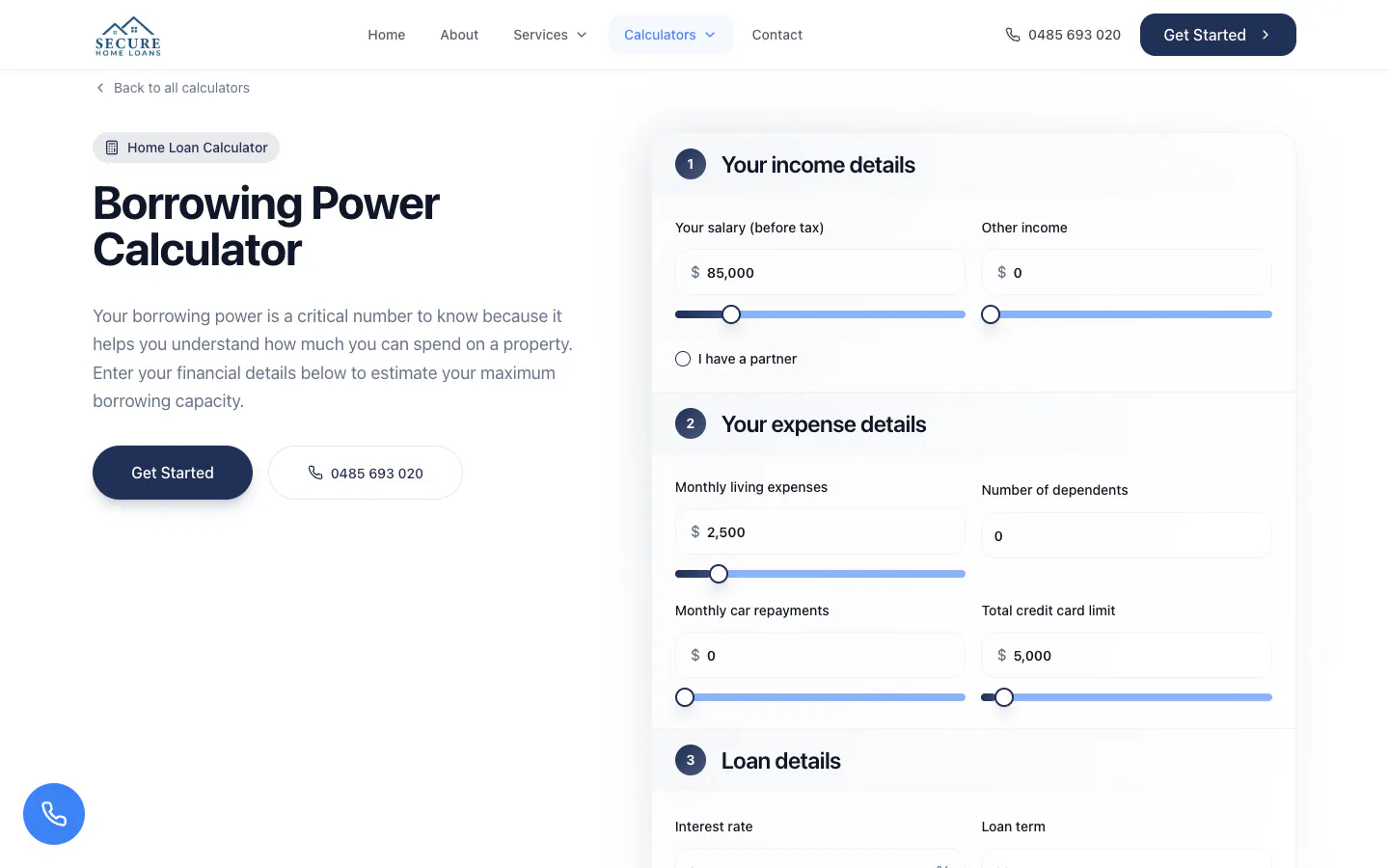
      Secure Home Loans borrowing power calculator with income and expense inputs
    3. What we built

      32 calculators beside 22 loan pages

      Six groups of calculators, 22 loan pages in four groups, loan pages that link to the calculators that fit them, and a consultation form at the end of every path.

      32calculators on the live site

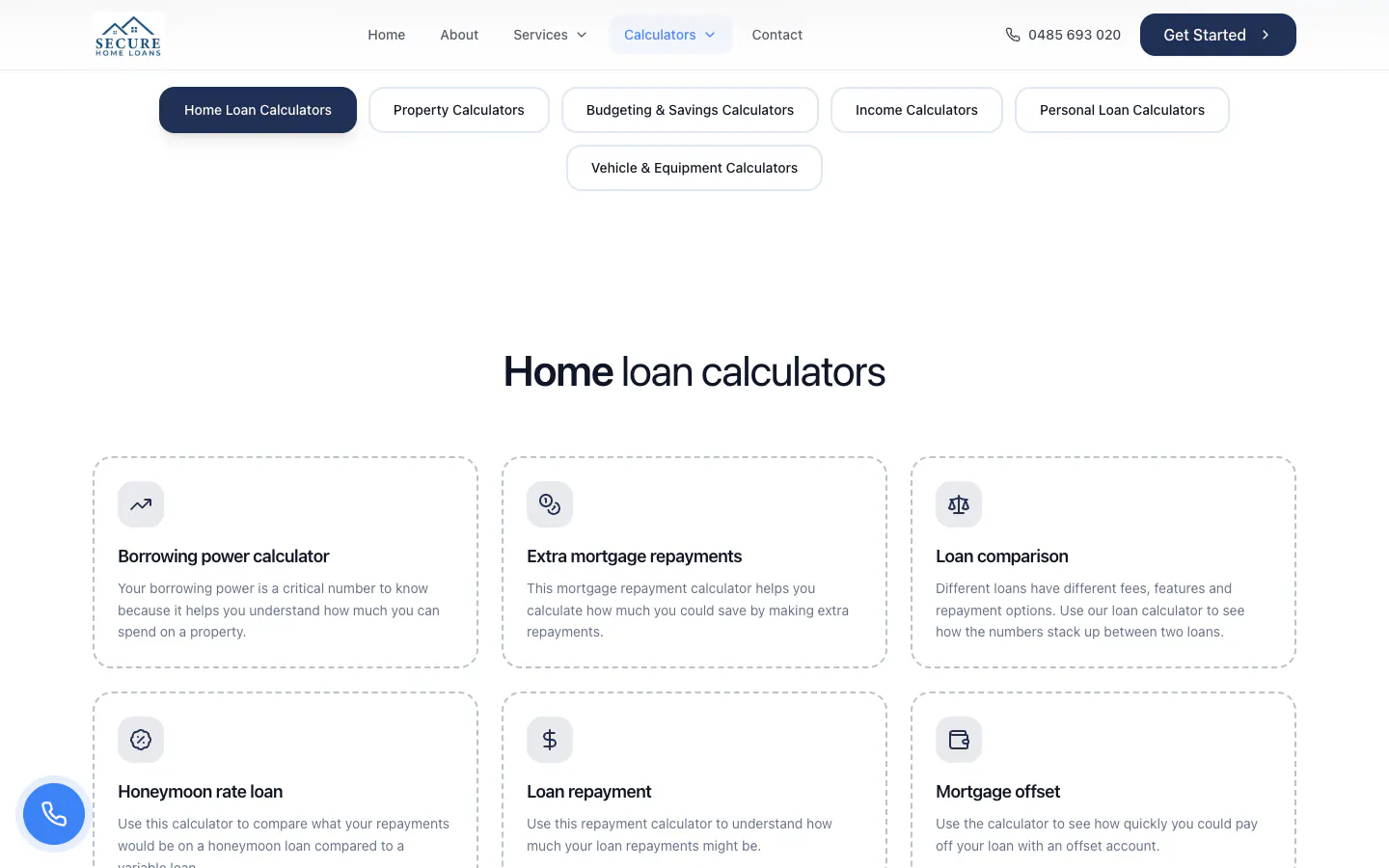
      Secure Home Loans calculators page with group tabs and calculator cards
    4. Built for phones

      Topic tags and Get Started on the first screen

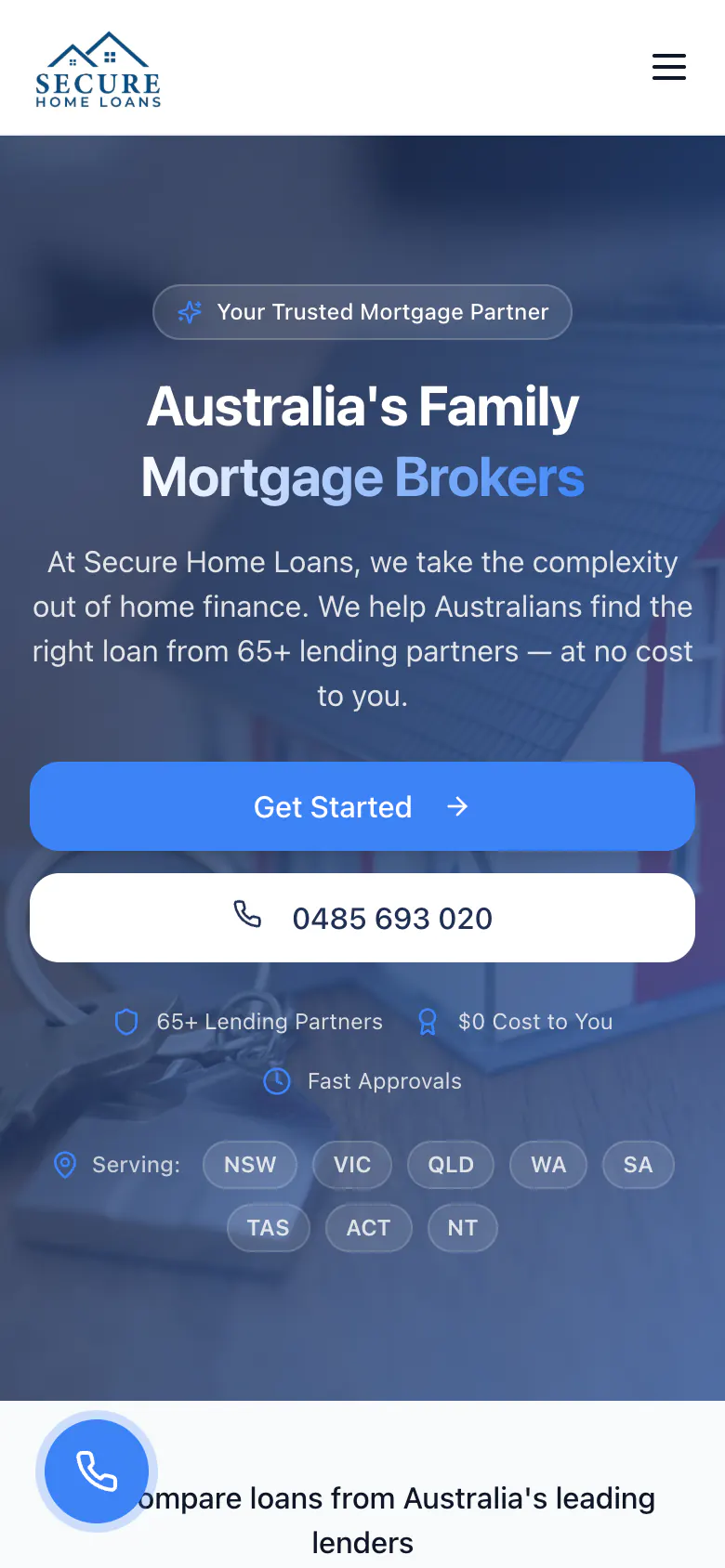
      On a phone the menu folds away, a loan page keeps its topic tags and Get Started on the first screen, and a round call button stays in the corner of every page.

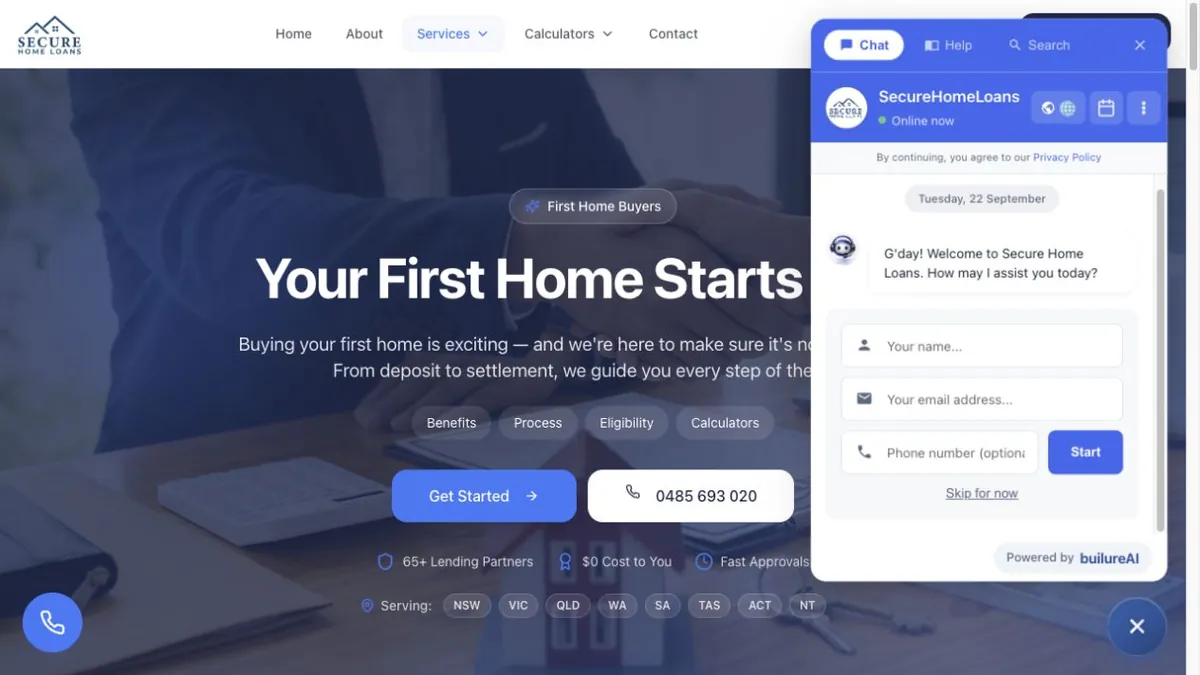
      Secure Home Loans first home buyers page on a phone with topic tags and Get Started
    5. What it connects to

      One consultation form at the end of every path

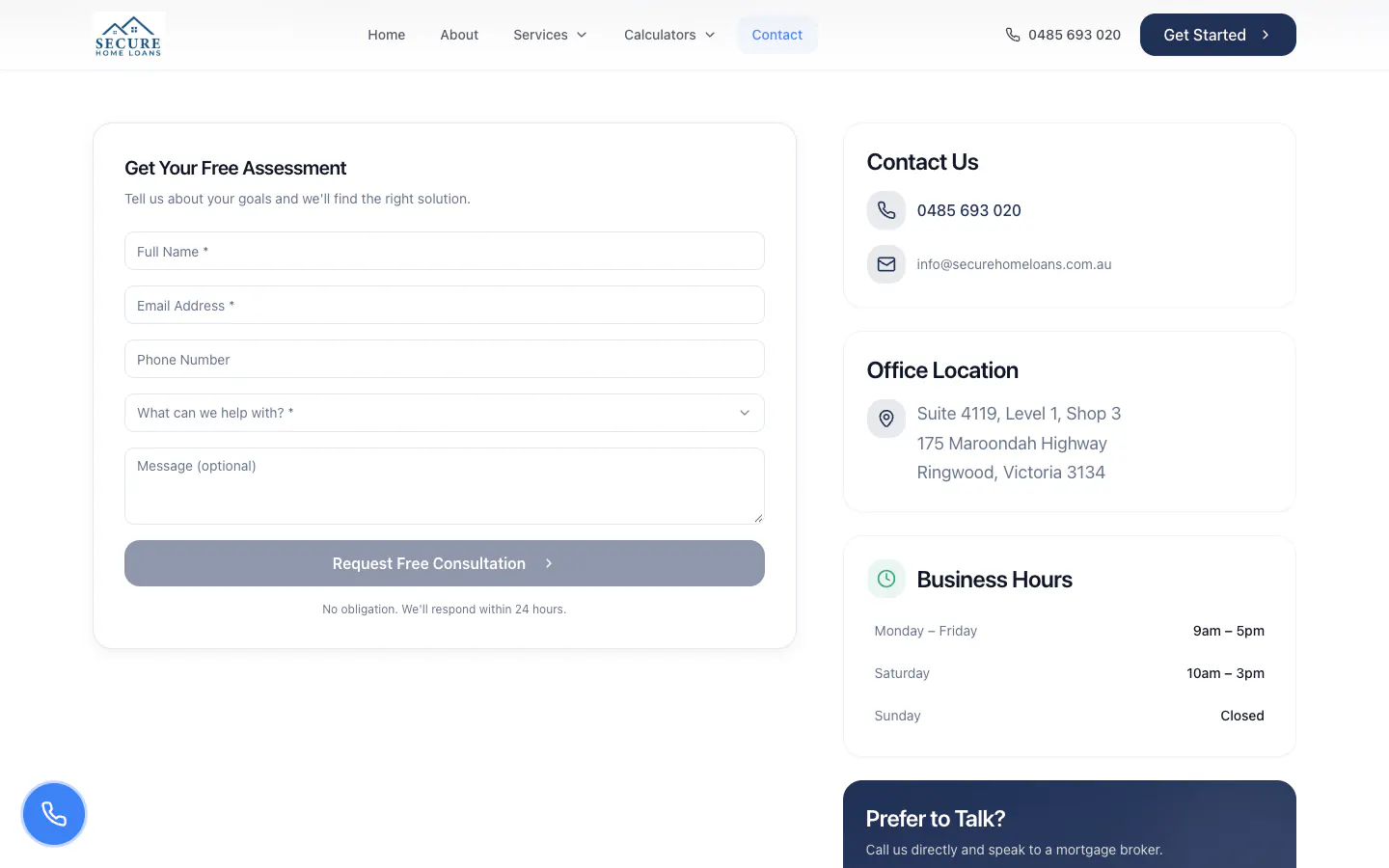
      Every Get Started button leads to one form that asks what the borrower needs help with, from a first home to business finance, with a call option beside it.

      Secure Home Loans contact page with a free assessment form

    Insights

    Inside the build

    Details from the Secure Home Loans project. Open a card for the finding and its source.

    • The build

      52%

      More than half the site is calculators

      • Calculators52%
      • Loan pages36%
      • Home, indexes and other pages12%

      32 of the 61 pages are calculators and 22 are loan pages. A visitor can work through borrowing power, repayments, stamp duty or a car loan before speaking to anyone, then move to the loan page and the consultation form.

    • The build

      22 of 22

      Every loan page points to the calculators that fit it

      All 22 loan pages carry a calculators section and their own common questions. The first home buyers page offers borrowing power, stamp duty and loan repayment, and the truck finance page its commercial vehicle calculators, so the numbers sit one click from the explanation.

    • The build

      2

      Two menus: one for the loan, one for the numbers

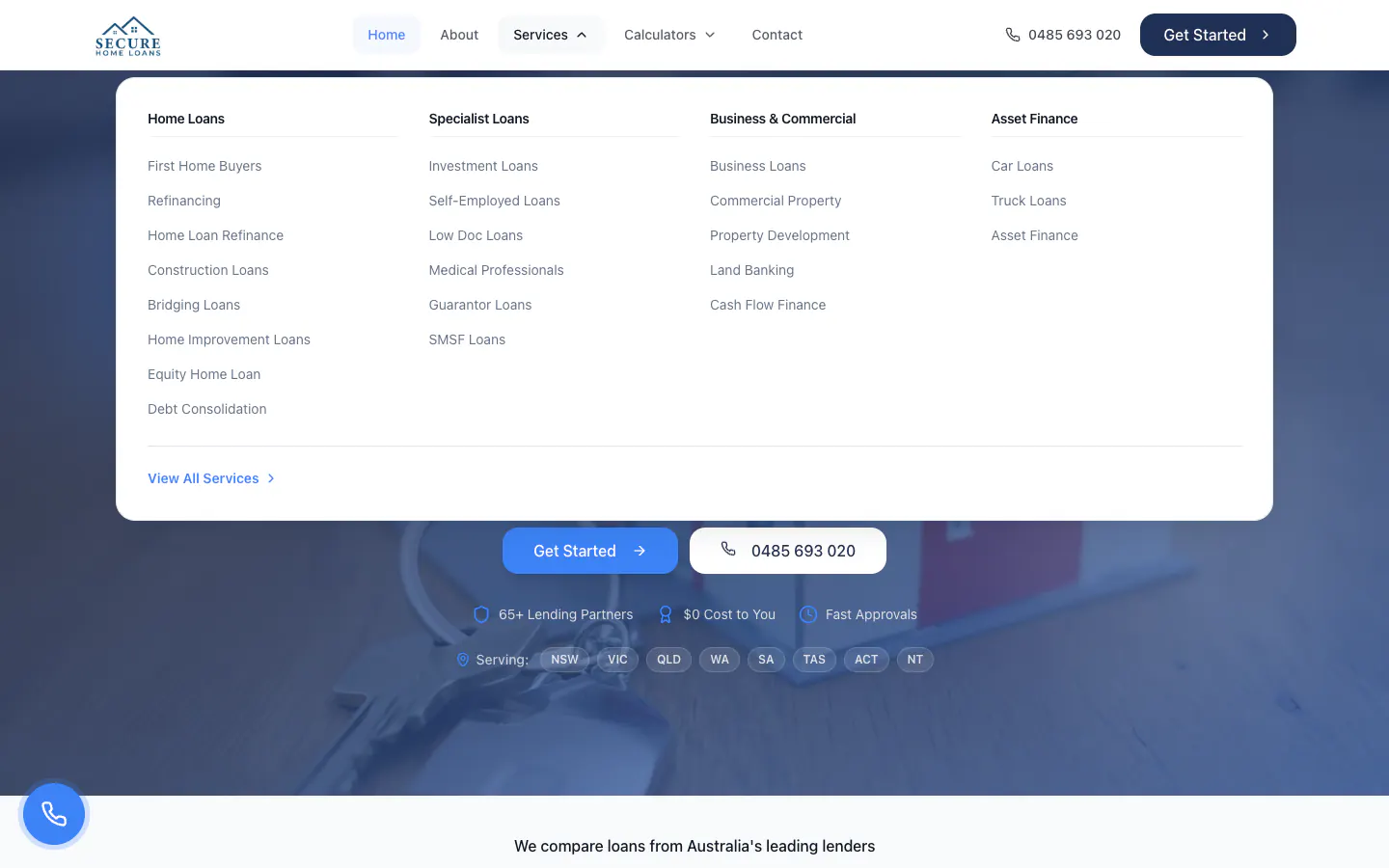
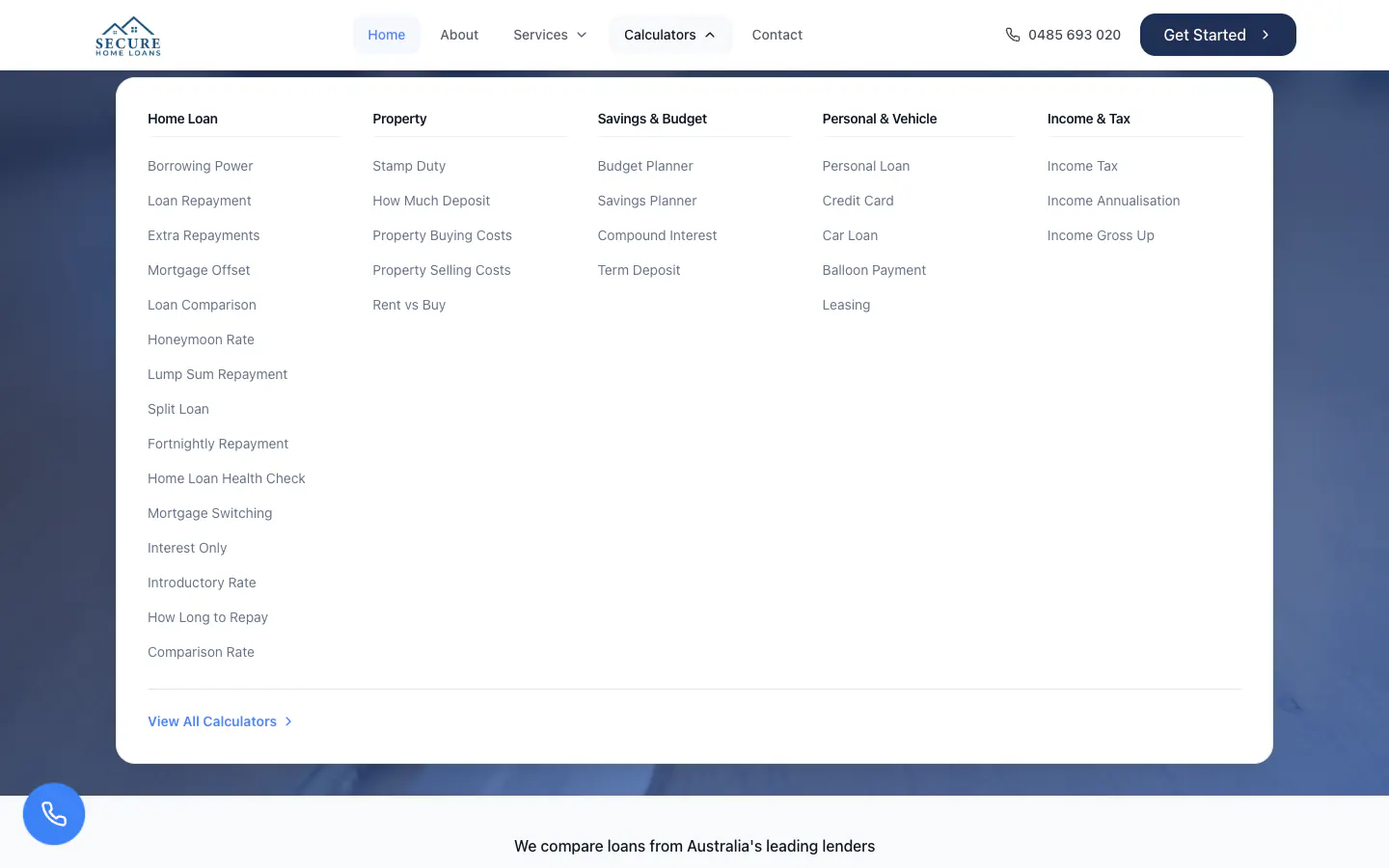
      The Services menu sorts 22 loans into home loans, specialist loans, business and commercial, and asset finance. The Calculators menu sorts 32 calculators into home loan, property, savings, personal and vehicle, and income and tax, so a visitor can start from the goal or from the sum.

    The website, working

    Secure Home Loans’ website, up close.

    The real pages on desktop and phone. Select any screenshot to see it full size.

    The home page, top to bottom

    The Secure Home Loans home page from the headline to the questions, with testimonials softened
    The whole home page, top to bottom. Click or tap the frame to scroll it yourself.

    The details that matter, 1 of 2

    Secure Home Loans desktop home page with its main features numbered
    1. Services and Calculators Two menus: 22 loans in four groups, and 32 calculators in five.
    2. Get Started, always in view The header keeps the number and a Get Started button on every page.
    3. Who they are The headline introduces a family mortgage broking business serving all of Australia.
    4. What a broker does The opening line explains in one sentence how a broker finds the loan for you.
    5. Every state and territory A row of tags shows the eight states and territories the brokers work in.

    The details that matter, 2 of 2

    Secure Home Loans calculators page with its features numbered
    1. Six groups of calculators Tabs jump between home loan, property, savings, income, personal loan and vehicle calculators.
    2. Not just home loans Vehicle and equipment calculators sit alongside the mortgage tools.
    3. 15 home loan calculators The largest group covers borrowing power, repayments, offsets, split loans and more.
    4. A card for each tool Every calculator has a card that says what it answers, linking to its own page.

    Inside the website

    The thinking behind the pages.

    1. Website detail

      32 calculators in six groups

      Home loan, property, savings, income, personal loan and vehicle calculators, each on its own page and listed on one index with tabs to jump between groups.

      Secure Home Loans calculators page with group tabs and calculator cards
      Open full-size screenshot
    2. Website detail

      Calculators that show the working

      Each calculator has labelled inputs with sliders and a result, beside Get Started and common questions, and most draw the result as a chart.

      Secure Home Loans borrowing power calculator with income and expense inputs
      Open full-size screenshot
    3. Website detail

      22 loans in four groups

      The Services menu sorts every loan page into home loans, specialist loans, business and commercial, and asset finance.

      Secure Home Loans Services menu with four groups of loans
      Open full-size screenshot
    4. Website detail

      Loan pages that link to the numbers

      Every loan page offers the calculators that fit it. The first home buyers page also opens with tags that jump to its benefits, process, eligibility and calculators.

      Secure Home Loans first home buyers page with topic tags
      Open full-size screenshot
    5. Website detail

      The process in plain steps

      The first home buyers page sets out five steps from consultation to settlement, and the home page sums up the service in four.

      Secure Home Loans first home buying journey in five steps
      Open full-size screenshot
    6. Website detail

      One form at the end of every path

      Every Get Started button leads to one short form that asks for contact details and what the borrower needs help with.

      Secure Home Loans contact page with a free assessment form
      Open full-size screenshot
    7. Mobile experience

      Stacked buttons on phones

      On a phone, Get Started and Call stack full width under the headline, and a round call button stays in the corner.

      Secure Home Loans home page on a phone
      Open full-size screenshot

    The case study

    The project, connected.

    The brief, the work and what it delivered.

    1. The starting point

      Secure Home Loans

      Secure Home Loans is a family mortgage broking business in Ringwood, Victoria, working with borrowers across Australia.

      Mortgage and finance broking · Australia

      Secure Home Loans

      SoudCoh services

      • Website design and build
      • Loan page structure
      • Calculator pages
      • Enquiry form design
    2. What we put in place

      The website experience

      • 32 calculators in six groups, each on its own page.
      • 22 loan pages in four groups.
      • Loan pages that link to the calculators that fit them.
      • One consultation form at the end of every Get Started button.
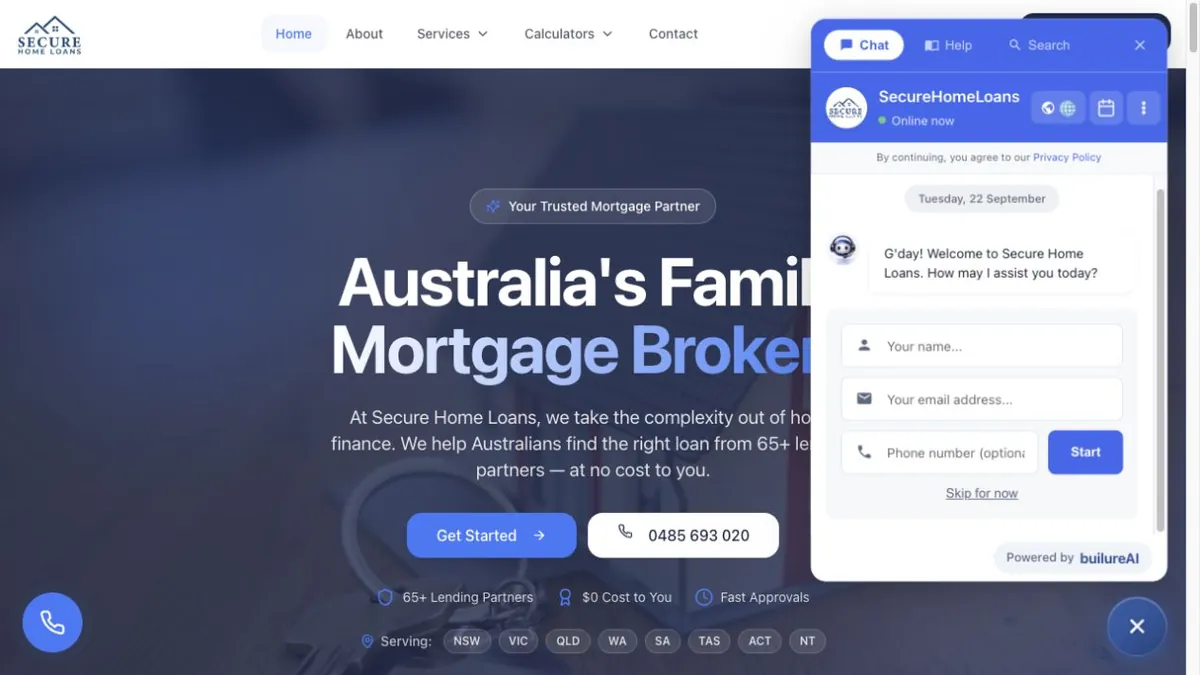
      Secure Home Loans home page with the headline and Get Started
      Home page — The headline introduces a family mortgage broker, with Get Started, a call button and the states served below it.Explore the website screenshots
    3. What the project delivered

      The outcome

      We built 32 calculators in six groups, each on its own page. We also added 22 loan pages in four groups.

    In this case study

    White paper · PDF

    Marketing for home services in Australia

    58 pages · 2.3 MB

    Download this PDFRead it on the page

    We built 32 calculators in six groups, each on its own page. We also added 22 loan pages in four groups.

    The business

    Secure Home Loans is a family mortgage broking business based in Ringwood, Victoria, working with borrowers across every state and territory. Its brokers compare lenders for first home buyers, refinancers, investors and people building, as well as self-employed borrowers, medical professionals, businesses and anyone financing a car, truck or equipment, and guide each application through to settlement.

    The brief

    Most borrowers want to know where they stand before they speak to a broker: their borrowing power, what the repayments would be, what stamp duty will cost. Others start from a goal, such as a first home or refinancing, and want to understand the loan first.

    The brief was to serve both: a page for every loan the brokers arrange, a calculator for every common question, clear links between the two, and one simple next step at the end of each path.

    22 loan pages in four groups

    The Services menu sorts 22 loan pages into home loans, specialist loans, business and commercial, and asset finance. Home loans run from first home buyers and refinancing to construction, bridging, home improvement, equity and debt consolidation. Specialist loans cover investment, self-employed, low doc, medical professional, guarantor and self-managed super loans. Business, commercial property, development, land banking and cash flow finance follow, then car, truck and asset finance.

    32 calculators, each on its own page

    The calculators index sorts 32 tools into six groups with tabs to jump between them: 15 home loan calculators, five property calculators, four for savings and planning, three for income, two for personal loans and three for vehicles and equipment. Each tool has its own page with labelled inputs, sliders and a result, beside a Get Started button and common questions, and most draw the result as a chart.

    Loan pages that link to the numbers

    Every loan page explains who the loan suits and how it works, then offers the calculators that fit it and its own common questions. The first home buyers page opens with tags that jump to its benefits, process, eligibility and calculators, sets out the journey in five steps, from the first consultation to settlement, and offers the borrowing power, stamp duty and loan repayment calculators beside the explanation.

    A home page that explains the broker

    The home page introduces the brokers with their photos, explains the service in six points, shows nine loans with a link to the rest, sets out how a loan comes together in four steps, and points to the calculators. The footer carries the business's credit licence details and a note that the information is general in nature.

    Built for phones

    On a phone, the menus fold behind one button and Get Started and Call stack full width under the headline. Loan pages keep their topic tags on the first screen, and a round call button stays in the corner of every page.

    What it connects to

    Every Get Started, Get In Touch and consultation button leads to one contact page. Its form asks for a name, email and phone, then what the borrower needs help with, from a first home purchase or refinancing to construction, low doc or business finance, with the office address, hours and a direct line beside it. Whether a visitor starts from a loan, a calculator or the home page, the next step is the same.

    For a broker or finance business that needs to explain a wide range of products, see our website design services and marketing for finance brokers.


    Key design decisions
    • 32 calculators in six groups, each on its own page.
    • 22 loan pages in four groups.
    • Loan pages that link to the calculators that fit them.
    • 32 calculators in six groups, each on its own page with its own inputs, sliders and result.

    Tags

    • Website design
    • Mortgage and finance broking
    • Australia

    A website built around your business.

    Tell us about your services, your customers and the next step you want them to take. We will shape the design and page structure around that brief.

    FAQ

    The questions this raises.

    The brief, the design and how the website supports the wider customer journey.

    The first call is free and there is no deck.

    Book a call
    What calculators are on the Secure Home Loans website?

    32, in six groups: home loan, property, savings and planning, income, personal loan, and vehicle and equipment. They range from borrowing power and repayments to stamp duty, rent versus buy and car loans.

    How are the loan pages organised?

    Into four groups in the Services menu: home loans, specialist loans, business and commercial, and asset finance, 22 pages in all.

    How do the loan pages and calculators work together?

    Every loan page has a calculators section. The first home buyers page, for example, links to borrowing power, stamp duty and loan repayment.

    What happens when a visitor clicks Get Started?

    They reach one contact page with a short form that asks what they need help with, from a first home purchase to business finance, with a direct line and office hours beside it.

    How does the site work on a phone?

    The menus fold away, Get Started and Call stack full width under the headline, and a round call button stays in the corner of every page.

    What did SoudCoh deliver for Secure Home Loans?

    32 calculators in six groups, each on its own page. 22 loan pages in four groups. Loan pages that link to the calculators that fit them. One consultation form at the end of every Get Started button.

    Ready for your next website?

    Tell us about your business, your services and what your website needs to do. We’ll help you decide what to build next.

    A clear scope, a considered design and a practical next step.