
A shopper choosing tiles or other home-improvement products may need to compare appearance, dimensions, finish and order requirements before deciding. Boutique Home Centre’s store work includes comparison, room preview and freight enquiry tools that support those decisions. Each tool has a different job, and the website works better when that job is clear.
Give comparison a shared set of facts
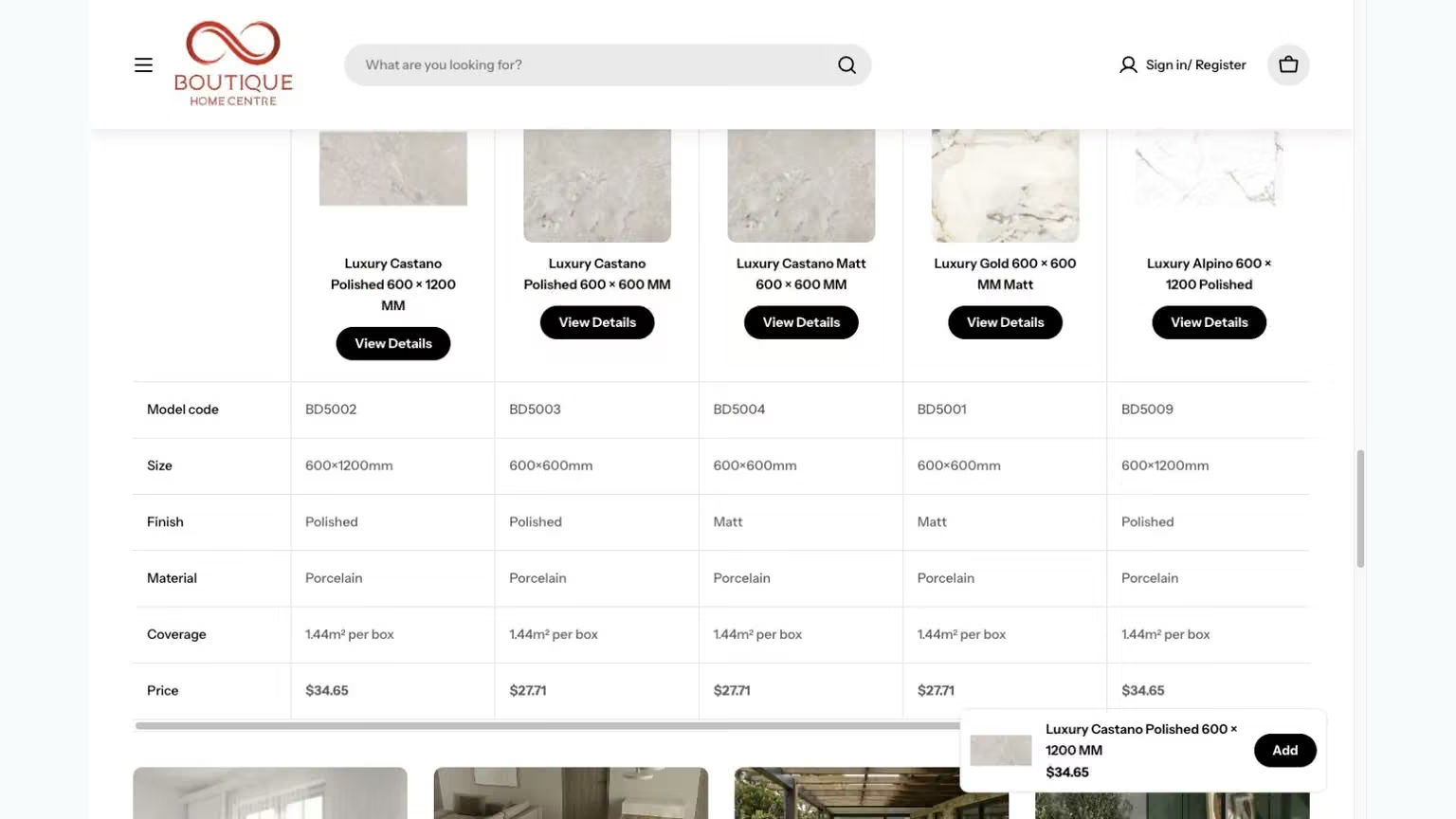
The BHC case study includes a product comparison table covering model codes, dimensions, finishes, materials, coverage and price. Bringing those facts into one view reduces the need to remember details across separate product pages.
A comparison tool is only as useful as the information beneath it. Use consistent names and units, and verify any attribute that affects selection or ordering. Do not add a column simply because the design has space. Choose the facts that help customers distinguish the products and make it clear when a detail needs confirmation before purchase.
Keep the selected product visible
A shopper may move from a product page into a comparison or an enquiry. Keep the product name and identifying details close enough that they know which item they are discussing. This is particularly important when several products have similar names or appearance.
BHC’s freight form retains the selected product and asks for quantity and delivery context. That creates continuity between browsing and asking a practical order question. For another store, review every step where the customer leaves the product page. They should not have to reconstruct the product details from memory to continue the purchase conversation.
Use the question to choose the next tool
Review whether each feature helps the shopper make a specific decision.
- “Which product fits my requirements?”
- Use comparable factual fields and show differences clearly. Preserve the selected items so the shopper can return to the product detail without losing the comparison.
- “How could it look in my space?”
- Offer the visual preview as an appearance aid. Keep dimensions, finish and other product information nearby so a visual choice does not replace the factual selection.
- “What do I need to arrange delivery?”
- Carry the product and relevant order details into the freight enquiry. Make it clear which information is needed for the team to respond.
A tool earns its place when it helps resolve a purchase question and preserves context for the next step.
Let visual tools answer visual questions
The room visualiser offers a way to explore a selected product in a room image. A room view helps the shopper explore a finish before checking product details and samples. Keep those facts and sample options within reach of the preview.
Room previews can change framing and small details. Keep the selected product visible and make it easy to return to its dimensions, finish and coverage information before ordering.
Offer the next step that fits the uncertainty
Different questions need different actions. A customer comparing finishes may want more product information. Someone planning a bulky order may need freight details. A person unable to judge a material from a screen may need a sample where the business offers one.
The Impress Blinds website illustrates that last distinction with separate sample and appointment routes alongside product information. It is not the same buying model as BHC, but it shows why a single buy-now instruction does not answer every customer's uncertainty. The website should help the shopper choose an appropriate next step without making the range harder to navigate.
Keep tools subordinate to the product decision
Comparison and visualisation should be easy to find when relevant, but they need not compete for attention on every screen. Start with the product, the information needed to understand it and the main action. Place supporting tools where they help resolve a question.
On mobile, check that controls, tables and images remain usable without hiding the product details. A feature can be impressive in a desktop demonstration and awkward during an ordinary phone visit. Test with several products and different lengths of text, including cases where an attribute is absent or an option requires further advice.
Measure whether questions become easier to answer
Review the kinds of enquiries the store receives and whether customers arrive with a product and quantity already identified. Ask the team which questions remain unclear. This provides practical feedback about content and tools without assuming that every interaction with a visualiser becomes a sale.
Include a way back to the ordinary product information after using a supporting tool. A shopper who explores a room preview may still need dimensions or delivery details before deciding. Keep that return path clear, and preserve the selected product where practical. The tool should extend the shopping journey rather than become a separate experience with no obvious next step. Test the transition in both directions, because customers often revisit facts after looking at a visual option.
For ecommerce website work, the purpose of these features is to support a real decision. BHC’s comparison, preview and freight journeys provide concrete examples to inspect. Choose tools that answer the retailer's actual customer questions, then assess their value through the quality of enquiries, ordering clarity and the business's sales records.
Questions and answers
Should a room preview replace product images and specifications?
No. It answers an appearance question. Shoppers still need the product’s factual details and ordinary imagery to understand what they are considering.
How do we assess whether a comparison tool is useful?
Watch representative shoppers try to explain a choice. Look for missing fields, confusing differences or lost selections, then use those observations to improve the task.