Proof
    Impress Blinds — cost per enquiry down 62.63%, $23.6 to $8.82SLS Solicitors — cost per enquiry down 58.48%, $84.64 to $35.14FixCare Property — cost per enquiry down 56.36%, $35.24 to $15.38Rubbish Removal WA — cost per enquiry down 53.18%, $71.02 to $33.25Floral Cakery — cost per enquiry down 49.82%, $13.83 to $6.94ILLUMINATE Laser Emporium — cost per enquiry down 48.54%, $138.65 to $71.35Aussie Plumbing — cost per enquiry down 41.96%, $117.75 to $68.34Sydney Fence Painting — cost per enquiry down 33.68%, $136.62 to $90.61Alliance Plumbing — cost per enquiry down 29.6%, $81.26 to $57.21Gridless Build Solutions — cost per enquiry down 29.16%, $78.16 to $55.37FacilityWorx — cost per enquiry down 23.62%, $157.13 to $120.01Cornerstone Roofing — cost per enquiry down 20.47%, $41.71 to $33.17A council finance platform — 194 of 194 requirements metA council finance build — 14 weeks to UAT, −34% 10-yr costA cultural institution — $634K of $750K kept workingA council platform — $470,106 built vs $503,262 SaaSA federal agency — n=5,000 prevalence survey at ±1.4%A civic mural — 36 concepts for a 71m × 9m wallA regional shire — 32-page visitor guide, 3 weeks earlyA shire council — one platform retiring 8 of 9 vendorsA pressure washing business — 138 jobs at A$20.43 eachA pressure washing business — 21.20% conversion rateA carpet cleaner — 53 jobs in 15 days at A$24.92 eachA roofing company — 68 quote requests in 35 daysA CCTV installer — 39 qualified leads in 15 daysA fence painter — 36 jobs in 24 days, quotes by day 3A maintenance business — live in 8 weeks, 3 stacks gone41 numbered clauses, published in full5.0 across every Google review$120M+ in media under management250+ active engagements across five countries
    Custom Web App

    NexData Internal Platform: Custom Operations System for Quoting, Invoicing & Dispatch

    Technology & Media

    The short version

    Custom internal platform built by SoudCoh for NexData.

    Centralised quoting, invoicing, dispatch scheduling, team management, and branded PDF generation for Australian service businesses.

    The result.

    End-to-End

    Quote to Invoice Workflow

    229+

    Reusable Templates

    Branded

    PDF Generation

    Live

    Dispatch Scheduling

    Industry
    Technology & Media
    Discipline
    Custom Web App
    Services
    Custom Web App · Dashboard · CRM & Automation · Technology & Media

    Every figure above was read out of this client's live account and is reproduced exactly as the study publishes it. It is a record of what happened on one account, in one market, at one budget — not a forecast for yours.

    What would this look like on your account?

    Different market, different budget, different numbers. The first call is where we work out whether the same approach fits yours at all.

    NexData Internal Platform: Custom Operations System for Quoting, Invoicing & Dispatch

    The case study

    End-to-End Quote to Invoice Workflow
    229+ Reusable Templates
    Branded PDF Generation
    Live Dispatch Scheduling

    About NexData

    NexData is a growing services business that needed a single internal platform to run day-to-day operations: quoting, invoicing, dispatch scheduling, customers, inventory, and reporting. They were juggling spreadsheets, emails, and disconnected apps across their sales, operations, and finance teams.

    SoudCoh designed and built a secure, staff-friendly web app that centralises operations end-to-end: from quote creation to customer approval, job scheduling to invoice generation, and branded PDF output.

    The Challenge

    Like most operational teams, NexData's bottlenecks were not "big problems." They were small frictions repeated hundreds of times across the business.

    Disconnected Systems

    Quotes created in one place, customer data in another, and invoice details manually retyped later. Every handoff introduced errors and wasted time.

    No Single View of the Business

    No single view of today's jobs, weekly workload, receivables, and pending quotes. Managers had to check multiple tools to understand where the business stood.

    Inconsistent Documents

    Quote and invoice formatting varied across staff. Different layouts, missing fields, and inconsistent branding made the business look unprofessional.

    Scheduling Chaos

    Scheduling relied on memory, chat threads, or separate calendars. Jobs fell through the cracks, and field teams lacked visibility on their daily workload.

    Template Sprawl

    Templates and common scope text lived in old documents, hard to reuse and easy to duplicate. Staff rewrote the same content repeatedly instead of pulling from a central library.

    SoudCoh's job was to build a system that made the right way the easy way.

    The Solution: A Custom Internal Web App

    SoudCoh delivered a modular internal platform with clean sidebar navigation and fast workflows covering every operational function.

    Dashboard with Quick Actions and KPI Cards
    Quotes Management with Pipeline Metrics
    Quote Editor with Sections, Templates, and Auto-Save
    Invoice Creation with Line Items, GST, and Payment Tracking
    Branded PDF Generation (Quotes and Tax Invoices)
    Dispatch Scheduling with Week and Month Views
    Jobs, Calendar, and Workload Management
    Customer Directory
    Inventory, Purchase Orders, and Suppliers
    Reports and Timesheet Tracking
    Team Members with Roles and Access Control
    Templates Library (229+ Saved Items)
    Company Settings with Branding and Compliance Fields

    This structure keeps core workflows within one to two clicks, so staff can move from "new lead" to "scheduled job" without jumping between tools.

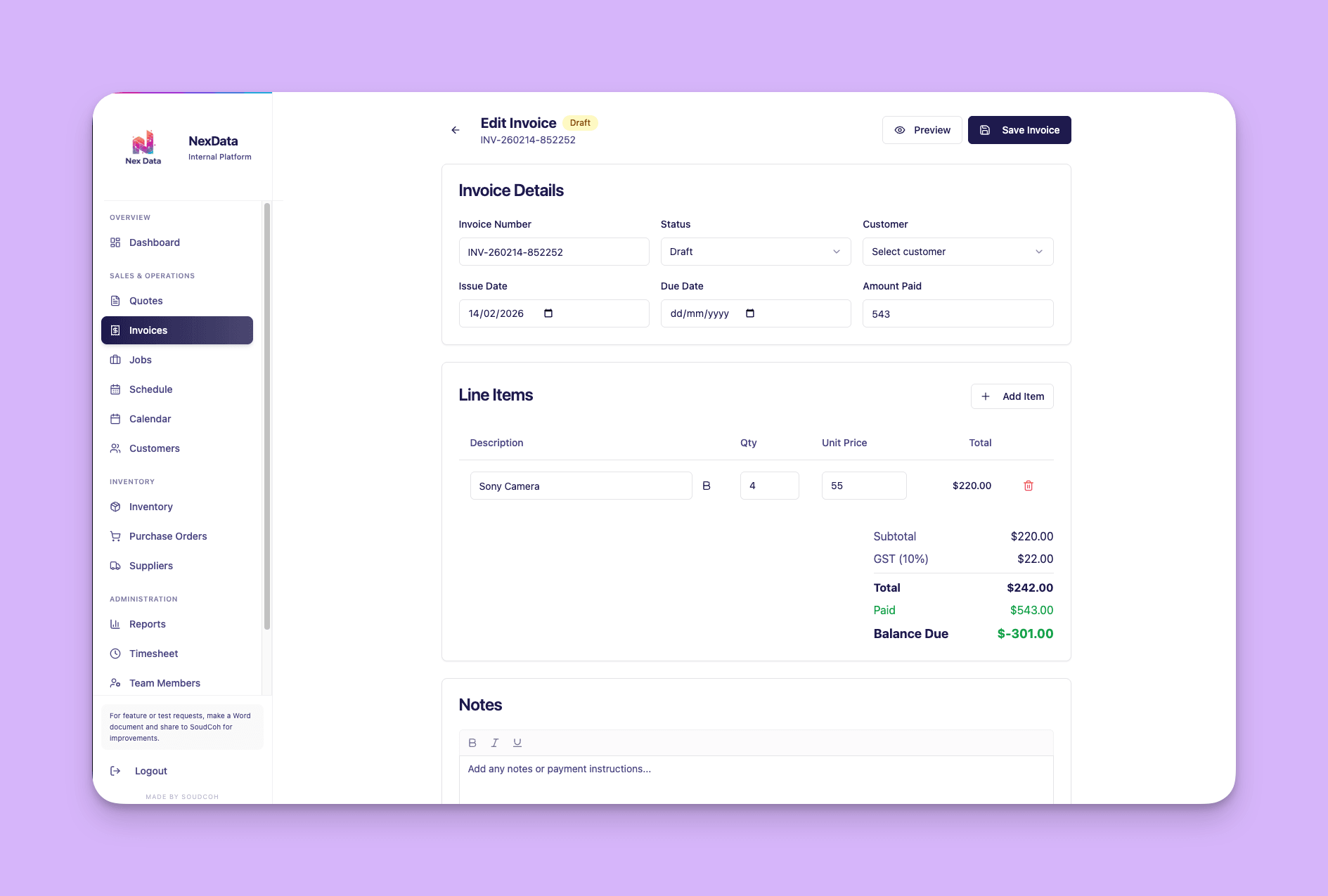
    Invoice Editor with Line Items, GST, and Payment Tracking

    Invoices are where small mistakes become expensive. The invoice editor is intentionally structured to reduce errors and speed up the billing cycle.

    NexData invoice editor showing line items, GST calculation, and payment tracking

    The invoicing module supports invoice numbering and status tracking, issue and due dates, customer selection, line items with description, quantity, unit price, and calculated totals. Automatic GST (10%) calculation, payment tracking with amount paid and balance due fields, and first-class notes for payment instructions and context.

    Branded PDF Generation

    The platform generates clean, printable PDFs from the same data used in the app. No manual exporting, reformatting, or copying into Word documents.

    NexData generated tax invoice PDF with ABN, line items, GST, and payment details

    PDFs include a branded header with business identifiers and ABN, clear item tables with descriptions, quantities, and unit prices, totals sections including GST, and payment details. The app becomes the source of truth, and the PDF is simply a rendered output, not a separate document staff maintain manually.

    Dispatch Scheduling for Field Teams

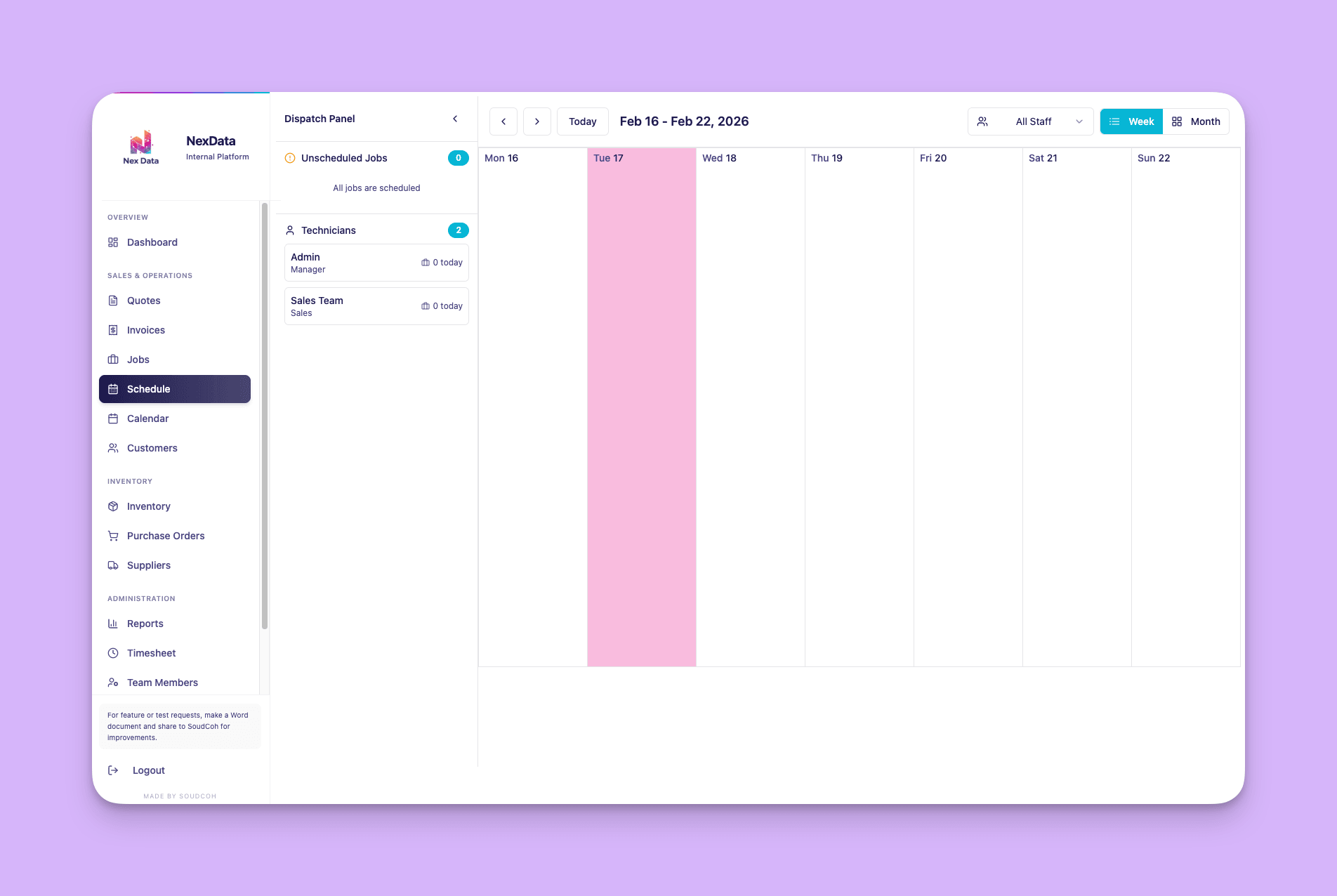
    For service businesses, scheduling is where profitability is won or lost. The dispatch panel gives operations staff exactly what they need: what must be done today, and what is not yet scheduled.

    NexData dispatch panel with weekly calendar view, unscheduled jobs count, and technician list

    The scheduling module supports weekly and monthly calendar views with date navigation, filtering by staff member, a count of unscheduled jobs with a clear "all jobs are scheduled" state, and a technician list with quick daily indicators showing jobs assigned per person.

    Team Members, Roles, and Access Control

    Internal tools fail when everyone has the same permissions. The team members screen provides practical role management as the team grows.

    NexData team members management screen showing roles, active status, and action controls

    The module shows total members, active versus inactive counts, role tags (Manager, Sales), and action controls per user. This supports cleaner auditability and ensures the right people have access to the right areas of the platform.

    Customer Directory

    The customer screen provides a lightweight CRM-style directory so teams quoting and invoicing daily can find customer details without digging through inboxes.

    NexData customer directory with search, name, email, phone, and address columns

    Searchable by name with columns for email, phone, and address. Quick actions for viewing and managing customer records. Simple, fast, and reliable.

    Company Settings for Branding and Compliance

    The platform includes business configuration so documents stay consistent across all staff members, regardless of who creates them.

    NexData company settings showing logo upload, ABN, licence fields, and PDF header footer configuration

    Settings include company logo upload, company name and ABN, licence fields for regulated industries, and PDF header and footer text for branded outputs. This is where internal tools become "client-ready": the system enforces brand consistency automatically.

    Templates Library for Repeatable, High-Quality Quotes

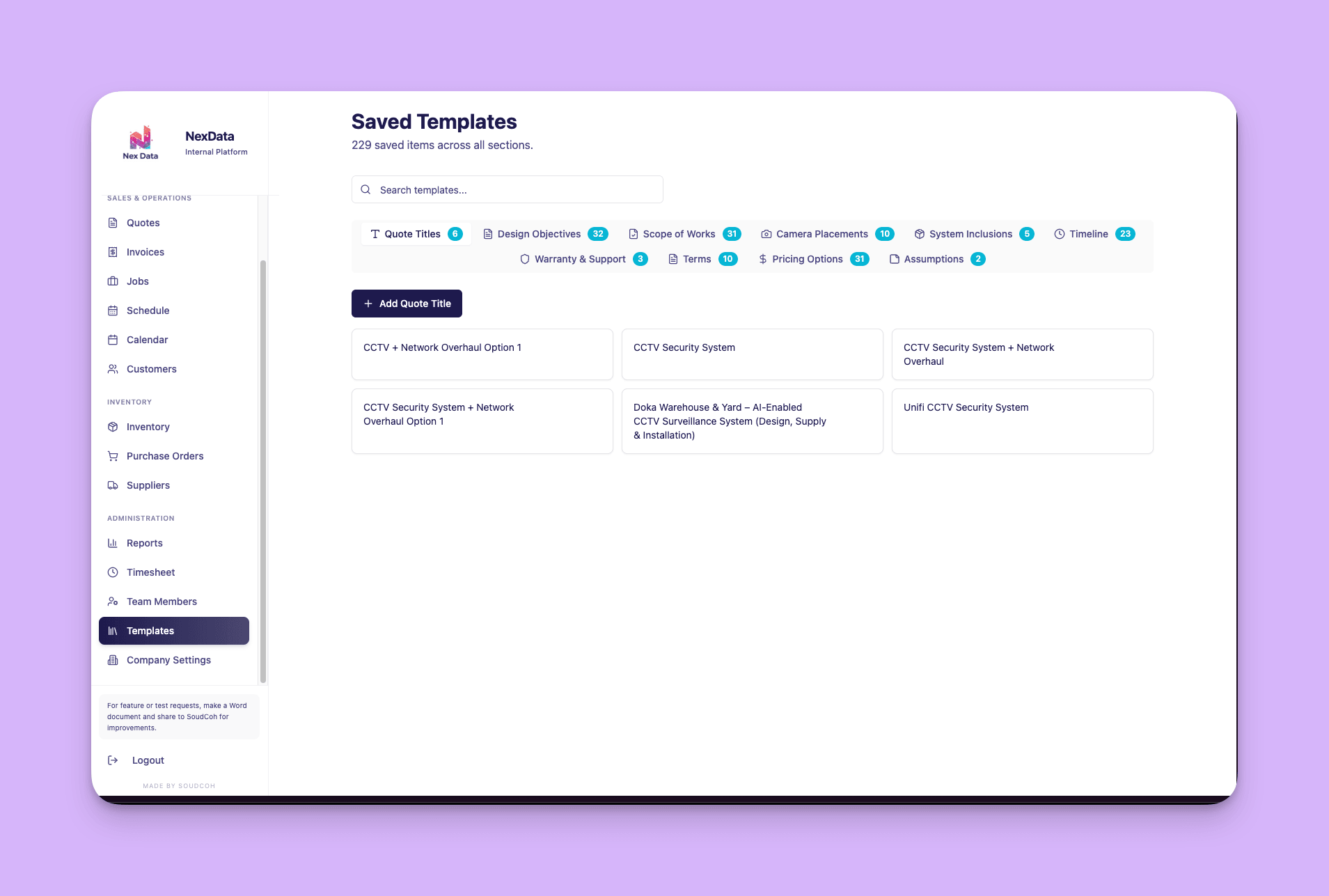
    The templates area is a major leverage point. Instead of rewriting scope text every time, NexData can reuse and standardise their best content across the entire team.

    NexData templates library showing 229 saved items across categories including scope of works, pricing options, and terms

    The library includes categorised tabs for quote titles, design objectives, scope of works, camera placements, system inclusions, timeline, warranty and support, terms, pricing options, and assumptions. With 229+ saved templates, staff build professional quotes in minutes instead of hours. This is how you scale quality: not by hiring more admins, but by reusing proven content.

    Built-In Automation

    The platform includes automation that removes repetitive work from daily operations.

    Auto-calculated GST (10%), totals, and balances on invoices
    PDF generation from live records with no manual formatting
    Template-driven quote building for fewer mistakes
    Persistent auto-saving to reduce lost edits
    Single source of truth across sales, operations, and finance

    Why This Worked

    SoudCoh built this as a practical operations system, not a generic SaaS clone. The UI patterns reflect workflow-first design: clear navigation, consistent layouts across modules, built-in standardisation through templates and settings without killing flexibility, and strong data structure where customers, staff, quotes, and invoices all connect to enable automation.

    The platform was built around NexData's actual workflow, not someone else's idea of how a business should operate. That is the difference between a tool people tolerate and a tool people actually use.

    Contributors

    Rohit Sood, Managing Director
    Holly Adelaide, Brand Messaging Specialist

    Tags

    • Custom Web App
    • Dashboard
    • CRM & Automation
    • Technology & Media
    • SaaS

    That is one account. Yours is a different one.

    We read your ads, your search presence and your tracking the same way this one was read, and tell you what we would change first.

    What every number on this page actually means.

    Marketing words get used loosely, and a loose word can make a small result look like a big one. Here is exactly what we mean by each of them.

    Conversion
    One real action by one real person: a phone call that lasted long enough to be a conversation, a submitted enquiry form, a booking, or a purchase. Not a page view and not a form that merely loaded.
    Cost per job · cost per lead
    The advertising money spent, divided by the number of those actions. It is the only figure that tells you whether the advertising is worth doing, which is why we publish it next to the count.
    Conversion rate
    The share of people who clicked the ad and then did the thing. A high click count with a low conversion rate usually means the ad and the page are promising different things.
    Ad spend
    Money that went to the advertising platform, not to us. Our management fee is separate and is never included in a cost-per-job figure, because mixing them would flatter the number.
    The measurement window
    The dates the figure covers, named every time. Where a study covers a launch, the clock starts the day campaigns went live — not the day the graph started looking good.
    A starting point
    Where a study knows what a figure was before the work began, that number is printed next to the one it became. Where the account had no history to compare against, the result is printed on its own rather than measured from a number nobody recorded.
    Qualified lead
    An enquiry that matched the service and the service area, so it was worth someone picking up the phone for. Where a study says qualified, somebody checked.
    An anonymised client
    Government, council and cultural-institution engagements are published as sector and jurisdiction only. The work and the measured outcome are described in full; the organisation is not named.

    One more, because it matters most: nothing on this page is a guarantee. It is a record of what happened on one account, in one market, at one budget.

    What this study cannot tell you is what the same figure looks like on your account — so the quote-to-win calculator, with your own click price and close rate. It takes about a minute and asks for nothing.

    SoudCoh Compound™

    This page exists because of two of the six stages.

    Compound is how our team works on any account — six stages every change passes through. Two of them are why there is anything honest to publish.

    • Meter

      If it can't be measured, it doesn't get bought.

      Before a dollar moves, every action worth money to the business is tracked as itself — calls, forms, bookings, purchases — with values attached. Without that stage there is no honest number to publish afterwards.

    • Ledger

      Every change we make becomes a record you can open.

      Every change lands in a dated record as it happens — what was added, what was stopped, what was rewritten and what it cost. Writing this page afterwards was reading a file, not reconstructing a memory.

    If you want one of these

    What actually happens after the first call.

    No mystery and no lock-in before you have seen anything. This is the sequence every account on this site went through.

    1. The call

      Thirty to forty-five minutes, free

      What you sell, who buys it, and what one customer is worth to you. No deck. You leave with a real number for your situation rather than a range.

    2. Week 0

      The audit

      We open your account — or your competitors' ground, if you do not have one yet — and write down every leak we can find. That list is yours whether or not you work with us.

    3. Week 1

      The build

      Everything the account needs before it can spend a dollar: what it will bid on, what it must never pay for, the ad copy, the assets, the landing pages and the tracking. A second person checks all of it before anything is live.

    4. Day one

      You press go

      Campaigns are created paused, every time, so you can read the whole build first. You activate when you are ready, not when we are.

    5. Days 1–14

      The clean

      The busiest fortnight your account will ever have. Search terms read daily, waste negated, early winners promoted, ad copy iterated against what is actually being served.

    6. From there

      Rhythm

      Weekly optimisation, reporting on a fixed cadence whether the news is good or bad, and a proper conversation each quarter about where the next block of budget should go.

    Before you ask us anything

    Here is what everybody asks first.

    FAQ

    The questions this raises.

    Whether the figures are real, how they were measured and over what length of window, what it costs, and whether any of it would hold for your business.

    The first call is free and there is no deck.

    Book a call
    Are the figures in this case study real?

    Yes. Every number on this page was read out of the client's own advertising account and is printed here exactly as the study publishes it, beside the period it covers. The dashboard and ad images are screen-grabs of that account rather than recreations. If one of these figures matters to your decision, ask about it on the first call and we will walk you through where it came from.

    How were these numbers measured, and over what window?

    Every figure on the page is printed beside the period it belongs to. We publish the LENGTH of a measurement window and the year, and withhold the exact dates — when a client advertised, and how their trading calendar looks, is their commercial information rather than ours. A conversion means one real action by one real person: a phone call that lasted long enough to be a conversation, a submitted enquiry form, a booking, or a purchase. Not a page view, and not a form that merely loaded.

    Would this work for my business?

    We cannot promise you the same numbers, and nobody honestly can. What this page tells you is what was achievable in that market, at that budget, for that service. Your competition, your service area, your margins and what one customer is worth to you all move the answer. On the first call we build the picture from your figures rather than someone else's, and if the honest answer is that this channel is wrong for you right now, we will say so.

    Why does this study show a result but not a starting point?

    Because in most of these engagements there was nothing reliable to start from. A brand-new advertising account has no history, and a business that was tracking enquiries on paper or in a spreadsheet has no comparable figure either. Where a real before-number exists we print it next to the after-number, so you can see the movement rather than take our word for it. Where it does not, we print the result on its own. Back-solving a starting point from a percentage would make the page look better and mean less.

    Would my business get the same result?

    We cannot tell you that, and nobody honestly can. What this page tells you is what was achievable in that market, at that budget, with that service. Your competition, your service area, your margins and what a customer is worth to you all move the answer. On the first call we build the picture from your numbers rather than from someone else's, and if the honest answer is that this channel is wrong for you right now, we will say so.

    How much would this cost to run?

    Two separate numbers. Your ad spend goes to the platform, and what it needs to be depends on how competitive your market is and how many jobs you want — the smallest companies we work with invest a minimum of A$3,000 a month, and our largest clients run multiple eight figures a month across paid channels. Our management fee is separate and scales with the work. The first call is free and you leave it with a real figure for your situation.

    How quickly could we start seeing enquiries?

    It depends on the channel. Paid search meets demand that already exists, so calls and forms can arrive within hours of launch, and the first two to four weeks are an optimisation period where waste is cut daily. Most accounts settle into their best rhythm around 60 to 90 days. SEO, content and brand work run on a much longer clock — months rather than weeks — and we will tell you which one your situation actually needs.

    Am I locked into a long contract?

    No long-term lock-in. We would rather keep the work because it is producing than because a contract says you have to stay. What we do ask for is enough runway to be fair to the account — a campaign judged on its first ten days is being judged during the part where we are still cutting waste out of it. Terms are put in front of you in plain English before anything is signed.

    More accounts, same discipline.

    Studies from the same kind of work, so you can see how the pattern holds across different businesses.

    Everything above was delivered by one of a handful of things we do. These are the ones this account leant on, written up in full rather than summarised.

    The briefing behind the work.

    The case study records what happened. These two explain the channel, measurement or operating decision that made the result interpretable in the first place.

    Instrumentation is part of the product when decisions are made from the numbers it emits. That case is argued in The Tag Manager layer that can invalidate the dashboard.

    The ownership, governance and operating constraints behind an internal data product. The other half of it is set out in Why first-party data projects stall outside tier one.

    The work behind this one is written up in full under how we scope and build custom software, and the operating sequence behind every study on this site sets out the sequence in order.

    Want results like this?

    Thirty minutes on your numbers rather than somebody else's, and a written list of what we would change first. Yours to keep either way.

    No pitch deck. No upsell. A real conversation and a written list of leaks.